PowerFlex:3.0.1 无法在 PowerFlex 群集中添加新 SDC。新 SDC 未显示在“Frontend”选项卡中。
Summary: PowerFlex:3.0.1 无法在 PowerFlex 群集中添加新 SDC。新 SDC 未显示在“Frontend”选项卡中。
This article applies to
This article does not apply to
This article is not tied to any specific product.
Not all product versions are identified in this article.
Symptoms
尝试添加新 SDC
:无法在 PowerFlex 群集中添加新 SDC。新 SDC 未显示在“Frontend”选项卡中。
我们运行了命令:-
esxcli system module parameters set -m scini -p “IoctlIniGuidStr=GUID_GOES_HERE IoctlMdmIPStr=MDM IP Addresses”
,但是在运行该命令后,新 SDC 未显示在 GUI
的“Frontend”选项卡中。同样,运行命令“scli --query_all_sdc”不会在输出中列出新添加的 SDC。
1.验证上述命令中使用的 MDM IP 地址是否可 ping 通。
2.还尝试使用所有三个 MDM 的虚拟 IP 和数据 IP。
在 AMS 环境中出现问题。也可以在非 AMS 中看到。
:无法在 PowerFlex 群集中添加新 SDC。新 SDC 未显示在“Frontend”选项卡中。
我们运行了命令:-
esxcli system module parameters set -m scini -p “IoctlIniGuidStr=GUID_GOES_HERE IoctlMdmIPStr=MDM IP Addresses”
,但是在运行该命令后,新 SDC 未显示在 GUI
的“Frontend”选项卡中。同样,运行命令“scli --query_all_sdc”不会在输出中列出新添加的 SDC。
1.验证上述命令中使用的 MDM IP 地址是否可 ping 通。
2.还尝试使用所有三个 MDM 的虚拟 IP 和数据 IP。
在 AMS 环境中出现问题。也可以在非 AMS 中看到。
Cause
scli --query_all命令输出显示 MDM 受限 SDC 模式 已启用,并且选择了“approve IPs”选项。这是一项附加的安全功能。
Resolution
运行AMS 部署指南的过程中未记录的附加命令。
scli --add_sdc --sdc_guid <SDC GUID>--mdm_port 6611
使用上述命令添加 SDC 后,您将在“Frontend”选项卡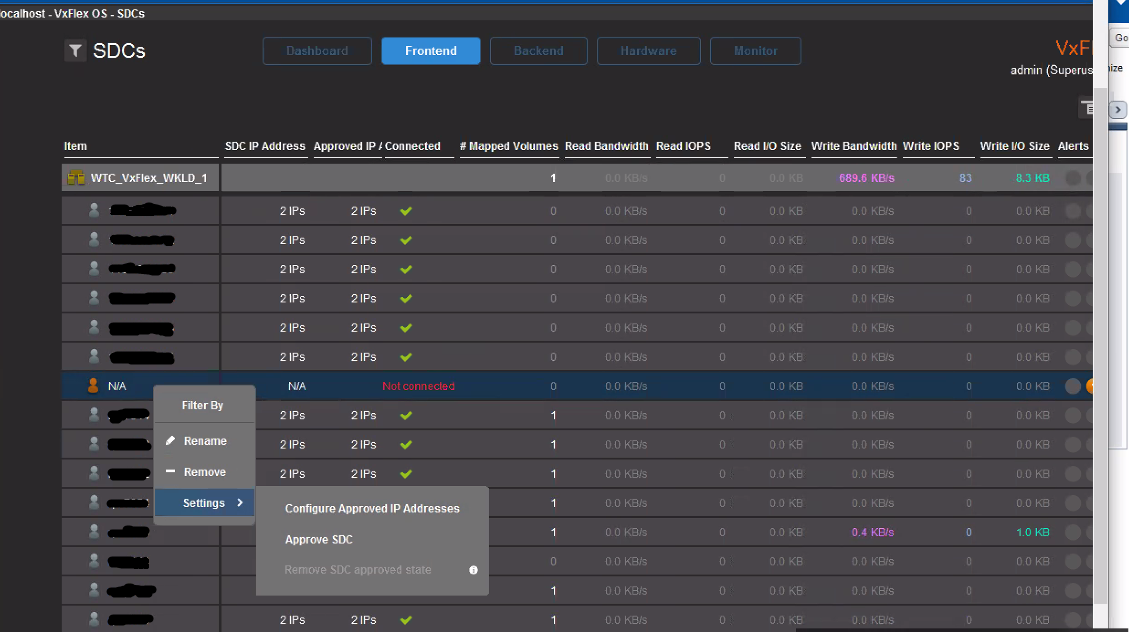
下看到一个显示“N/A”的新条目,右键单击“N/A”,单击“Settings”,然后单击“Configure Approved IP Addresses”。
输入您希望 IO 流经的 SDC IP。
输入 IP 后,您将看到包含所有输入 IP 的条目,并显示为已连接(绿色勾选)。
Article Properties
Article Number: 000173533
Article Type: Solution
Last Modified: 22 Aug 2025
Version: 5
Find answers to your questions from other Dell users
Support Services
Check if your device is covered by Support Services.