NetWorker: NWUI non riesce a ottenere l'elenco dei gruppi senza che sia possibile analizzare la stringa disk_uuid
Summary: La pagina dei gruppi di NetWorker Web User Interface (NWUI) non restituisce alcuna informazione. Viene visualizzato un errore indicante che non è stato possibile ottenere l'elenco dei gruppi. Impossibile analizzare la stringa 'disk_uuid'. ...
This article applies to
This article does not apply to
This article is not tied to any specific product.
Not all product versions are identified in this article.
Symptoms
La soluzione NWUI viene utilizzata per gestire la datazone di NetWorker. Il pannello di navigazione viene utilizzato per selezionare "Protection>Groups" e il riquadro dei dettagli genera "Failed to get the list of groups. Unable to parse 'disk_uuid' string: '50301dd2-9032-1b04-eca2-c943c61fd55d.'" I gruppi di protezione VMware sono configurati con regole per selezionare le macchine virtuali (VM) protette utilizzando tag e la VM a cui si fa riferimento presenta un'esclusione del disco.
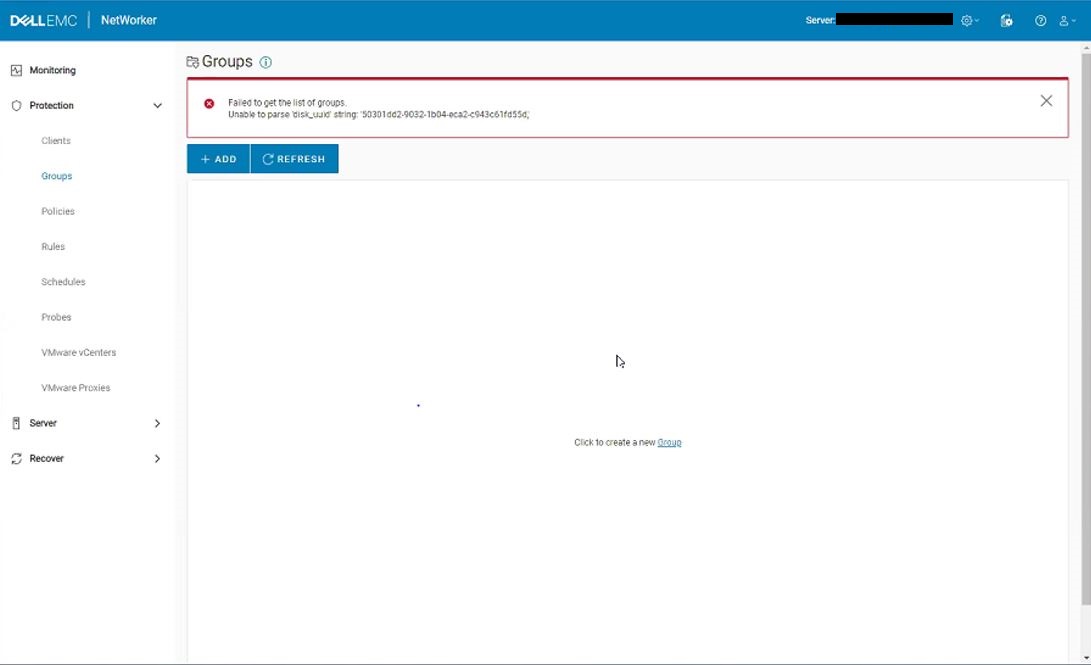
Figura 1. I gruppi NWUI non possono essere caricati con "Impossibile analizzare disk_uuid stringa"
Il nwui.raw mostra:
HH:MM:SS [https-jsse-nio-9090-exec-8] ERROR c.e.n.c.n.impl.PolicyApi - Could not fetch the list of groups.
- Linux:
/opt/nwui/logs/nwui.raw - Windows:
C:\Program Files\EMC NetWorker\nwui\logs\nwui.raw - NetWorker: Come utilizzare nsr_render_log (in inglese)
Il file localhost_access*.txt mostra:
XXX.XXX.XXX.XXX - - [DD/MM/YYYY:HH:MM:SS -0500] "GET /nwrestapi/v3/global/protectiongroups HTTP/1.1" 500 487
- Linux:
/nsr/authc/logs/localhost_access*.txt - Windows:
C:\Program Files\EMC NetWorker\nsr\authc-server\tomcat\logs\localhost_access*.txt
La restapi.log del server NetWorker mostra:
YYYY-MM-DD HH:MM:SS INFO  [https-jsse-nio-9090-exec-2] c.e.n.w.WebApiRequest - Request method 'GET', URL 'v3/global/protectiongroups
YYYY-MM-DD HH:MM:SS ERROR [https-jsse-nio-9090-exec-2] c.e.n.w.WebApiExceptionMapper - Status 'Internal Server Error', msg: Unable to parse 'disk_uuid' string: '50301dd2-9032-1b04-eca2-c943c61fd55d,'
com.emc.nw.webapi.exception.InternalServerErrorException: Unable to parse 'disk_uuid' string: '50301dd2-9032-1b04-eca2-c943c61fd55d,'
	at com.emc.nw.webapi.adapter.VMwareVmDataAdapter.convertJsonToXmlVmWorkItem(VMwareVmDataAdapter.java:639) ~[nwrestapi.jar:na]
	at com.emc.nw.webapi.adapter.ProtectionGroupDataAdapter.expandVMwareAllWorkItemSelection(ProtectionGroupDataAdapter.java:137) ~[nwrestapi.jar:na]
	at com.emc.nw.webapi.adapter.ProtectionGroupDataAdapter.getItems(ProtectionGroupDataAdapter.java:115) ~[nwrestapi.jar:na]
	at com.emc.nw.webapi.common.WebLogic.getItemList(WebLogic.java:173) ~[nwrestapi.jar:na]
	at com.emc.nw.webapi.common.WebLogic.getItemList(WebLogic.java:160) ~[nwrestapi.jar:na]
	at com.emc.nw.webapi.resource.ProtectionGroups.get(ProtectionGroups.java:101) ~[nwrestapi.jar:na]
	at sun.reflect.NativeMethodAccessorImpl.invoke0(Native Method) ~[na:1.8.0_211]
	at sun.reflect.NativeMethodAccessorImpl.invoke(Unknown Source) ~[na:1.8.0_211]
	at sun.reflect.DelegatingMethodAccessorImpl.invoke(Unknown Source) ~[na:1.8.0_211]
	at java.lang.reflect.Method.invoke(Unknown Source) ~[na:1.8.0_211]
...
YYYY-MM-DD HH:MM:SS INFO  [https-jsse-nio-9090-exec-2] c.e.n.w.WebApiResponse - Response status Method: 'GET', URI:'v3/global/protectiongroups', Status '500'
- Linux:
/nsr/logs/restapi/restapi.log - Windows:
C:\Program Files\EMC NetWorker\nsr\logs\restapi\restapi.log
Cause
Un gruppo di protezione VMware dispone di una voce Null VM per un disco .vmdk escluso. La voce del disco .vmdk null causa l'errore RESTAPI durante il recupero delle informazioni sul gruppo di protezione. La voce Null nella risorsa VMware Protection Group viene visualizzata come backspace e virgolette (\"\"). Di seguito è riportato un esempio di voce null nel VMware Protection Group:
{\"moref-id\":\"vm-1024536\",\"uuid\":\"50301dd2-9032-1b04-eca2-c943c61fd55d\",\"type\":\"VMDisk\",\"disks\":[\"\",\"6000C292-524d-1baa-f10b-5e780833a1ed\",\"6000C29c-75b5-ad1f-27d3-602b6d5da260\"]}
La causa della voce null non è nota.
Resolution
Usare il programma amministrativo di NetWorker (nsradmin) per rimuovere la voce del disco .vmdk null dal database delle risorse di NetWorker (nsrdb).
- Eseguire un lavoro di backup Server Protection e assicurarsi che si ottenga un backup di bootstrap:
mminfo -B
- Creare una copia della directory nsrdb sul server NetWorker.
- Linux:
/nsr/res/nsrdb - Windows:
C:\Program Files\EMC NetWorker\nsr\res\nsrdb
3. Da una riga di comando o da una shell Linux, aprire l'utilità della riga di comando nsradmin e accedere alla modalità visiva immettendo visual. In questo modo viene caricata un'utilità interattiva della riga di comando da cui è possibile sfogliare e modificare le risorse di NetWorker:
nsradmin > visual mode > NSR Protection Group > Select the "NSR Protection Group" > Edit > delete the NULL Disk entry in the "vproxy group exclude items" > save > Exit
Prima:
{\"moref-id\":\"vm-1024536\",\"uuid\":\"50301dd2-9032-1b04-eca2-c943c61fd55d\",\"type\":\"VMDisk\",\"disks\":[\"\",\"6000C292-524d-1baa-f10b-5e780833a1ed\",\"6000C29c-75b5-ad1f-27d3-602b6d5da260\"]}
Dopo:
{\"moref-id\":\"vm-1024536\",\"uuid\":\"50301dd2-9032-1b04-eca2-c943c61fd55d\",\"type\":\"VMDisk\",\"disks\":[\"6000C292-524d-1baa-f10b-5e780833a1ed\",\"6000C29c-75b5-ad1f-27d3-602b6d5da260\"]}
Se si osservano problemi, è possibile ripristinare la copia nsrdb creata prima dell'applicazione delle modifiche.
Article Properties
Article Number: 000173881
Article Type: Solution
Last Modified: 17 Nov 2025
Version: 4
Find answers to your questions from other Dell users
Support Services
Check if your device is covered by Support Services.