Avamar: PDM loading recommended proxies receives message "Login failed due to invalid credentials or vcenter"
Summary: Avamar: Proxy Deployment Manager loading recommended proxies receives message "Login failed due to invalid credentials or vcenter"
This article applies to
This article does not apply to
This article is not tied to any specific product.
Not all product versions are identified in this article.
Symptoms
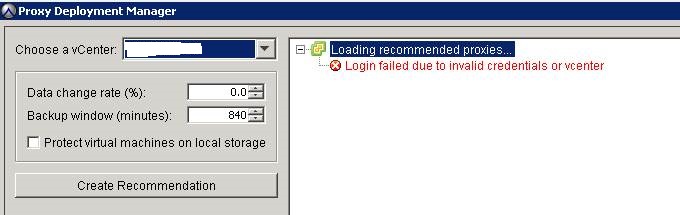
When attempting to check for recommended proxies, Avamar's Proxy Deployment Manager reports message:
"Login failed due to invalid credentials or vcenter"
Cause
In the VCS connection manager log "/usr/local/avamar/var/log/vcs/connectionmanager.log", the following error is seen:
2017-06-05T02:03:22.971+0500 TRACE [cTaskExecutor-4][     handler.ConnectionHandler#    handleMessage]: [Leaving]
2017-06-05T02:03:22.971+0500 ERROR [cTaskExecutor-3][   model.ConnectionPoolManager#           logout]: Pool is not available.  Invalid ticket: ...a1a7522bfec3
2017-06-05T02:03:22.971+0500 DEBUG [cTaskExecutor-3][   model.ConnectionPoolManager#           logout]:
TicketPools:
...50c79c741e9f: com.emc.avamar.vmware.connection.model.VSphereConnectionPool@62cf90d1
...a1019b98afac: com.emc.avamar.vmware.connection.model.VSphereConnectionPool@62cf90d1

In the VCS deploymanager log file /usr/local/avamar/var/log/vcs/deploymanager.log, the following is seen:
7-07-13T16:12:45.466+0500 ERROR [cTaskExecutor-6][       impl.UserSessionService#            login]: Error communicating with connection manager
2017-07-13T16:12:45.466+0500 TRACE [cTaskExecutor-6][        handler.RequestHandler#    handleMessage]: LoginResponse [sessionId=null, success=false, reason=Login failed due to invalid credentials or vcenter, statusCode=401]
2017-07-13T16:12:46.601+0500 TRACE [cTaskExecutor-7][        handler.RequestHandler#    handleMessage]: LoginRequest [vcenter=xx.xx.xx.xx, port=443, user=avamar, locale=null]
2017-07-13T16:12:46.602+0500 TRACE [cTaskExecutor-7][       impl.UserSessionService#            login]: Login request for avamar@xx.xx.xx.xx:443
2017-07-13T16:17:46.602+0500 ERROR [cTaskExecutor-7][       impl.UserSessionService#            login]: Error communicating with connection manager
Resolution
Procedure:
The Proxy Deployment Manager should no longer report the error.
- Verify that port 443 is open (from Avamar) to the vCenter hosts by using telnet or curl.
For more information about required data ports, refer to the VMware User guide (see page.106 in the ver. 7.3 manual)
curl -kv xx.xx.xx.xx:443

* About to connect() to xx.xx.xx.xx port 443 (#0)

*   Trying xx.xx.xx.xx... connected

* Connected to xx.xx.xx.xx (xx.xx.xx.xx) port 443 (#0)
- Restart Apache Tomcat as the OS root user
emwebapp.sh --stop
followed by
emwebapp.sh --start
followed by
emwebapp.sh --start
The Proxy Deployment Manager should no longer report the error.
Affected Products
AvamarProducts
Avamar, Avamar Client for VMwareArticle Properties
Article Number: 000175084
Article Type: Solution
Last Modified: 21 Nov 2025
Version: 5
Find answers to your questions from other Dell users
Support Services
Check if your device is covered by Support Services.