Dell Command Integration Suite for System Center or Dell Command Intel vPro Applications Not Installing on Non-English Operating Systems
Summary: This article contains information about a 1609 error when installing Dell Command | Integration Suite for System Center or Dell Command | Intel vPro software.
This article applies to
This article does not apply to
This article is not tied to any specific product.
Not all product versions are identified in this article.
Symptoms
Cause
No cause information is available.
Resolution
Dell Command | Integration Suite for System Center or Dell Command | Intel vPro
When you try to install the Dell Command | Integration Suite for System Center or Dell Command | Intel vPro applications on a Non-English Operating System (OS). You may receive a 1609 error (Figure 1 & 2).
Dell Command | Integration Suite for System Center Error: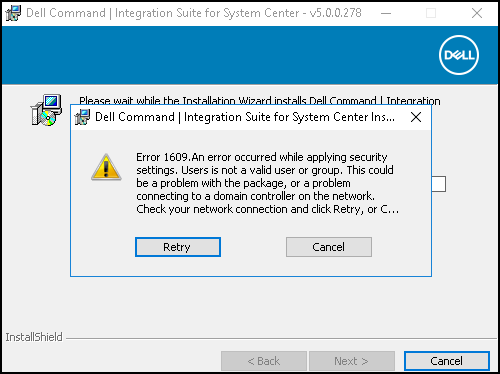
Figure 1
Dell Command Intel vPro Error: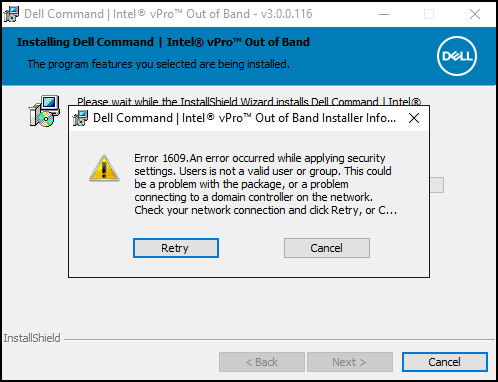
Figure 2
In the logs it displays:
Error 1609. An error occurred while applying security settings. Users is not a valid user or group. This could be a problem with the package, or a problem connecting to a domain controller on the network. Check your network connection and click Retry, or Cancel to end the install. Unable to locate the user's SID, system error 1332"
Solution
The current workaround for this behavior is to create a User Group called "Users" (English word):
- Open "Active Directory Users and Computers (How to Open Active Directory Users and Computers
)".
- Navigate to the Folder of [Domain] -> Built in.
- Create a Group called "Users".
- Once you create the new group "Users", map the Members of your group to be the same members as the equivalent language Users group. (French is Utilisateurs Group for Example)
- Install application.
Article Properties
Article Number: 000177160
Article Type: Solution
Last Modified: 23 Jan 2025
Version: 6
Find answers to your questions from other Dell users
Support Services
Check if your device is covered by Support Services.