The Remote vPro Provisioning Feature of Dell Command Integration Suite for System Center Requires a License Key
Summary: The process to perform Remote Provisioning Licensing for the Dell Command Integration Suite for System Center (Dell Command Integration Suite for System Center) for System Center.
This article applies to
This article does not apply to
This article is not tied to any specific product.
Not all product versions are identified in this article.
Symptoms
Cause
No cause information is available.
Resolution
DCIS Remote Provisioning Licensing
The Remote vPro Provisioning feature of Dell Command | Integration Suite for System Center (DCIS) requires a license key. Follow the steps below to obtain this.
Steps
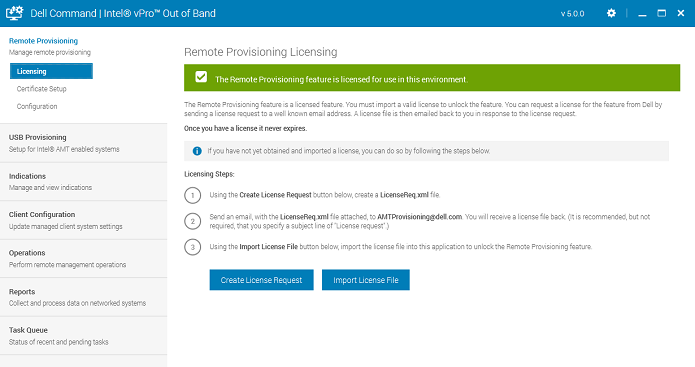
You can request a license in DCIS by completing the Licensing request process within the tool:
Note: The Remote Provisioning feature is a licensed feature. You must import a valid license to unlock the feature. You can request a license from the feature from Dell by sending a license request to Dell.
Licensing Steps:
- Using the Create License Request Button, create a LicenseReq.xml file.
- Send an email, with the LicenseReq.xml file attached, to AMTProvisioning@Dell.com. You should receive an automatic reply as follows:
Dear valued customer.
Thank you for your interest in our Remote vPro Provisioning feature in our Dell Command | Integration Suite for System Center. We have received your license request for a license key to enable it, and you will receive an email from us that will include the license key file. The license file creation process is not fully automated so please allow some time for us to get it delivered to you. If you have further questions, you can reply to this email with your questions.
Thanks,
Dell Client Systems Management Team. - You receive a license file back. (It is recommended, but not required, then you specify a subject line of "License Request.")
- Using the Import License File button, import the license file into this application to unlock the Remote Provisioning feature.
Article Properties
Article Number: 000177193
Article Type: Solution
Last Modified: 12 Sep 2025
Version: 6
Find answers to your questions from other Dell users
Support Services
Check if your device is covered by Support Services.