SC Storage Customer Notification: SCOS 7.4.10 Available
Summary: This article explains the upgrade process to SCOS 7.4.10 for Dell Storage SC Series systems.
This article applies to
This article does not apply to
This article is not tied to any specific product.
Not all product versions are identified in this article.
Symptoms
This alert serves as a proactive notification and recommendation to upgrade to Storage Center Operating System (SCOS) 7.4.10. SCOS 7.4.10 is now the minimum recommended version of SCOS. For more information on this version, see the release notes.
Customers who utilize SupportAssist technologies were sent a message directly to the affected systems using the Proactive Notification feature in Storage Center OS.
These systems have been identified as a candidate to upgrade to this latest version and SCOS 7.4.10 has been released for all systems receiving this alert. During the next maintenance window, please apply the upgrade to the system.
Please reference all upgrade planning steps and documentation prior to completing the upgrade. The Storage Center Version 7 Software Update Guide contains for more information regarding the upgrade process and recommended best practices.
Check for update
The check can be performed from either Unisphere or DSM. When checking for updates the Storage Center reaches out to the Automated System check server (AU server) and confirms there is a valid version. When selecting the upgrade, a set of automated upgrade checks are performed. If the checks are successful it will prompt the customer to download/install from the released SCOS version allowing customers to update without support's required assistance. These automated checks completely replace the need for support to perform a pre-upgrade check.

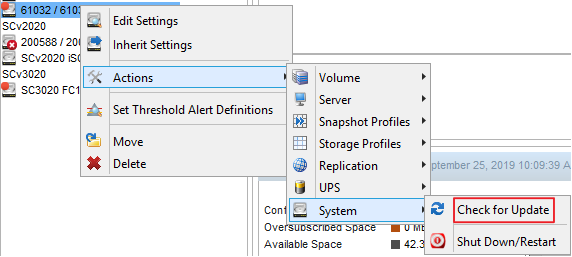
If the checks are successful, the Storage Center will allow for the update to proceed.
If the checks fail, the Storage Center will prevent the system from updating with a detailed explanation of what must be resolved prior to updating. In this instance, contact Dell Support for assistance.
Customers who utilize SupportAssist technologies were sent a message directly to the affected systems using the Proactive Notification feature in Storage Center OS.
These systems have been identified as a candidate to upgrade to this latest version and SCOS 7.4.10 has been released for all systems receiving this alert. During the next maintenance window, please apply the upgrade to the system.
Please reference all upgrade planning steps and documentation prior to completing the upgrade. The Storage Center Version 7 Software Update Guide contains for more information regarding the upgrade process and recommended best practices.
Check for update
The check can be performed from either Unisphere or DSM. When checking for updates the Storage Center reaches out to the Automated System check server (AU server) and confirms there is a valid version. When selecting the upgrade, a set of automated upgrade checks are performed. If the checks are successful it will prompt the customer to download/install from the released SCOS version allowing customers to update without support's required assistance. These automated checks completely replace the need for support to perform a pre-upgrade check.
To check for updates within Unisphere
To check for updates within the Dell Storage Manager Client
If the checks are successful, the Storage Center will allow for the update to proceed.
If the checks fail, the Storage Center will prevent the system from updating with a detailed explanation of what must be resolved prior to updating. In this instance, contact Dell Support for assistance.
Affected Products
Dell Storage SC7020, Dell Storage SC9000, Dell Storage SCv3000, Dell Storage SCv3020Article Properties
Article Number: 000177559
Article Type: Solution
Last Modified: 21 Feb 2021
Version: 4
Find answers to your questions from other Dell users
Support Services
Check if your device is covered by Support Services.