What is the Alienware OSD Application?
Summary: The Alienware On-Screen Display (OSD) Application is an app that enables custom messages to be displayed on your system through the Windows Notifications.
This article applies to
This article does not apply to
This article is not tied to any specific product.
Not all product versions are identified in this article.
Symptoms
 |
Description | This article provides important information about the Alienware OSD Application. |
Supported Systems:
| Alienware Laptops | |||||||
What is the Alienware OSD Application?
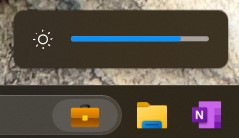
The Alienware On-Screen Display (OSD) Application is an app that enables custom messages to be displayed through the Windows Notifications that pop up at the lower right-hand corner of your screen.
 |
 |
| Figure 1. Windows Notification Example |
What happens if I uninstall the Alienware OSD Application?
If the Alienware OSD Application is not installed, you will not receive system-specific notifications that might help you understand better the operation of your system.
Important: The Alienware OSD Application does not affect the performance or functionality of your system.
Where can I download the Alienware OSD Application?
The Alienware OSD Application is available for download at the Dell Drivers & Downloads page.
Cause
|
|
 |
 |
 |
 |

Resolution
 Out of warranty? No problem click here, enter your Service Tag and view our offers.
Currently, offers are only available for US, Canada, UK, and France PC Customers. Server and Storage not applicable.
Affected Products
Alienware, Alienware 13, Alienware 15, Alienware 17, Alienware Area-51, Alienware m15, Alienware m17Article Properties
Article Number: 000177587
Article Type: Solution
Last Modified: 20 Dec 2024
Version: 7
Find answers to your questions from other Dell users
Support Services
Check if your device is covered by Support Services.