戴尔 Precision 和 OptiPlex 可选模块信息
Summary: 本文包含有关可用于戴尔 Precision 和 OptiPlex 系统的可选端口模块卡的信息。
This article applies to
This article does not apply to
This article is not tied to any specific product.
Not all product versions are identified in this article.
Symptoms
Cause
无可用的原因信息。
Resolution
可选的端口模块卡
某些戴尔 Precision 和 OptiPlex 系统可能安装可选的端口模块卡。这可以用于额外的 VGA、HDMI、USB-C、DVI、串行端口等。这是因为系统主板上没有这些端口。
请查看您的系统型号的服务手册,验证此选项是否可用:
安装和卸下模块卡
以下步骤是如何安装或卸下模块卡的示例。
提醒:将来将添加更多模块卡的步骤。
安装模块卡:
- 要卸下金属支架,请将平口螺丝刀插入支架的孔中 [1],推动支架以释放支架 [2],然后将支架提离系统。

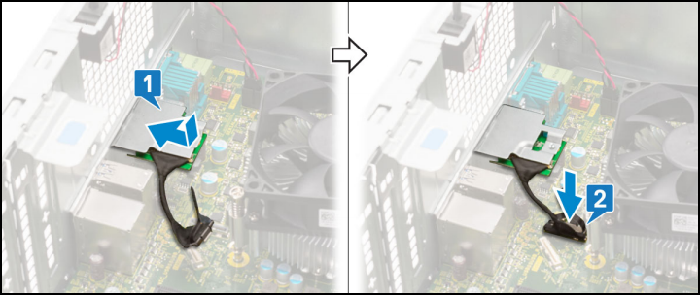
- 将 VGA 模块插入计算机内部的插槽中 [1]。将 VGA 线缆连接至系统板上的连接器 [2]。
- 拧上两颗 (M3X3) 螺钉以将可选的 VGA 模块固定至系统。

卸下模块卡:
- 拧下将可选的 VGA 模块固定至系统的两颗 (M3X3) 螺钉。

- 从系统主板上的接头拔下 VGA 线缆 [1]。从系统中卸下 VGA 模块 [2]。

有关购买这些卡的信息,请联系戴尔销售支持。
Affected Products
Desktops & All-in-OnesArticle Properties
Article Number: 000177676
Article Type: Solution
Last Modified: 13 May 2025
Version: 8
Find answers to your questions from other Dell users
Support Services
Check if your device is covered by Support Services.