Isilon:使用 Powershell 和 Platform API — 基础知识
Summary: 本文介绍如何使用 Powershell 和 PAPI(平台 API)连接到群集。
This article applies to
This article does not apply to
This article is not tied to any specific product.
Not all product versions are identified in this article.
Symptoms
不适用
Cause
不适用
Resolution
提醒:本主题是 Isilon SDK - Isilon 信息中心的一部分。
介绍
随着新 RESTful 平台 API (PAPI) 的推出,现在可以更轻松、更优雅地使用 Powershell 自动执行和管理 Isilon 群集。本文将介绍如何使用 Powershell 和 PAPI 连接到群集的基础知识。
强烈建议您 在此处下载并阅读 OneFS 版本的 PAPI 参考指南。
由于 PAPI 通过 REST 提供对群集的访问,因此您可以使用 HTTP 方法(如 GET、POST、PUT 和 DELETE)操作资源。对象和集合的表示形式以 JSON 格式的文档交换。要使用 PAPI,您需要通过登录 WebUI 并导航到以下命令在群集上启用 HTTP:协议>HTTP 设置>启用 HTTP。

如果您没有 Powershell v3 下载并安装 .NET Framework 版本 4,请在此处找到。
然后在此处下载并安装相应的 v3 管理框架。
# 接受输入参数
Param([字符串]$isilonip,[字符串]$username,[字符串]$password)
要访问群集上的资源,我们将使用具有相应参数的“Invoke-RestMethod”。此方法采用多个参数,例如 URI 字符串、正文(用于 POST)、标头等。以下代码将构建我们需要的标头信息和基本 URL 以供访问:
# 编码基本授权标头并创建 baseurl
$EncodedAuthorization = [System.Text.Encoding]::UTF8。GetBytes($username + “:”+ $password)
$EncodedPassword = [System.Convert]:::ToBase64String($EncodedAuthorization)
$headers = @{“Authorization”=“Basic $($EncodedPassword)”
$baseurl = 'https://'+ $isilonip +“:8080”
在此示例中,我们将访问配额。将其添加到基本 URL,以创建我们将传递给“Invoke-RestMethod”的最终 URI。如果您查看 PAPI 文档,您将看到以以下格式访问资源集合:“/platform/1/<namespace>/<collection-name>”。例如,如果我们需要获取代表群集上定义的所有配额的对象集合,我们需要获得“/platform/1/quota/quotas”。
$resourceurl = “/platform/1/quota/quotas”
$uri = $baseurl + $resourceurl
现在,我们调用 Invoke-RestMethod,然后访问包含配额收集的返回对象:
下面是脚本输出的示例:
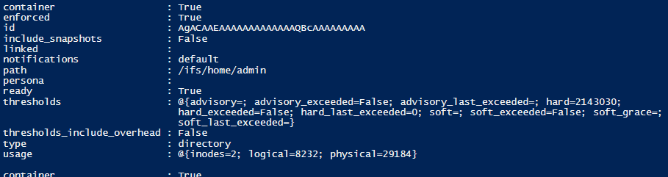

列出了在群集上定义的所有配额及其属性。使用此方法,PSv3 会自动将 JSON 输出转换为对象。
脚本正文:
介绍
随着新 RESTful 平台 API (PAPI) 的推出,现在可以更轻松、更优雅地使用 Powershell 自动执行和管理 Isilon 群集。本文将介绍如何使用 Powershell 和 PAPI 连接到群集的基础知识。
强烈建议您 在此处下载并阅读 OneFS 版本的 PAPI 参考指南。
由于 PAPI 通过 REST 提供对群集的访问,因此您可以使用 HTTP 方法(如 GET、POST、PUT 和 DELETE)操作资源。对象和集合的表示形式以 JSON 格式的文档交换。要使用 PAPI,您需要通过登录 WebUI 并导航到以下命令在群集上启用 HTTP:协议>HTTP 设置>启用 HTTP。
Powershell v3
Powershell v3 具有可简化 RESTful 访问的内置方法。您可以通过查看$PSVersionTable值来检查当前的 Powershell 版本:
如果您没有 Powershell v3 下载并安装 .NET Framework 版本 4,请在此处找到。
然后在此处下载并安装相应的 v3 管理框架。
连接到群集
以下脚本接受 Isilon IP 地址或主机名、用户名和密码的参数:# 接受输入参数
Param([字符串]$isilonip,[字符串]$username,[字符串]$password)
要访问群集上的资源,我们将使用具有相应参数的“Invoke-RestMethod”。此方法采用多个参数,例如 URI 字符串、正文(用于 POST)、标头等。以下代码将构建我们需要的标头信息和基本 URL 以供访问:
# 编码基本授权标头并创建 baseurl
$EncodedAuthorization = [System.Text.Encoding]::UTF8。GetBytes($username + “:”+ $password)
$EncodedPassword = [System.Convert]:::ToBase64String($EncodedAuthorization)
$headers = @{“Authorization”=“Basic $($EncodedPassword)”
$baseurl = 'https://'+ $isilonip +“:8080”
在此示例中,我们将访问配额。将其添加到基本 URL,以创建我们将传递给“Invoke-RestMethod”的最终 URI。如果您查看 PAPI 文档,您将看到以以下格式访问资源集合:“/platform/1/<namespace>/<collection-name>”。例如,如果我们需要获取代表群集上定义的所有配额的对象集合,我们需要获得“/platform/1/quota/quotas”。
$resourceurl = “/platform/1/quota/quotas”
$uri = $baseurl + $resourceurl
现在,我们调用 Invoke-RestMethod,然后访问包含配额收集的返回对象:
$ISIObject = Invoke-RestMethod -Uri $url -Headers $headers -Method Get
$ISIObject.quotas
$ISIObject.quotas
下面是脚本输出的示例:
列出了在群集上定义的所有配额及其属性。使用此方法,PSv3 会自动将 JSON 输出转换为对象。
脚本正文:
############
2013 年 9 月 18 日 由 EMC NAS 专家中心部门
# Jeremy Smith 修改:
#
#
# ps_isilon_get_quotas_via_papi.ps1 — 获取 Isilon 群集
上的所有配额# 注意:您需要在 OneFS 7.0.2 或更高版本上才能利用 PAPI,并且必须在群集上启用 HTTP 访问。
#
#PARAMETERS
#
# -isilonip = 节点 IP
# -username
# -password
# -path = /ifs 目录路径,其中包含需要配额
的目录# -quoatasize = 配额字节的大小(例如“500000”)
# #
# EXAMPLE
# .\ps_isilon_get_quotas_via_papi.ps1 -isilonip 10.10.10.1 -user root -password P@ssword1
# #
##### ####
接受输入参数
Param([字符串]$isilonip,[字符串]$username,[字符串]$password)
# 使用默认证书时,您通常会看到使用 System.Net 的证书错误(来自 blogs.msdn.com 的代码)
add-type @“;
使用 System.Security.Cryptography.X509 认证;
公共级信任所有: ICertificatePolicy {
public TrustAll() {}
public bool CheckValidationResult(
ServicePoint sPoint, X509Certificate 证书,
WebRequest req, int problem) {
返回 true;
}
}
“@
[System.Net.ServicePointManager]::CertificatePolicy = new-object TrustAll
#if 未传递正确的参数,则在出现消息
(!)$isilonip -and $username -and $password )) {
写入“failed to specify parameters”;
写入“示例:.\ps_isilon_get_quotas_via_papi.ps1 -isilonip 192.168.1.2 -username root -password p@ssw0rd1“ ;
exit
}
# 编码基本授权标头并创建 baseurl
$EncodedAuthorization = [System.Text.Encoding]::UTF8。GetBytes($username + “:” + $password)
$EncodedPassword = [System.Convert]:::ToBase64String($EncodedAuthorization)
$headers = @{“Authorization”=“Basic $($EncodedPassword)”}
$baseurl = 'https://'+ $isilonip +“:8080”
# 获取所有定义的
配额$resourceurl = “/platform/1/quota/quotas”
$uri = $baseurl + $resourceurl
$ISIObject = Invoke-RestMethod -Uri $uri -Headers $headers -Method Get
$ISIObject.quotas
2013 年 9 月 18 日 由 EMC NAS 专家中心部门
# Jeremy Smith 修改:
#
#
# ps_isilon_get_quotas_via_papi.ps1 — 获取 Isilon 群集
上的所有配额# 注意:您需要在 OneFS 7.0.2 或更高版本上才能利用 PAPI,并且必须在群集上启用 HTTP 访问。
#
#PARAMETERS
#
# -isilonip = 节点 IP
# -username
# -password
# -path = /ifs 目录路径,其中包含需要配额
的目录# -quoatasize = 配额字节的大小(例如“500000”)
# #
# EXAMPLE
# .\ps_isilon_get_quotas_via_papi.ps1 -isilonip 10.10.10.1 -user root -password P@ssword1
# #
##### ####
接受输入参数
Param([字符串]$isilonip,[字符串]$username,[字符串]$password)
# 使用默认证书时,您通常会看到使用 System.Net 的证书错误(来自 blogs.msdn.com 的代码)
add-type @“;
使用 System.Security.Cryptography.X509 认证;
公共级信任所有: ICertificatePolicy {
public TrustAll() {}
public bool CheckValidationResult(
ServicePoint sPoint, X509Certificate 证书,
WebRequest req, int problem) {
返回 true;
}
}
“@
[System.Net.ServicePointManager]::CertificatePolicy = new-object TrustAll
#if 未传递正确的参数,则在出现消息
(!)$isilonip -and $username -and $password )) {
写入“failed to specify parameters”;
写入“示例:.\ps_isilon_get_quotas_via_papi.ps1 -isilonip 192.168.1.2 -username root -password p@ssw0rd1“ ;
exit
}
# 编码基本授权标头并创建 baseurl
$EncodedAuthorization = [System.Text.Encoding]::UTF8。GetBytes($username + “:” + $password)
$EncodedPassword = [System.Convert]:::ToBase64String($EncodedAuthorization)
$headers = @{“Authorization”=“Basic $($EncodedPassword)”}
$baseurl = 'https://'+ $isilonip +“:8080”
# 获取所有定义的
配额$resourceurl = “/platform/1/quota/quotas”
$uri = $baseurl + $resourceurl
$ISIObject = Invoke-RestMethod -Uri $uri -Headers $headers -Method Get
$ISIObject.quotas
Affected Products
Isilon, PowerScale OneFS, Isilon Platform APIArticle Properties
Article Number: 000177716
Article Type: Solution
Last Modified: 11 Dec 2023
Version: 6
Find answers to your questions from other Dell users
Support Services
Check if your device is covered by Support Services.