How to Perform an Active Directory Domain Migration for Dell Security Server
Summary: How to do an Active Directory domain migration in Dell Data Protection | Enterprise Edition.
This article applies to
This article does not apply to
This article is not tied to any specific product.
Not all product versions are identified in this article.
Instructions
Warning: Dell Technologies strongly recommend engaging our services department (paid services) to assist with the planning for the domain migration process.
Affected Products:
- Dell Security Management Server
- Dell Security Management Server Virtual
- Dell Data Protection | Enterprise Edition
- Dell Data Protection | Virtual Edition
Affected Versions:
- v6.0 - 11.0
Table of Contents
- Details Prior to Continuing
- Domain Migration Considerations
- How a Domain Migration is Performed?
- What a Domain Migration Entails on the Dell Security Management Server?
- Alias or New Domain Under The Dell Security Management Server "Domain" section?
- WSDEACTIVATE of a Migrated Endpoint?
- Removing the Old Domain?
- Enforce the Shield Reactivation After a Software Uninstall on a Migrated Domain
- Is a New Domain License Required?
Details Prior to Continuing
- Dell Security Management Server (formerly Dell Data Protection | Enterprise Edition) is stood up and domain joined.
- An existing domain has been added to the "domain" section under the WebUI console.
- Endpoints have been activated against the server.
- A migration of domain is required.
- We are planning on migrating the SID History of the AD objects as well.
- Endpoints have full connectivity to the server and can retrieve policies on the old domain before starting the domain migration process.
- Encrypted data on the endpoints are fully accessible, endpoints are activated and it is possible to deactivate and reactivate them. We can confirm that activations are happening without any issue using a quick
WSDeactivateof any endpoints.
The overall steps are not too complex, but it is required to understand that if the whole process is not properly performed data can be lost or a recovery of machines could be required. Finally while this process can be performed on any version of Dell Security Management Server and client, Dell Technologies recommends having at least 8.3.0 client and 8.5 server installed as several improvements have been made since then that makes the overall migration process easier on Dell Security Management Server side. Below is an overview of how the overall process works and some of the most concerning questions.
Domain Migration Considerations
The first step is to understand if a domain migration is required. There are situations as when a company is moving, for example, to Office 365 where it is enough to add an alias and set this as the primary UPN for the AD users. This is not a real domain migration and no other action is required on Dell Data Protection | Enterprise Edition server than adding the new alias to the domain alias list under Settings, Domain Alias List section. If a new Domain is created and AD objects must be moved from the old decommissioned domain to the new one, this is when a domain migration must be planned.
How a Domain Migration is Performed?
Whenever a domain migration is planned the first step is considering to migrate the SID history as well. To make the domain migration successful on Dell Security Management Server side, it is required to preserve the SID history otherwise AD objects are considered new to our Dell Security Management Server, and hence post reactivation that we cannot leverage of the same encryption keys. Dell requires to migrate the SID history. We are not going to spend time on how a domain migration is performed as this is not a Dell Data Protection | Encryption task but there are several tools around as ADMT from Microsoft that enables an organization to migrate a domain A to a domain B. As stated above, a SID history migration is required for us to keep persistence in terms of keys. Migrating the SID history means we are adding to the SID history attribute in AD of the old user SID premigration guaranteeing continuity in the migrated objects.
As rule on the AD side:
- When any object is renamed, the value of the objectSID attribute (the SID) is not changed. When you move an object from one domain to another, then the objectSID must change, as part of it is domain-specific, and the old SID is added to the
SIDHistoryattribute (assuming this is migrated). You can viewSIDHistoryusing ADSI Edit (you can view in hexadecimal or decimal). If there are no values, there is no SID history or the object was never moved from another domain. SIDhistoryis only available when migrating accounts between domains or forests.
Below is a screenshot of how to determine if the SIDHistory has been migrated using the attribute editor:
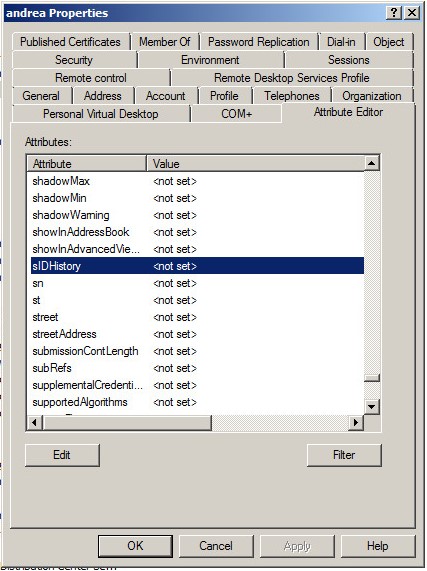
Note: Both the user and machine object have its own SID history that must be migrated.
Once we have confirmed that the SIDHistory of the migrated users and machines have been moved as well, we can move forward with the Dell Security Management Server configuration. If more info is required on how to perform a domain migration and how to preserve the SID history, see the following Microsoft documentation:
- https://www.microsoft.com/en-us/download/details.aspx?id=19188
- https://technet.microsoft.com/en-us/library/cc974332(v=ws.10).aspx
- https://technet.microsoft.com/en-us/library/cc974384(v=ws.10).aspx

What a Domain Migration Entails on the Dell Security Management Server?
Below is what happens during a domain migration on the Dell Security Management Server side.
- On the client side:
- We resolve the Users UPN to the SID. We look for their SID in the vault file. We do not find it.
- We decide this is a new user and we contact the Security Server, passing up the UPN password as a typical activation request.
- On the server side:
- We get the activation request. We contact Active Directory and look up the UPN. Then we triage the user, as part of this triage process, we notice that the SID in the Entity table does not match the SID in AD. We examine the
SIDHistoryto check for the SID in our Entity table. If we do not find it, we throw an exception, and the activation fails as we already have that SCID in place. When we do find the SID, we update the Entity table with the new SID (in the UID part the first part is the domain, and we update it and update the endpoint domain part). - Then we pass down to the client the old keys, policy, DCID, so forth (like it was a reactivation).
- We get the activation request. We contact Active Directory and look up the UPN. Then we triage the user, as part of this triage process, we notice that the SID in the Entity table does not match the SID in AD. We examine the
- Back on the client:
- The endpoint receives this information, and adds an entry in the credsys.vlt file, that the user is activated and the user at that point is logged in as normal.
Alias or New Domain Under The Dell Security Management Server "Domain" section?
A key point on Dell Security Management Server side is the understanding of whether a new domain must be added under the WebUI to get things working with new and old users while activating or reactivating.
On a domain migration, we do not add the new domain to the Dell Security Management Server console IF the root domain parent of the old and new migrated domain is there. It is enough to add the new domain in the form of an alias under the section "Settings," "Domain Alias List." (and we are assuming there is in place a bi-directional trust between the parent and the new child domain.) The service account for the root domain should be set up possibly in the parent domain. If, instead, we are migrating a domain A.local to B.local and the two domains are not child of the same root domain or they belong to a different forest we need a new domain that is added under our console as we must bind any existing endpoints to the new domain and a new service account.
The understanding of the above hovers over configure Dell Security Management Server correctly is a key point as otherwise we face several issues post migration. An understanding of the kind of trust in place between those domains and their root domains (if any) and what their current domains list is under Dell Security Management Server console is vital as well. The rule is simple, if you have some sort of trust between the parent/child, then having under Dell Data Protection | Enterprise Edition server the root domain and the aliases in place is enough. Otherwise we must add as many child domains under Dell Security Management Server as their real subdomains and this rule applies to domain migration as well.
Finally as more in general we should *never* get added simultaneously a child and parent domain as having the same user potentially visible at both levels break things for us. And removing domain is not (yet) a fully supported task on the Dell Security Management Server side.
WSDEACTIVATE of a Migrated Endpoint?
If the client is on v8.2.1 or earlier and the server is on v8.3.1 or earlier, WSDeactivate is a required step as we did not rename the endpoint domain part on the server side automatically. This is not true on the latest builds of our Dell Security Management Server or endpoint.
Removing the Old Domain?
Old domains cannot be removed from the Dell Security Management Server database manually or using the console. This is because Dell Security Management Server looks up a user or group and then determines it is domain membership. Because of that, what must happen when a domain gets removed, all the objects that are part of that domain should be removed as well. Neither option is supported at this stage. Dell is researching to change this behavior in future builds of Dell Security Management Server, though at this stage this is not a supported or a viable task. As a side note if we opt to mark (manually) the domain as removed in the database, we start getting an error that is thrown in the server logs every 15 minutes for all the associated orphaned users and groups.
Enforce the Shield Reactivation After a Software Uninstall on a Migrated Domain
Should the Shield be uninstalled on a migrated endpoint the same steps that are required to enforce a normal (nondomain) reactivation against the same Shield ID is needed here. In common encrypted files, we must enforce the same DCID in the registry before letting the endpoint reactivate against the Dell Data Protection | Enterprise Edition Server or Dell Security Management Server. If there are any questions, contact the technical support team for more help.
Is a New Domain License Required?
No, a new domain license is not required since Dell Data Protection | Enterprise Edition Server 8.x. On older versions of Dell Data Protection | Enterprise Edition Server, a new license is still required. Reach out to the technical support team for more information.
To contact support, reference Dell Data Security International Support Phone Numbers.
Go to TechDirect to generate a technical support request online.
For additional insights and resources, join the Dell Security Community Forum.
Affected Products
Dell EncryptionArticle Properties
Article Number: 000178442
Article Type: How To
Last Modified: 09 Jun 2026
Version: 15
Find answers to your questions from other Dell users
Support Services
Check if your device is covered by Support Services.