整合式攝影機的 Alienware 13 R3 和 15 R3 LED 持續閃爍
Summary: 您的 Alienware 15 R3 和 13 R3 支援 Tobii EyeX Lite,此應用程式使用系統的紅外線攝影機追蹤您的眼睛並啟用各種功能,包括調暗螢幕亮度、關閉顯示器,或讓系統在未偵測到您的存在時待命。
This article applies to
This article does not apply to
This article is not tied to any specific product.
Not all product versions are identified in this article.
Symptoms

Cause
|
|
 |
 |
 |
 |

Resolution
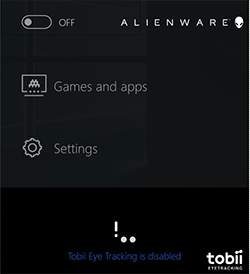
這是系統的預期行為,如果您想要關閉 IR LED,您必須停用 Tobii Eye Tracking 應用程式。
如何停用 IR 攝影機 LED?
-
開啟 系統並開機進入 Windows
-
按兩下 畫面右下角系統匣中的 Tobii 圖示
-
在Tobii應用程式中,按兩下開啟/關閉按鈕以關閉眼動追蹤
 保固過期?按一下這裡,輸入您的產品服務編號,並檢視我們提供的內容。
提供的內容僅適用於美國、加拿大、英國和法國的 PC 客戶。不適用於伺服器和儲存裝置
Affected Products
Alienware 15 R3Products
Alienware 13 R3Article Properties
Article Number: 000178459
Article Type: Solution
Last Modified: 19 Apr 2025
Version: 7
Find answers to your questions from other Dell users
Support Services
Check if your device is covered by Support Services.