Avamar - La raccomandazione PDM (Proxy Deployment Manager) genera un errore interno dovuto a "java.lang.ArrayIndexOutOfBoundsException: -1"
Summary: Avamar - La raccomandazione PDM (Proxy Deployment Manager) genera un errore interno dovuto a "java.lang.ArrayIndexOutOfBoundsException: -1"
This article applies to
This article does not apply to
This article is not tied to any specific product.
Not all product versions are identified in this article.
Symptoms
In Avamar 19.3 (o versione successiva), la raccomandazione PDM genera un errore interno:
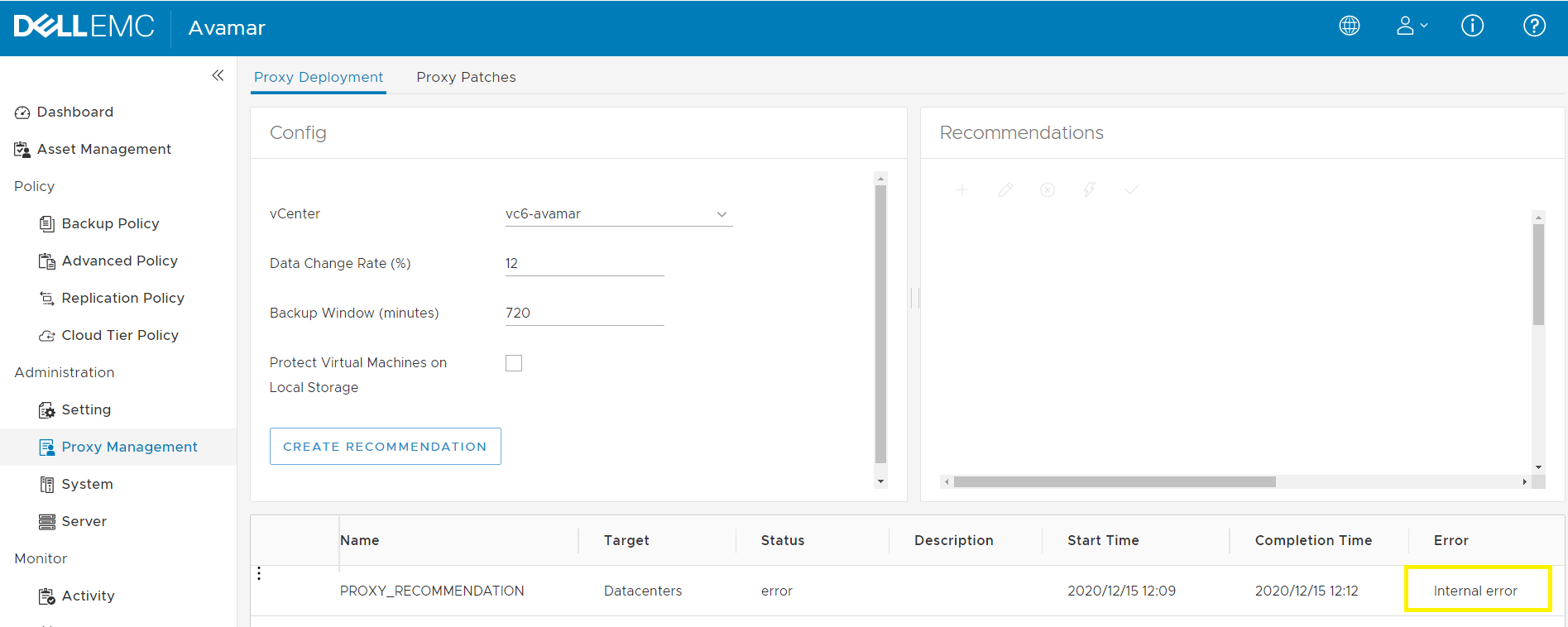
Nel server Avamar, /usr/local/avamar/var/log/vcs/deploymanager.log mostra la seguente eccezione Java "ava.lang.ArrayIndexOutOfBoundsException: -1".
Nel server Avamar, /usr/local/avamar/var/log/vcs/deploymanager.log mostra la seguente eccezione Java "ava.lang.ArrayIndexOutOfBoundsException: -1".
2020-12-10T11:21:51.378+0200 INFO [cTaskExecutor-1][ util.MCCipherUtil# getResultValue]: jarPath==/usr/local/avamar-tomcat-8.5.57/webapps/deploymanager/WEB-INF/vcs-util.jar 2020-12-10T11:21:52.572+0200 INFO [cTaskExecutor-1][ util.MCCipherUtil# getResultValue]: proc.exitValue():0 2020-12-10T11:21:52.574+0200 ERROR [cTaskExecutor-1][CredentialsMcConnectionFactory# newMcConnection]: Error connecting to mc service java.lang.ArrayIndexOutOfBoundsException: -1 at com.emc.avamar.vmware.util.MCCipherUtil.getResultValue(MCCipherUtil.java:110) at com.emc.avamar.vmware.util.MCCipherUtil.getMCRootPW(MCCipherUtil.java:35) at com.emc.avamar.vmware.deploymanager.service.impl.DefaultCredentialsMcConnectionFactory.newMcConnection(DefaultCredentialsMcConnectionFactory.java:77) at com.emc.avamar.vmware.deploymanager.service.impl.UserSessionService.login(UserSessionService.java:121)
Cause
In Avamar 19.3 è stato introdotto un nuovo lockbox RSA:
/usr/local/avamar/var/lockbox/avlockbox.clb
L'eccezione java.lang.ArrayIndexOutOfBoundsException si verifica quando l'elemento da recuperare è NULL.
/usr/local/avamar/var/lockbox/avlockbox.clb
L'eccezione java.lang.ArrayIndexOutOfBoundsException si verifica quando l'elemento da recuperare è NULL.
Resolution
Sul server Avamar eseguire il comando change-password per modificare la password "Avamar Server" per l'utente root. In questo modo verrà corretto lo stato del lockbox. NOTA: 1. change-password riavvia i servizi gsan/mcs. 2. L'utilizzo della stessa password risolve il problema.
root@ave193:~/#: change-passwords [change-passwords version 2.1] Identity added: /root/.ssh/rootid (/root/.ssh/rootid) Identity added: /root/.ssh/rootid (/root/.ssh/rootid) Do you wish to specify one or more additional SSH passphrase-less private keys that are authorized for root operations? Answer n(o) here unless there are known inconsistencies in ~root/.ssh/authorized_keys files among the various nodes. Note that the following key will be used automatically (i.e., there is no need to re-specify it here): /root/.ssh/rootid y(es), n(o), h(elp), q(uit/exit): y -------------------------------------------------------- Please enter a list of paths to SSH private keys, one per line. These keys should be passphrase-less. Tilde references are permitted in the paths. Example: ~/.ssh/dpnid.orig Press Enter or Return after each response. An empty response (a blank line) ends the list. [00] You entered nothing. Is that what you intended? y(es), n(o), q(uit/exit): y -------------------------------------------------------- The following is a test of OS root authorization with the currently loaded SSH key(s). If the authorization test fails, then you might be missing an appropriate private key, e.g., rootid or dpnid. -> In that event, re-run this program and, when prompted, specify as many SSH private key files as are necessary in order to complete root operations. Starting root authorization test with 600 second timeout... End of root authorization test. -------------------------------------------------------- Change OS (login) passwords? y(es), n(o), q(uit/exit): n -------------------------------------------------------- Generate new SSH keys? y(es), n(o), h(elp), q(uit/exit): n -------------------------------------------------------- Change Avamar Server passwords? y(es), n(o), q(uit/exit): y -------------------------------------------------------- Please enter the CURRENT server password for "root" (Entering an empty (blank) line twice quits/exits.) > Checking Avamar Server root password (1200 second timeout)... Avamar Server current root password accepted. -------------------------------------------------------- Change Avamar Server password for "MCUser"? y(es), n(o), q(uit/exit): n -------------------------------------------------------- Change Avamar Server password for "root"? y(es), n(o), q(uit/exit): y Please enter a new Avamar Server password for user "root". (Entering an empty (blank) line twice quits/exits.) > Enter the same Avamar Server password again. (Entering an empty (blank) line twice quits/exits.) > Accepted Avamar Server password for "root". -------------------------------------------------------- Change Avamar Server password for "repluser"? y(es), n(o), q(uit/exit): n -------------------------------------------------------- Please enter the CURRENT server password for "MCUser" (Entering an empty (blank) line twice quits/exits.) > Checking Avamar Server MCUser password (1200 second timeout)... Avamar Server current MCUser password accepted. -------------------------------------------------------- Change the viewuser password? y(es), n(o), h(elp), q(uit/exit): n -------------------------------------------------------- Do you wish to proceed with your changes on the selected node? Answering y(es) will proceed to make changes. Answering n(o) or q(uit) will not proceed. y(es), n(o), q(uit/exit): y Changing Avamar Server passwords... Suspending maintenance cron jobs Checking Administrator Server status... Stopping Administrator Server... Changing the passwords for the local Avamar Server... The passwords for the local Avamar Server have been changed. Starting process of updating Administrator and Enterprise Manager configurations... Running script to update Administrator and Enterprise Manager configurations on node 0.s... [Logging to /usr/local/avamar/var/change-passwords.log...] Done with updating Administrator configuration on node 0.s... Starting process of updating client configurations... Running script to update client configuration on all... [Logging to /usr/local/avamar/var/change-passwords.log...] Updating client configuration on node 0.0... Done updating client configuration on 0.0... Starting process of updating mccli configuration files... Running script to update mccli configuration files on node set "0.0"... [Logging to /usr/local/avamar/var/change-passwords.log...] Done with updating mccli configuration files on node 0.0... Checking Administrator Server status... Starting Administrator Server... Resuming maintenance cron jobs Stopping EMT subsystem Starting EMT subsystem -------------------------------------------------------- Done. NOTES: - If mccli (the Administrator command line interface) is used from any remote user accounts, then please update the password in each remote account's copy of the mccli preferences/configuration file, typically ~USER/.avamardata/var/mc/cli_data/prefs/mcclimcs.xml. - Please be sure to resume schedules via the Administrator GUI or via 'dpnctl start sched'.
Additional Information
Per un problema simile di tipo "PDM internal error", consultare l'articolo della KB 181136 Avamar - La raccomandazione PDM (Proxy Deployment Manager) genera un errore interno dovuto a "org.apache.axis2.AxisFault: Socket is closed" (in inglese)
Affected Products
AvamarArticle Properties
Article Number: 000181440
Article Type: Solution
Last Modified: 30 Nov 2022
Version: 4
Find answers to your questions from other Dell users
Support Services
Check if your device is covered by Support Services.