Dell VxRail:如何測試 Secure Remote Services 或安全連線閘道 dial-home 功能
Summary: 這是一篇內容豐富的文章,描述如何測試 VxRail 4.7.520 及更新版本附掛程式 UI 上可用的安全遠端服務或安全連線閘道 dial-home 功能。
This article applies to
This article does not apply to
This article is not tied to any specific product.
Not all product versions are identified in this article.
Instructions
從 VxRail 4.7.520 開始,可使用 VxRail 附掛程式 UI 完成測試 dial-home 功能。
使用 Secure Remote Services 時,請選取 VxRail Cluster>設定>支援,然後按一下測試連線。


使用 Secure Remote Services 時,請選取 VxRail Cluster>設定>支援,然後按一下測試連線。
- 如果連線處於作用中,則會顯示藍色訊息,如下所示:
- 如果發生連線問題,則會顯示類似以下內容的紅色訊息:

- 檢查 VxRail Manager 與 Secure Remote Services 閘道之間的網路問題。
- 登入 VxRail Manager 中斷連線的 Secure Remote Services 閘道機器,網址為:
https://<SRS-GATEWAY-IP>:9443。檢查目前 VxRail 叢集中是否有列為受管裝置的 ESXi 主機。 - 如果未列出任何主機,請從 VxRail Manager 附掛程式 UI 刪除 Secure Remote Services,然後重新設定。
- 重新啟動 runjars 以修正問題:
- 登入 VxRail Manager。
- 在命令列中執行以下命令。
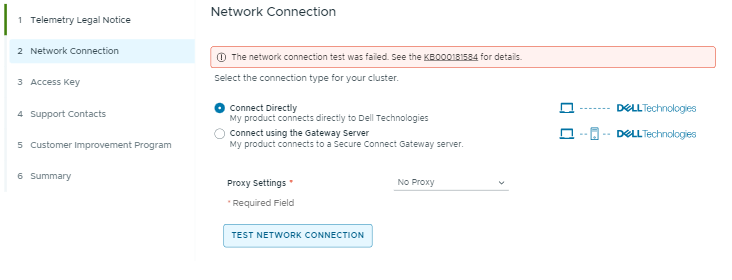
service runjars restart從 7.0.350 版本開始,選取 VxRail Cluster>設定>支援>連線啟用,然後按一下網路連線步驟中的測試連線。
- 如果測試連線成功,則會顯示如下綠色訊息:
- 如果測試連線失敗,會顯示如下紅色訊息:
- 檢查 VxRail Manager 與 Secure Remote Services 閘道之間的網路問題,如需詳細資訊,請參閱安全連線閘道 5.x — Virtual Edition 支援矩陣。
- 如果是 IPv6,請確定 VxRail Manager 可以連線至 https://srs-1-v6.dell.com
- 如果是 IPv4,請確定 VxRail Manager 可以連線至 https://esrs3-core.emc.com 並 https://www.dell.com
Additional Information
有時可能會發生這種情況:
- VxRail Manager 與 Secure Remote Services 閘道之間的網路問題。
- 裝置 (ESXi 主機) 已從 Secure Remote Services 閘道移除。
- 連線能力問題將在 VxRail 7.0.120 版本之後發生。當 Secure Remote Services 連接器因在 runjars 啟動時沒有從 DO 擷取裝置資料,而無法將 Secure Remote Services 標記為初始化。在這種情況下,您會在connectors-esrs.log中看到以下錯誤訊息:
ESRSService initialization partially done有兩種方法可確認 Secure Remote Services 的 dial-home 功能是否正常運作:
- 使用支援網站檢查事件 MYSTICFFFE 的服務要求:https://www.dell.com/support
- 請聯絡 Dell Technologies 支援,確認事件 MYSTICFFFE 的服務要求是否已產生。
測試之間至少有 3 分鐘的間隔。如果在第一次後不到 3 分鐘內第二次按一下「測試連線」按鈕,就會發生錯誤。
Affected Products
VxRailArticle Properties
Article Number: 000181584
Article Type: How To
Last Modified: 01 Aug 2025
Version: 10
Find answers to your questions from other Dell users
Support Services
Check if your device is covered by Support Services.