IDPA:重新部署 DPA 后,DPA 中的数据收集失败
Summary: 本知识库文章提供了在重新部署 IDPA DPA 后解决 DPA 数据收集问题的说明。
This article applies to
This article does not apply to
This article is not tied to any specific product.
Not all product versions are identified in this article.
Symptoms
DPA 已在 IDPA 系统上重新部署,但报告中没有数据。尝试运行调试数据收集失败。
dpaagent.log已停止或显示“存储和转发队列已满”。这表示代理无法与 APP 服务器通信。
Cause
代理程序已失去与应用程序服务的连接。病因不明。
Resolution
提醒:此问题的修复程序已添加到 goidpa 工具中,请按照以下知识库文章安装 goidpa:
然后在 ACM 上运行以下命令:
./goidpa dpa agent-register
如果 goidpa 命令无法解决此问题,则使用以下过程手动配置代理并向应用程序服务器重新注册。
- 在 DPA UI 中,转至管理员>系统>配置系统设置。在弹出框中,单击 Data Collection Agents 旁边的箭头以展开列表。突出显示正在使用的代理程序、应用程序或单独的数据收集服务器。然后单击 Remove Agent 按钮。

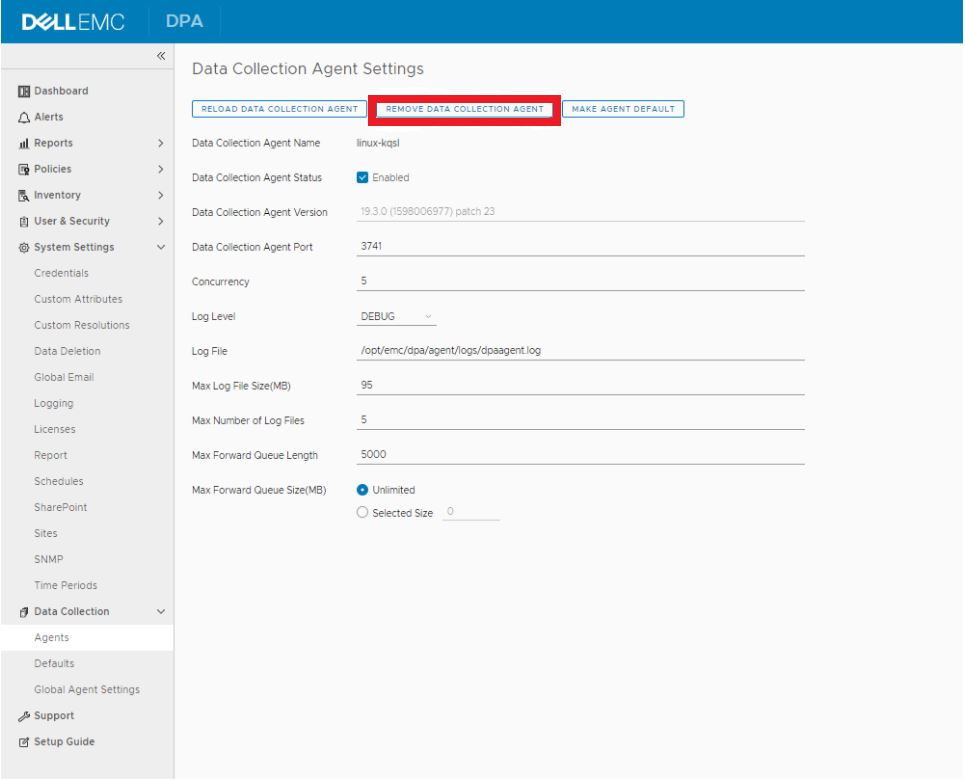
在 IDPA 2.6 或 DPA 19.3 中,转至 Data Collection>Agents ,然后突出显示该代理,然后单击 Data Collections Agent Settings 按钮。然后单击 Remove Agent 按钮。
- 登录到 DPA APP 服务器,然后转到
/opt/emc/dpa/services/bin directory并运行以下命令:
./dpa.sh app agentpassword
输入密码(通常是 IDPA 通用密码)并确认密码。
./dpa.sh app restart - 登录到 DPA 代理服务器(对于 DP 4400,这是 APP 服务器)。
- 在左侧的导航树中导航到
/opt/emc/dpa/agent/etc并运行以下命令:
- 在左侧的导航树中导航到
vi dpaagent_config.xml
#Check the <servername> tag, is this the DPA APP IP address? If it is not then change to the DPA APP IP. Once this is the DPA APP IP save and exit.
./dpa stop-
- 在左侧的导航树中导航到
/opt/emc/dpa/agent/data并运行以下命令:
- 在左侧的导航树中导航到
mkdir olddata
mv * olddata/-
- 在左侧的导航树中导航到
/opt/emc/dpa/agent/etc并运行以下命令:
- 在左侧的导航树中导航到
./dpa start -
- 在左侧的导航树中导航到
/opt/emc/dpa/agent/bin并运行以下命令:
- 在左侧的导航树中导航到
./dpaagent --set-credentials
#put in the passwork you set in step 2, confirm the password -
- 在左侧的导航树中导航到
/opt/emc/dpa/agent/etc并运行以下命令:
- 在左侧的导航树中导航到
./dpa start -
- 在左侧的导航树中导航到
/opt/emc/dpa/agent/logs并检查dpaagent.log以查看重新启动后是否存在任何错误。
- 在左侧的导航树中导航到
- 再次打开 DPA UI,然后转至 AdministratorSystemConfigure>>System Settings。在弹出框中,单击 Data Collection Agents 旁边的箭头以展开列表。查看代理是否再次出现。
转至 InventoryObject>LibraryApplications>选项卡。选择 Avamar,然后单击 属性 按钮,在 属性 弹出框中,单击 数据收集 选项卡。选择 Avamar 作业监视器 收集,然后单击历史记录按钮。检查上次数据收集是否成功。
如有任何疑问,请联系戴尔支持。
Affected Products
Integrated Data Protection Appliance FamilyProducts
Data Protection Advisor, PowerProtect Data Protection SoftwareArticle Properties
Article Number: 000181653
Article Type: Solution
Last Modified: 02 Dec 2025
Version: 3
Find answers to your questions from other Dell users
Support Services
Check if your device is covered by Support Services.