VxRail:在 VxRail Manager 插件程序中设置节点 iDRAC VLAN 配置失败
Summary: 启用 iDRAC VLAN ID 失败,并显示消息“运行脚本错误:脚本输出失败:设置 iDRAC VLAN 配置失败:设置 VLAN 配置失败
This article applies to
This article does not apply to
This article is not tied to any specific product.
Not all product versions are identified in this article.
Symptoms
VxRail Manager 提供了一种在不访问 iDRAC UI 的情况下设置 IDRAC VLAN ID 的方法。
从节点启用 iDRAC VLAN ID →配置 → VxRail(iDRAC 配置)→ VLAN 设置时,失败,并显示以下消息:
"Running script error: Script output fail: Set iDRAC VLAN configuration failed: Set VLAN configuration failed."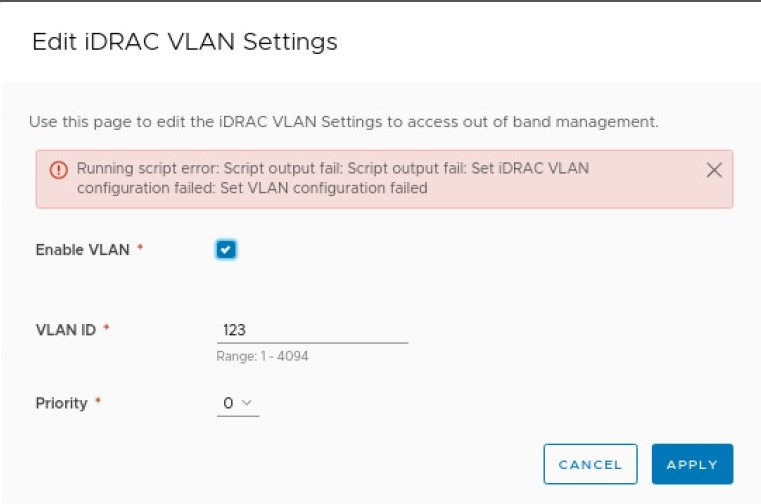
Cause
这是 iDRAC 版本 4.40.00.201 中的缺陷。
Resolution
解决办法:
- 如果可以访问 iDRAC UI,请尝试从 iDRAC 设置→连接性→网络→ VLAN 设置中配置 VLAN。
- 使用以下步骤启用 VLAN 并使用命令行设置 VLAN ID:
- 通过 SSH 连接到 ESXi 节点
- 从 ESXi作系统,使用 iDRAC 根凭据通过 SSH 连接到 iDRAC:
-
Ssh root@169.254.0.1
-
- 使用命令启用 VLAN
"set iDRAC.NIC.VLanEnable“,0 表示禁用,1 表示启用:Racadm>>set iDRAC.NIC.VLanEnable 1Key=iDRAC.Embedded.1#NIC.1Object value modified successfully
- 使用命令”
set iDRAC.NIC.VLanID“的 vlan ID:Racadm>>set iDRAC.NIC.VLanID <VLAN_ID>Key=iDRAC.Embedded.1#NIC.1Object value modified successfully
- 如果上述过程无法解决问题,请联系 戴尔支持 部门以获取其他解决方法。
Additional Information
如果 iDRAC VLAN ID 已启用并生效,则可能无法访问 iDRAC IP 或进入 iDRAC UI。从节点 ESXi作系统使用 ssh root@169.254.0.1访问 iDRAC。
如果需要,请使用 racadm 再次禁用 iDRAC VLAN:
Racadm>>set iDRAC.NIC.VLanEnable 0Key=iDRAC.Embedded.1#NIC.1Object value modified successfullyRacadm>>exit
Affected Products
VxRail Appliance Family, VxRail Appliance SeriesProducts
VxRail SoftwareArticle Properties
Article Number: 000182267
Article Type: Solution
Last Modified: 20 Feb 2025
Version: 4
Find answers to your questions from other Dell users
Support Services
Check if your device is covered by Support Services.