Avamar: ADMe Supplemental Material
Summary: Welcome to the Avamar Data Migration enabler (ADMe) landing page.
This article applies to
This article does not apply to
This article is not tied to any specific product.
Not all product versions are identified in this article.
Instructions

Updated: December 08, 2023
Current ADMe Release: 19.72b
End of Service Life, June 2025
ADMe is a utility providing automation for the migration of Avamar backup data to a different storage medium. This storage medium are: tape, disk, cloud based storage, Dell Power Protect Data Manager (PPDM) application, or to another Avamar Data Domain. Backup data is first rehydrated to a staging disk area into a structured top-level folder layout for organizational purposes. From there, it can automatically be backed up to a tape backup application as a standard file system backup, Dell Power Protect Data Manager (PPDM) application, or to another Avamar for purposes of placing the backup data into its Data Domain. When staging to cloud-enabled storage including ECS or ATMOS or any third-party S3 object storage system using an appropriate gateway such as Geo Drive, TNT Drive or similar products, where files are automatically uploaded to the cloud storage provider directly rather than passing it through a tape backup application. The ADMe migration process consists of three distinct phases, client backup selection phase to identify which backups to act on, backup recovery or staging phase where the backup data is recovered to a staging disk area, followed by an optional export phase swept up by an external tape backup application or cloud synchronization phase. The complete end-to-end workflow is automated by ADMe Job Policies eliminating the need for manual intervention or localized scripting. ADMe Job policies can be scheduled to run automatically or run on demand as needed.
ADMe is compatible with all Avamar system types including single or multinode GRID systems, source and replication target systems, Integrated Data Protection Appliance (IDPA), and those systems using Data Domain storage. Several tape backup applications (see compatibility guide for details) are supported and leveraged in a consistent manner for purposes of automation. Performance varies based on the infrastructure provided and the migration strategy used incremental or nonincremental. Nonincremental typically averages ~50-150 GB/Hr per migration thread during the recovery phase with slightly higher rates when file counts are low or larger files are involved. Incremental staging is effective against large file system or NDMP type backups only providing effective staging rates up to ~500+ GB/Hr from a single staging thread. Multiple staging servers using multiple staging threads per server can be leveraged concurrently increasing overall aggregate throughput. The tape or export backup phase performs at the tape or export applications normal file system backup rate and similar rules pertain to Avamar or PowerProtect Data Manager when used as a target application.
ADMe Capabilities:
- Single point of management
- Eliminates dependencies on Avamar when recovering from tape or cloud with the exception of Oracle and PAX file archives
- Support for the different staging platforms and operating systems
- Supports migration of backups to public or private cloud storage using a compatible gateway
- Results in a cataloged and browsable tape backup
- Supports file level recoveries directly from tape or cloud storage
- Supports multiple staging servers and concurrent migration threads per server
- All Avamar system types supported
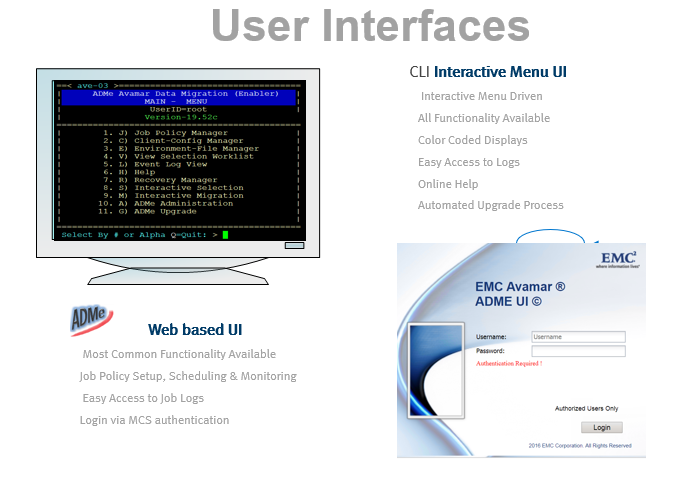
- Simple menu-driven CLI UI or WEB-based UI
- Automated tape backup initiation and monitoring for supported tape backup applications
- Structured email notifications, and event and job logs capture the status of significant migration activity.
- Supports incremental and nonincremental migration strategies
- Support for most Avamar Plug-In types
- A wide range of filters are available for backup selection

ADMe ONLINE TRAINING Course: (requires a registered Dell support account.)
See the ADMe Overview Microsoft PowerPoint below for a comprehensive overview before taking the online course.
ADMe Online Training (Course-ID: Avamar Data Migration Enabler ID: MR-7WN-AVADMET

Common ADMe related KB Articles (a registered Dell support account is required.)
- Article Avamar: ADMe Install and Upgrade Procedures for version 19.52 and higher
- Article Avamar: ADMe - Custom Job Scheduling Script
- Article Avamar: ADMe NetWorker Setup and Automated Configuration Procedures
- Article Avamar: ADMe backup selection criteria
- Article Avamar: ADMe - How to use include or exclude to limit the amount of data acted on during the staging phase
- Article Avamar: ADMe mail notifications are not being received
- Article Avamar: ADMe staging fails due to the presence of reparse points
- Article Avamar: ADMe-Exchange BU recovery using -exchvssavtar (avtar)
- Article Avamar: ATO or ADMe fails to start a job policy
- Article Avamar: ADMe installation and configuration may be deleted after an Avamar OS upgrade

Planning a new ADMe Installation?
- Engage Dell professional Services to ensure a supportable ADMe implementation.
- Complete the ADMe Planning Questionnaire verified by a trained ADMe SME prior to moving forward.
- Sizing Data gathering script dump_root_hash, must be run on the Avamar Utility Node using appropriate syntax to gather detailed backup data sizing and used to determine the staging resources required.
The above steps must be coordinated with the assistance of a trained ADMe SME or Dell PS.
ADMe Install or Upgrade Procedure.
- Review the Install or Upgrade README file in the ADMe download .zip file or retrieve it here from Article: Avamar: ADMe Install and Upgrade Procedures for version 19.52 and later
Note: Only the latest ADMe patch build is considered supported. It is a user responsibility to go to this site frequently and download the latest ADMe build-# and perform the ADMe upgrade process as needed. If you encounter what you perceive to be an ADMe issue, upgrade to the latest build version and try again.
ADMe - Avamar Pre-Requisites:
Korn Shell ksh and mailx RPMs are required to be installed on the Avamar Utility Node. These may exist but if not, they are available from Article195585 or related link in the Internal Notes section below.
When NetWorker is used to perform Tape out operations, its 64-Bit Linux FS agents basic and extended must be installed on the Avamar Utility Node, and its related service started.
Both agents are available from Article 195585.
An install code is required to deploy ADMe which is only available to Dell Support and Dell PS employees.

Dell Download Site: (a registered Dell support account is required)
Dell Official Download Page
Latest ADMe Builds:
The official download link above may not have the most recent patch build version. This page typically has the latest ADMe patch build available, see download section below. Scroll past the table documenting the available files to where the attachments are located for download.
Important:
Downloading the file attachments has a string "_pkb_en_us" appended to their filenames. Files that are used directly by ADMe such as the .tar and .war files must be renamed to remove this string before using them with ADMe. For example, ADMe filenames names are expected to be formatted as adme-tar-19.72.tar and adme-1.0.67.war.
Note: For upgrades to ADMe 19.64f or later, see Release Notes section dated May 10, 2022 pertaining to applying the mentioned
avtar flags on Windows staging servers.
| File-Description | File Name | Date |
* ADMe Core file |
adme-tar-19.72b_pkb_en_us.tar |
2023-11-29 |
* ADMe Web-UI file |
adme-1.0.67_pkb_en_us.war |
2022-12-12 |
| ADMe Planning Questionnaire | ADME_planning_questionare23_pkb.docx |
2023-04-19 |
| ADMe Compatibility Guide | ADME_compatibility_Guide_pkb.pdf |
2023-04-12 |
| ADMe Q & A Guide | adme_qa-2020-10-02_pkb.pdf |
2021-02-03 |
| ADMe Overview ppt Part-1 | ADMe_Overview_2021-Part-1_pkb.pptx |
20221-03-04 |
| ADMe Overview ppt Part-2 | ADMe_Overview_2021-Part-2_pkb.pptx |
2021-02-03 |
| ADMe-Revised-User-Guide
ADMe-Release Notes |
ADMe - Revised User Guide_pkb
ADMe-Release-Notes_pkb |
2023-04-12
2023-11-29 |
Affected Products
Data Backup & Protection Software, Avamar, NetWorker Family, Avamar Data Migration EnablerAttachments
adme_qa-2020-10-02_pkb_en_US_1.pdf ADME-Networker-Policy-Setup_pkb_en_US_1.pdf 2023-04-06-ADME_compatibility_Guide_pkb_en_US_1.pdf Revised-ADMe-User-Guide_pkb_en_US_1.pdf ADMe-Release-Notes_pkb_en_US_1.pdf adme-tar-19.72b_pkb_en_US_1.tar adme-1.0.67_pkb_en_US_1.war ADMe_Overview 2021-Part-1_pkb_en_US_1.pptx ADME_planning_questionnaire24_pkb_en_US_1.doc ADMe_Overview 2021-Part-2_pkb_en_US_1.pptx
Article Properties
Article Number: 000182609
Article Type: How To
Last Modified: 05 Aug 2026
Version: 59
Find answers to your questions from other Dell users
Support Services
Check if your device is covered by Support Services.