vProxy:虚拟机备份失败,并显示“Failed to finalize writer.合成不完全”
Summary: 虚拟机磁盘配置问题
This article applies to
This article does not apply to
This article is not tied to any specific product.
Not all product versions are identified in this article.
Symptoms
vProxy 虚拟机备份失败,并显示:
Backup has failed: Backup has FAILED. Failed to backup virtual disk "Hard disk 2". Failed to finalize writer. Incomplete synthesis, only moved 131072 of 135397376 bytes, from previous data file from offset 0 to target data file
提醒:它报告的磁盘编号通常是 VM 中的最后一个磁盘。
Cause
当虚拟机在同一虚拟机上混合使用精简磁盘和密集资源调配磁盘时,会出现此问题。
来宾作系统:Windows Server 2016 或更高版本(64 位)
兼容性:ESXi 6.0 及更高版本(VM 版本 11)
硬盘 1
容量 100 GB
类型精简配置
硬盘 2
容量 100 GB
类型厚置备延迟置零
Resolution
重新配置 VM,以便所有磁盘的类型相同,例如:精简资源调配。
解决办法:
-
为虚拟机禁用 VMware 更改数据块跟踪 (CBT)
-
重新启动虚拟机。
-
将 (VMware vSphere vMotion) 虚拟机迁移到新数据存储。

-
拍摄虚拟机的 VMware 快照。
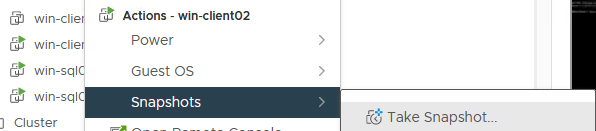
-
删除 VMware 快照。

-
清理“上次 vproxy 备份会话”信息。

-
执行虚拟机的完整级别备份。
Affected Products
NetWorkerArticle Properties
Article Number: 000182661
Article Type: Solution
Last Modified: 12 Nov 2025
Version: 4
Find answers to your questions from other Dell users
Support Services
Check if your device is covered by Support Services.