Dell Latitude 9520 노트북 키보드 기능 키 가이드
Summary: 다음 문서에서는 Dell Latitude 9520 Qwerty 키보드의 기능 키에 대 한 정보를 제공 합니다.
This article applies to
This article does not apply to
This article is not tied to any specific product.
Not all product versions are identified in this article.
Instructions
Dell Latitude 9520 노트북 키보드 가이드
다음 문서에서는 Dell Latitude 9520 Qwerty 키보드의 기능 키에 대 한 정보를 제공 합니다.
키보드 바로 가기 키 기능
아래 표는 Latitude 9520. 키보드에서 사용 가능한 바로 가기 키 조합 기능의 목록입니다.
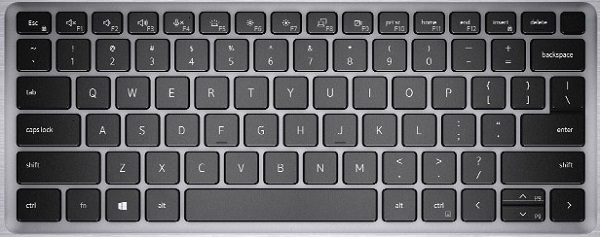
| 기능 키 콤보 | 결과 | 보조 동작 |
|---|---|---|
| Fn+F1 | 오디오 음소거 | F1 |
| Fn+F2 | 볼륨 낮춤 | F2 |
| Fn+F3 | 볼륨 높임 | F3 |
| Fn+F4 | 마이크 음소거 | F4 |
| Fn+F5 | 키보드 백라이트 전환 (선택 사항) | F5 |
| Fn+F6 | 밝기 감소 | F6 |
| Fn+F7 | 밝기 증가 | F7 |
| Fn+F8 | 외부 디스플레이로 전환 | F8 |
| Fn+F9 | SafeShutter Control | F9 |
| Fn+F10 | Print Screen | F10 |
| Fn+F11 | Home | F11 |
| Fn+F12 | 종료 | F12 |
| Fn + Num Lock | Insert | Num lock |
| Fn+Esc | Esc | Fn 키 잠금 전환 |
| Fn+오른쪽 Ctrl | 마우스 오른쪽 버튼 클릭을 에뮬레이트합니다. | - |
| <FN> + <Up> 화살표 | 페이지 위로 이동 | 위로 커서 |
| <FN> + <Down> 화살표 | 페이지 아래로 이동 | 아래쪽 커서 |
Latitude, 15 "화면, 9520, 키보드 바로 가기, 기능 키, Latitude 15 9520, 랩탑, QWERTY, 노트북,
 추가 리소스 및 정보는 키보드 기술 자료를 참조하십시오.
 추가 문서 및 정보는 터치패드 지원 페이지를 참조하십시오.
 추가 문서 및 정보는 마우스 지원 페이지에서도 확인할 수 있습니다.
Affected Products
Latitude 9520Article Properties
Article Number: 000184477
Article Type: How To
Last Modified: 16 Jul 2025
Version: 2
Find answers to your questions from other Dell users
Support Services
Check if your device is covered by Support Services.