Dell Encryption 在 Windows 更新後顯示登入程序初始化失敗
Summary: 在 2020 年 7 月或之後發出 Windows 10 更新後,端點重新開機時,裝置具有 Dell Encryption 和加密 C:\Windows\System32 內的可執行檔原則,可能會顯示訊息,表示登入程序失敗。
This article applies to
This article does not apply to
This article is not tied to any specific product.
Not all product versions are identified in this article.
Symptoms
受影響的產品:
- Dell Encryption Enterprise
- Dell Encryption Personal
受影響的作業系統:
- Windows 10 v1809 及更新版本
Cause
套用在 2020 年 7 月或之後發出的 Windows 10 功能更新後重新開機時,裝置可能會遇到錯誤。如果已安裝 Dell Encryption,且已在 C:\Windows\System32 中設定加密可執行檔的原則,可能會出現錯誤訊息。錯誤出現在黑屏上,指出 登錄過程初始化失敗 - 初始化中的互動式登錄過程失敗:
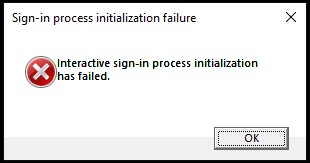
圖 1:(僅英文)登入程序初始化失敗
此提示會防止這些裝置正確開機進入 Windows,且 系統資料加密復原 如何執行 Dell Encryption Enterprise/Dell Encryption Personal 復原套裝 如何執行 Dell Encryption Enterprise/Dell Encryption Personal 復原套裝 無法解決此故障。
Resolution
舊版 Dell Encryption 實作 (先前稱為 Dell Data Protection |Encryption) 可能包含可加密 Windows System32 目錄中可執行檔的原則元素。反映這些加密規則的原則會類似下列文字:
^3@%ENV:SYSTEMROOT%\SYSTEM32\;exe
Dell Technologies 建議您移除加密 C:\Windows\System32 或其任何子資料夾中具有 EXE、DLL 或 SYS 等副檔名之檔案的原則元素。
這些資料夾是 受保護的系統資料夾,只有本地管理員或預定義的帳戶才能訪問。雖然這些檔案仍為解密狀態,但在管理的 Dell Security Management Server 中啟用 安全 Windows 登入資料原則時,Dell Encryption 會驗證這些檔案在開機之間沒有被篡改。
處於不良狀態的裝置必須將 C:\Windows\System32\ 中的logonui.exe更換為已知良好電腦的複本。完成此作業後,必須執行如何 執行 Dell Encryption Enterprise / Dell Encryption Personal 復原套裝 的系統資料加密復原。然後,端點應可正確開機。
如要聯絡支援部門,請參閱 Dell Data Security 國際支援電話號碼。
請前往 TechDirect,以線上產生技術支援要求。
如需更多深入見解與資源,請加入 Dell 安全性社群論壇。
Affected Products
Dell EncryptionArticle Properties
Article Number: 000184661
Article Type: Solution
Last Modified: 09 May 2026
Version: 6
Find answers to your questions from other Dell users
Support Services
Check if your device is covered by Support Services.