IDPA: vSphere Update Manager 경고를 비활성화하는 방법
Summary: Integrated Data Protection Appliance: Update Manager를 사용하지 않도록 설정한 후 IDPA(ACM)에서 이메일로 전송된 여러 경고가 표시됨
This article applies to
This article does not apply to
This article is not tied to any specific product.
Not all product versions are identified in this article.
Symptoms
Update Manager를 비활성화한 후 IDPA(Integrated Data Protection Appliance) ACM에서 다음과 같은 알림이 이메일로 전송됩니다.
날짜 및 시간: DD-MM-YYYY HH:MM:SS
Device:DataProtection-VCSA
Device Ip Address:10.x.x.x
Critical
Details:Task 데이터 센터에서 데이터 센터에 대한 VMware vSphere Update Manager 확인 알림을 완료할 수 없습니다. 사용자가 작업을 취소했습니다.
권장 사항: 지원팀에 도움을 요청하세요.
Recipients:systemadministrators@contactemail.com
vCenter 6.7, IDPA 2.5-2.7.x에서 표시되는 메시지:
예기치 않은 오류가 발생했습니다.

Cause
IDPA에서 vCenter Update Manager 서비스는 기본적으로 비활성화되지만 플러그인은 삭제되지 않습니다.
동적 알림이 계속 생성됩니다.
동적 알림이 계속 생성됩니다.
Resolution
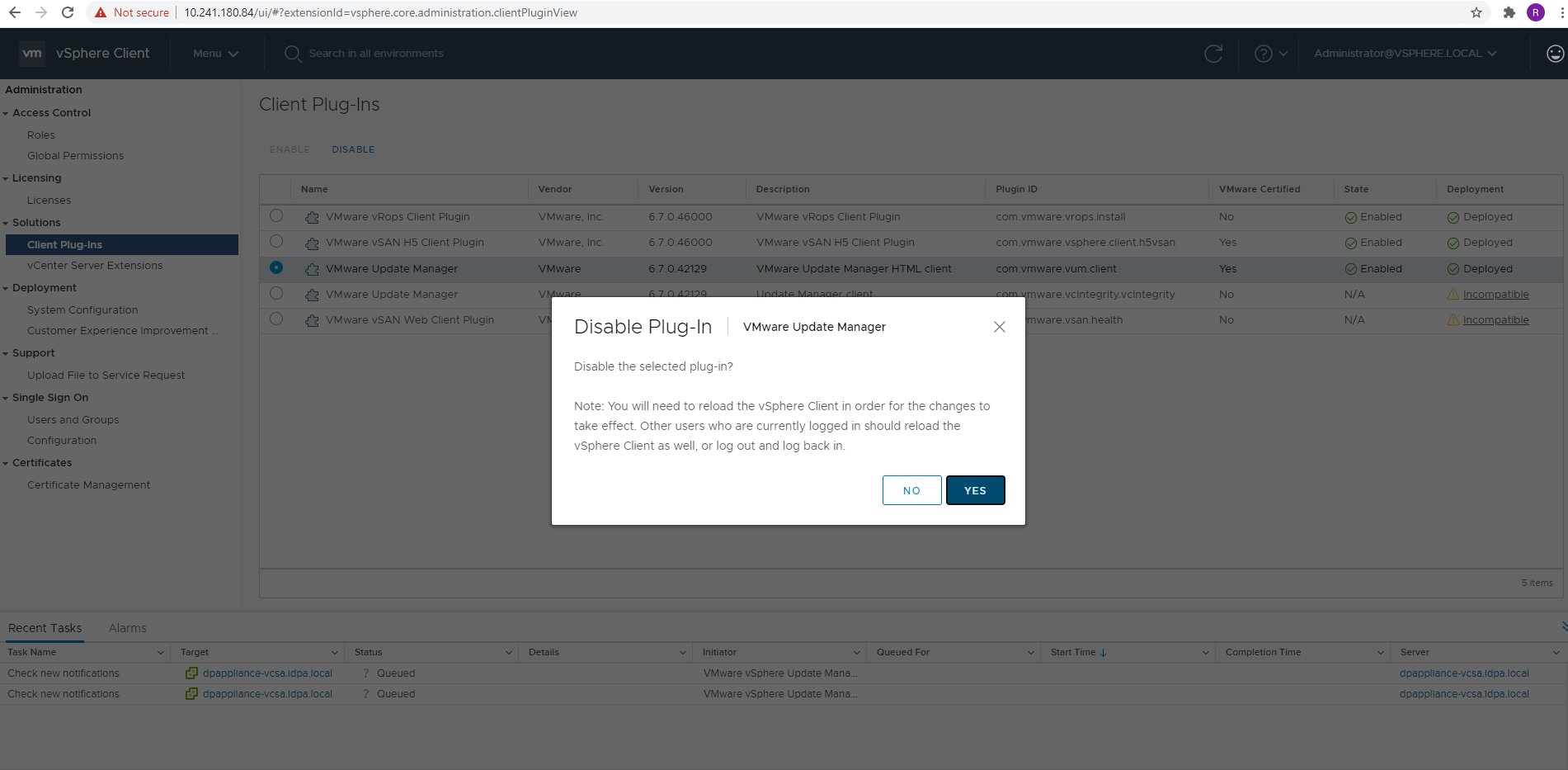
이 서비스는 IDPA에서 실행할 필요가 없습니다. 플러그인은 다음 단계를 통해 삭제할 수 있습니다.



요약 페이지의 호스트 및 클러스터 보기로 돌아가면 이제 Update Manager 패널이 표시되지 않습니다. 이에 대한 알림이 더 이상 생성되지 않습니다.
- administrator@vsphere.local 사용자를 사용하여 로그인하고 Menu Administration > 으로 이동합니다.
- 솔루션 아래에 나열된 클라이언트 플러그인을 클릭합니다.
- VMware Update Manager HTML 클라이언트 설명이 포함된 VMware Update Manager를 선택합니다.
- 상단의 DISABLE 버튼을 클릭합니다. 메시지가 나타나면 YES를 클릭합니다.
- 이 플러그인 상태에 대해 DISABLED 가 표시되어야 합니다.
요약 페이지의 호스트 및 클러스터 보기로 돌아가면 이제 Update Manager 패널이 표시되지 않습니다. 이에 대한 알림이 더 이상 생성되지 않습니다.
Affected Products
PowerProtect Data Protection ApplianceArticle Properties
Article Number: 000185471
Article Type: Solution
Last Modified: 26 Jan 2024
Version: 6
Find answers to your questions from other Dell users
Support Services
Check if your device is covered by Support Services.