IDPA:如何禁用 vSphere Update Manager 警报
Summary: 融合备份一体机:在禁用 Update Manager 后,看到 IDPA (ACM) 通过电子邮件发送的多个警报。
This article applies to
This article does not apply to
This article is not tied to any specific product.
Not all product versions are identified in this article.
Symptoms
在禁用 Update Manager 后,融合备份一体机 (IDPA) ACM 会通过电子邮件发送警报:
日期和时间:YYYY-MM-DD HH:MM:SS
Device:DataProtection-VCSA
Device IP Address:10.x.x.x
Critical
Details:Task VMware vSphere Update Manager Check Notification on Datacenters in datacenter cannot be completed:用户已取消任务。
建议:请与支持部门联系以获得帮助。
Recipients:systemadministrators@contactemail.com
vCenter 6.7、IDPA 2.5 到 2.7.x 中显示的消息:
发生意外错误

Cause
在 IDPA 中,默认情况下会禁用 vCenter Update Manager 服务,但不会删除插件程序。
仍会生成动态警报。
仍会生成动态警报。
Resolution
此服务不需要在 IDPA 中运行。可以通过以下步骤删除插件程序:


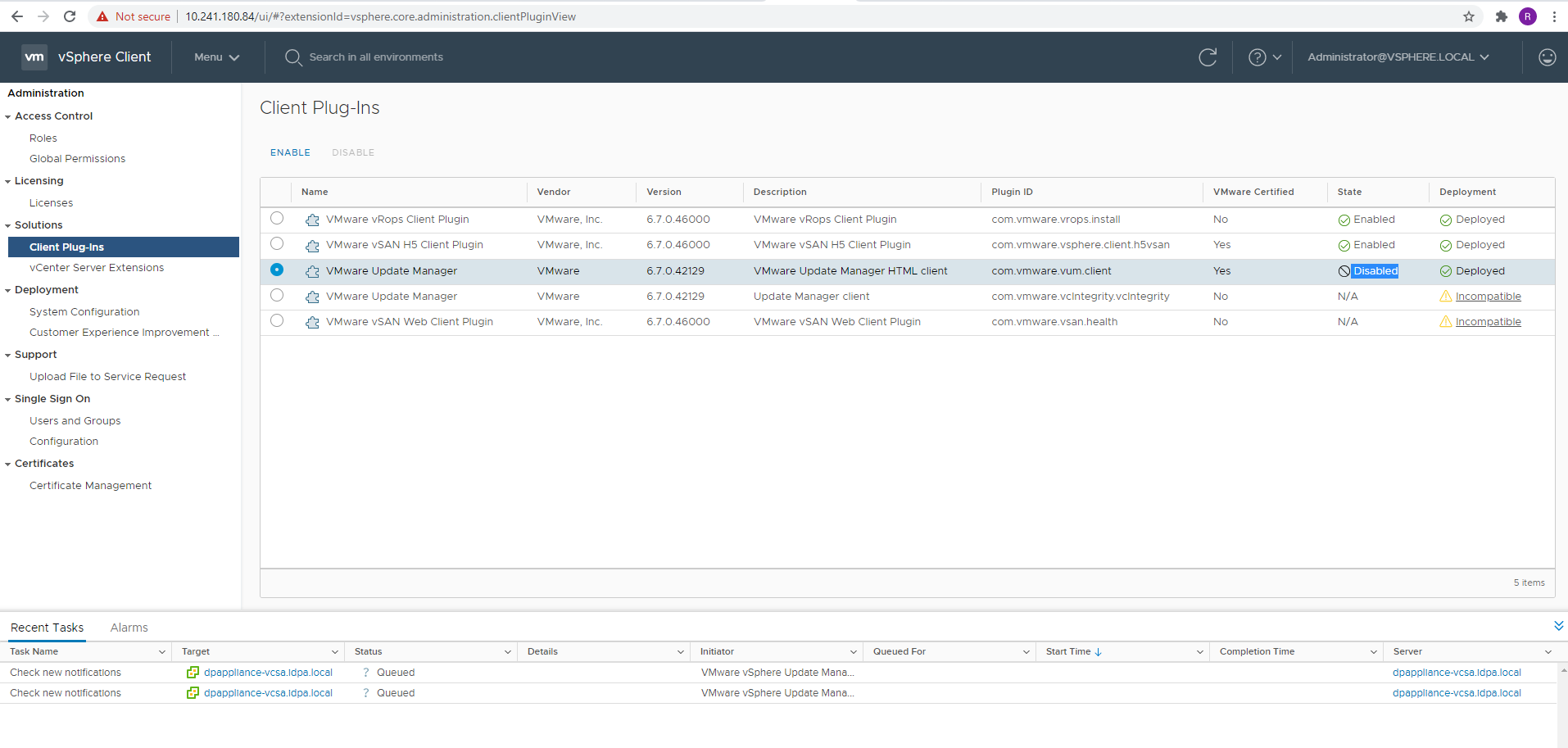
如果返回到摘要页面上的 主机和群集 视图,则现在看不到 Update Manager 面板。不会再为此生成警报。
- 使用 administrator@vsphere.local 用户登录,然后转至 菜单 >管理。
- 单击“解决方案”下列出的客户端插件。
- 选择带有说明的 VMware Update Manager HTML 客户端 VMware Update Manager。
- 单击顶部 的 DISABLE 按钮。出现提示时,单击 是。
- 对于此插件程序状态,您应该会看到 DISABLED 。
如果返回到摘要页面上的 主机和群集 视图,则现在看不到 Update Manager 面板。不会再为此生成警报。
Affected Products
PowerProtect Data Protection ApplianceArticle Properties
Article Number: 000185471
Article Type: Solution
Last Modified: 26 Jan 2024
Version: 6
Find answers to your questions from other Dell users
Support Services
Check if your device is covered by Support Services.