思科提供电子可编程逻辑设备 (EPLD) 映像升级,以增强硬件功能或解决已知问题
Summary: 思科提供电子可编程逻辑设备 (EPLD) 映像升级,以增强硬件功能或解决已知问题。使用以下步骤升级主区域和备份区域。 主 EPLD 区域和备份 EPLD 区域必须在同一过程中升级。
This article applies to
This article does not apply to
This article is not tied to any specific product.
Not all product versions are identified in this article.
Instructions
程序
1) 启动与交换机的 SSH 会话。
2) 输入以下命令以提交到持久存储。此外,将配置复制到远程服务器或跳转服务器:
#copy running-config startup-config
3) 输入 show version module <number> epld 命令以确定当前正在运行的版本。
4) 检查 bootflash 目录的内容,以验证软件映像是否有足够的可用空间。
一个。输入以下命令以检查闪存上的可用空间:
dir bootflash:
下面是一个示例命令输出:
bootflash:// 使用情况1275002880 字节已用
375902208字节可用
1650905088字节总数
b. 删除较旧的固件文件以腾出更多空间(如果需要)。
提醒: 在删除 Cisco Nexus 3000 和 Cisco Nexus 9000 交换机之前,它们不会提供确认提示。
5) 从 SCP、FTP 或 TFTP 服务器输入以下命令以将固件文件复制到 Cisco Nexus 交换机上的本地存储:
使用以下 TFTP 命令复制映像:
#copy tftp://XXX.XXX.XXX.XXX/ n9000-epld.9.3.3.img bootflash:
您还可以使用 SCP 复制映像。
6) 要确定是否必须升级,请使用 show install all impact epld bootflash: n9000-epld.9.3.3.img命令。
switch# show install all impact epld bootflash: n9000-epld.9.3.3.img

7) 输入以下命令以启动升级过程:
#install epld bootflash: n9000-epld.9.3.3.img module all

NOTE: 升级后,交换机重新启动可能需要 5 到 10 分钟。使用来自跳转服务器的连续 ping 命令验证交换机何时恢复联机状态。
8) 通过键入以下命令更新 EPLD 的备份区域:
#install epld bootflash:n9000-epld.9.3.5.img module all golden
9) 使用命令 reload
重新启动交换机 10) 使用 SSH,通过用户名和密码重新登录交换机。
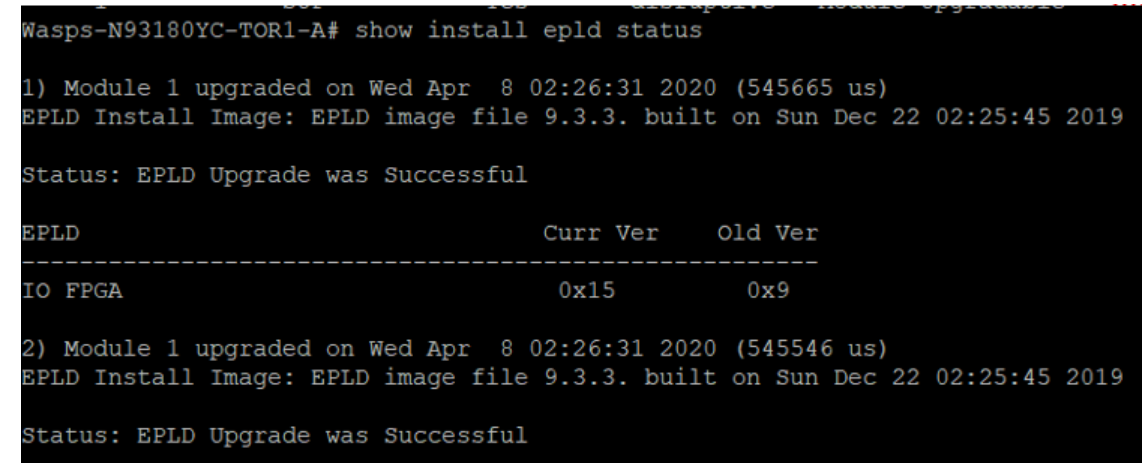
11) 输入以下命令以验证交换机是否运行正确的版本:
switch# show install epld status
1) 启动与交换机的 SSH 会话。
2) 输入以下命令以提交到持久存储。此外,将配置复制到远程服务器或跳转服务器:
#copy running-config startup-config
3) 输入 show version module <number> epld 命令以确定当前正在运行的版本。
4) 检查 bootflash 目录的内容,以验证软件映像是否有足够的可用空间。
一个。输入以下命令以检查闪存上的可用空间:
dir bootflash:
下面是一个示例命令输出:
bootflash:// 使用情况1275002880 字节已用
375902208字节可用
1650905088字节总数
b. 删除较旧的固件文件以腾出更多空间(如果需要)。
提醒: 在删除 Cisco Nexus 3000 和 Cisco Nexus 9000 交换机之前,它们不会提供确认提示。
5) 从 SCP、FTP 或 TFTP 服务器输入以下命令以将固件文件复制到 Cisco Nexus 交换机上的本地存储:
使用以下 TFTP 命令复制映像:
#copy tftp://XXX.XXX.XXX.XXX/ n9000-epld.9.3.3.img bootflash:
您还可以使用 SCP 复制映像。
6) 要确定是否必须升级,请使用 show install all impact epld bootflash: n9000-epld.9.3.3.img命令。
switch# show install all impact epld bootflash: n9000-epld.9.3.3.img
7) 输入以下命令以启动升级过程:
#install epld bootflash: n9000-epld.9.3.3.img module all
NOTE: 升级后,交换机重新启动可能需要 5 到 10 分钟。使用来自跳转服务器的连续 ping 命令验证交换机何时恢复联机状态。
8) 通过键入以下命令更新 EPLD 的备份区域:
#install epld bootflash:n9000-epld.9.3.5.img module all golden
9) 使用命令 reload
重新启动交换机 10) 使用 SSH,通过用户名和密码重新登录交换机。
11) 输入以下命令以验证交换机是否运行正确的版本:
switch# show install epld status
Additional Information
不适用
Affected Products
PowerFlex rackArticle Properties
Article Number: 000186388
Article Type: How To
Last Modified: 12 Nov 2025
Version: 5
Find answers to your questions from other Dell users
Support Services
Check if your device is covered by Support Services.