PowerFlex Presentation Server: Cannot Approve all MDM Certificates
Summary: The Presentation Server alerts show the secondary Main Data Management (MDM) certificates are not approved.
This article applies to
This article does not apply to
This article is not tied to any specific product.
Not all product versions are identified in this article.
Symptoms
After entering the MDM IP, but before logging in, only one certificate is seen as in this example:
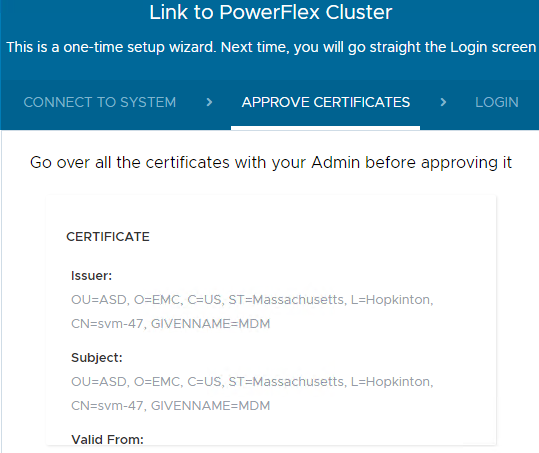 On a properly working server, two or three MDM certificates are presented on initial login (depending on a three or five node MDM cluster).
After login, the Presentation Server shows the secondary MDM certificates as needing approval in the alerts. The Approve button does nothing.
Presentation Server logs show an error for not being able to find the certificate for a given thumbprint, as noted in this snippet:
Impact:
On MDM ownership switchover or failover, the Presentation Server does not reconnect automatically to the new primary MDM.
After login, the Presentation Server shows the secondary MDM certificates as needing approval in the alerts. The Approve button does nothing.
Presentation Server logs show an error for not being able to find the certificate for a given thumbprint, as noted in this snippet:
2021-04-19 12:43:33,491 [qtp1679714298-172119|ERROR|com.emc.vxflexos.webui.backend.services.certificates.RepositoryCertificatesManager.findCertificate] Unable to find the cluster certificate for thumbprint 92 C4 A0 2F 0F 9F A4 8F 61 1C 85 1B 28 F5 EB 2F A4 65 AB 32
2021-04-19 12:43:33,492 [qtp1679714298-172119|ERROR|com.slimgears.rxrpc.server.RxServer.lambda$handleSubscription$1] RxServer.handleSubscription: Log uncaught error before sending to client
java.lang.NullPointerException: Null certificate
    at com.emc.vxflexos.webui.backend.connection.AutoValue_CertificateRecord$Builder.certificate(AutoValue_CertificateRecord.java:109) ~[backend-api-3.5.1200.103.jar:?]
    at com.emc.vxflexos.webui.backend.services.certificates.RepositoryCertificatesManager.lambda$null$6(RepositoryCertificatesManager.java:91) ~[backend-core-3.5.1200.103.jar:?]
    at java.util.stream.ReferencePipeline$3$1.accept(Unknown Source) ~[?:1.8.0_251]
On MDM ownership switchover or failover, the Presentation Server does not reconnect automatically to the new primary MDM.
Cause
The Presentation Server cannot reach the management IPs of the MDM cluster properly. Confirm the following:
- The MDM cluster management IPs are correct. This is seen with
scli --query_cluster - The Presentation Server can ping the MDM cluster management IPs
- The Presentation Server can telnet to ports 6611 and 9011 of the MDM cluster management IPs
Resolution
This is a network issue and does not require a fix in the PowerFlex code.
Workaround:
If the items listed in the Cause section are working properly, follow the below steps:
- Log in to the Presentation Server and unlink the system
- Switch the MDM ownership. See Dell PowerFlex v3.5.x CLI Reference Guide | Dell US
- Relink the Presentation Server
Impacted Versions:
PowerFlex 3.5 and 3.6
Affected Products
Converged Infrastructure, ScaleIO, PowerFlex SoftwareArticle Properties
Article Number: 000186621
Article Type: Solution
Last Modified: 28 Mar 2025
Version: 6
Find answers to your questions from other Dell users
Support Services
Check if your device is covered by Support Services.