Keyboard Illumination Setting in BIOS Does Not Sync with Ubuntu Operating System Settings
Summary: This article provides information about keyboard backlight or illumination setting in BIOS not syncing with settings in Ubuntu operating system.
This article applies to
This article does not apply to
This article is not tied to any specific product.
Not all product versions are identified in this article.
Symptoms
Dell computers running on Ubuntu operating system may find that the keyboard backlight or illumination settings in the BIOS does not sync with the settings in Ubuntu.

Figure 1: Screenshot of the keyboard illumination set to Bright in the BIOS.
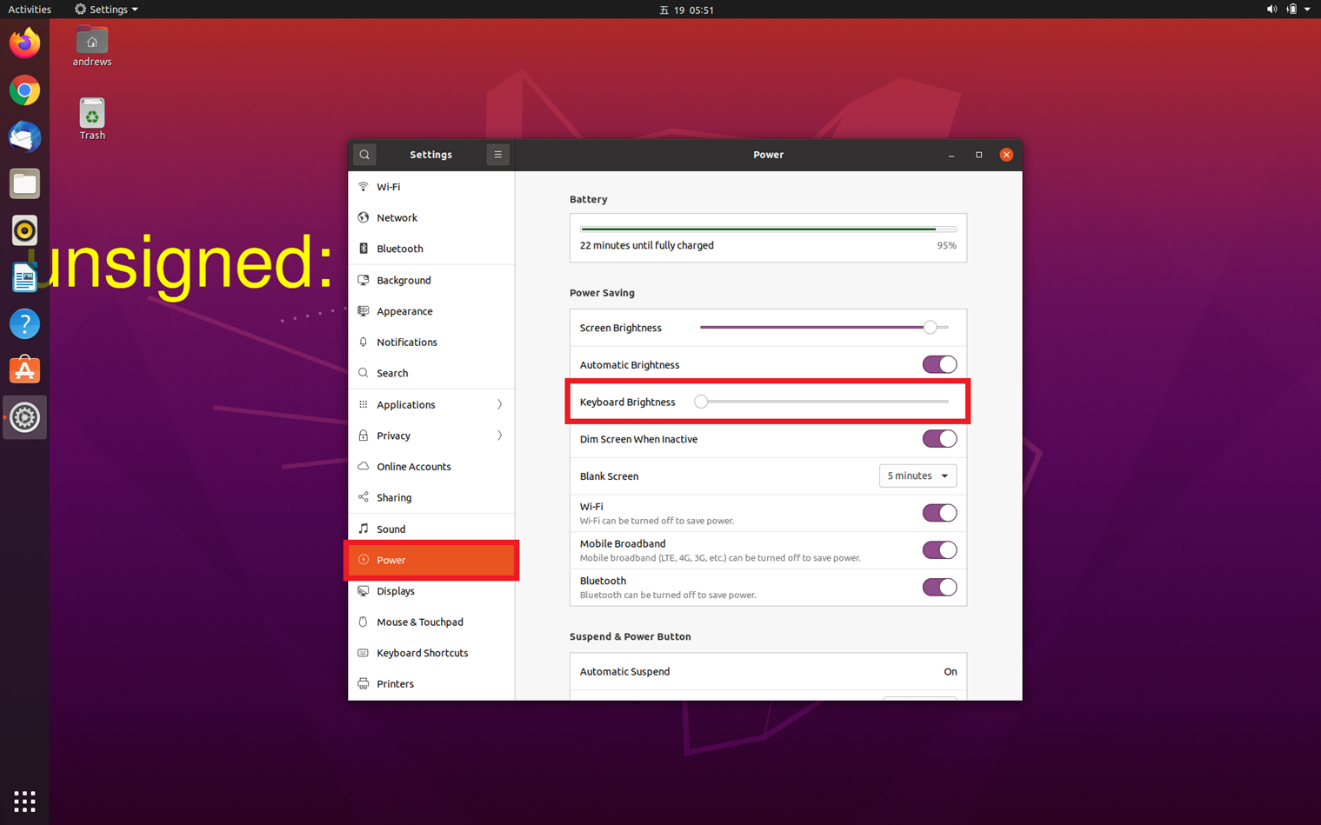
Figure 2: Screenshot of the keyboard illumination setting in Ubuntu.
Cause
Ubuntu will not sync with the keyboard illumination setting that is in the BIOS. The operating system keeps the state which the user has set in the Ubuntu.
Resolution
This is expected behavior in Ubuntu. The keyboard backlight or illumination settings must be set in Ubuntu. The user preferences for the keyboard backlight or illumination settings is preserved in the operating system. This does not sync with the keyboard illumination setting in the BIOS.
Article Properties
Article Number: 000187280
Article Type: Solution
Last Modified: 28 Nov 2024
Version: 3
Find answers to your questions from other Dell users
Support Services
Check if your device is covered by Support Services.