PowerFlex: Gateway High Availability Configuration Might Cause a Delay in Command Relay When Primary Gateway is Down
Summary: Client-side API automation or manual operations take longer than expected to complete over the Secondary Gateway (GW) than through the Primary GW.
This article applies to
This article does not apply to
This article is not tied to any specific product.
Not all product versions are identified in this article.
Symptoms
Once the Primary GW is failed over and receives requests on the Secondary GW, sending a request takes longer to complete the operation.
Example scenario:
- A customer is using Cinder (OpenStack) as a client-side application for backend storage communication.
- A user sends an API request to create a new volume on the system.
- The request is received on P-GW (Primary), transmitted to the MDM, and the volume is created successfully.
- The whole operation from the client to a successful completion takes X seconds (depending on the users' network and environment).
- The user sends a UNMAP request on the newly created volume.
- GW failover promotes S-GW (Secondary) to receive requests (failover can be done manually or as a result of the Primary's service or network or both going down).
- The user sends another API request to create a new volume on the system.
- The request is received on S-GW, transmitted to the MDM, and the volume is created successfully.
- The whole operation from the client to a successful completion takes X+Y seconds.
The example scenario consists of three operations: "Create Volume", "Map Volume", and "Unmap Volume", run one after the other.
P-GW
operations.log
2021-06-02 17:09:17,413 [https-jsse-nio-28443-exec-8] INFO  audit - 1.1.1.1:/api/types/Volume/instances {volumeType=ThinProvisioned, name=9g/MBZDNTYioDl1bTD34cw==, storagePoolId=fa75c1c100000000, compressionMethod=Normal, protectionDomainId=0089dc6000000000, volumeSizeInKb=5242880}
2021-06-02 17:09:17,601 [https-jsse-nio-28443-exec-3] INFO  audit - 1.1.1.1:/api/instances/Volume::5b273f9b00000005/action/addMappedSdc {guid=bb77b627-250b-457e-8a0b-fee221ceb941, allowMultipleMappings=TRUE}
2021-06-02 17:09:19,270 [https-jsse-nio-28443-exec-5] INFO  audit - 1.1.1.1:/api/instances/Volume::5b273f9b00000005/action/removeMappedSdc {guid=bb77b627-250b-457e-8a0b-fee221ceb941}
cinder-volume.log
2021-06-02 17:09:17.428 136 DEBUG cinder.volume.drivers.dell_emc.powerflex.rest_client [req-747562dc-0abd-472f-bff4-f739c52d88d2 8561f3a4fa914f0283bebe844eaae9ff 16f473111d914314aba5f4a3870a1ec7 - default default] REST Request: https://1.1.1.254:443/api/types/Volume/instances with params {"protectionDomainId": "0089dc6000000000", "storagePoolId": "fa75c1c100000000", "name": "9g/MBZDNTYioDl1bTD34cw==", "volumeType": "ThinProvisioned", "volumeSizeInKb": "5242880", "compressionMethod": "Normal"} _check_response /usr/lib/python3.6/site-packages/cinder/volume/drivers/dell_emc/powerflex/rest_client.py:518
2021-06-02 17:09:17.559 136 INFO os_brick.initiator.connectors.scaleio [req-747562dc-0abd-472f-bff4-f739c52d88d2 8561f3a4fa914f0283bebe844eaae9ff 16f473111d914314aba5f4a3870a1ec7 - default default] map volume request: https://1.1.1.254:443/api/instances/Volume::5b273f9b00000005/action/addMappedSdc
2021-06-02 17:09:19.241 136 INFO os_brick.initiator.connectors.scaleio [req-747562dc-0abd-472f-bff4-f739c52d88d2 8561f3a4fa914f0283bebe844eaae9ff 16f473111d914314aba5f4a3870a1ec7 - default default] Unmap volume request: https://1.1.1.254:443/api/instances/Volume::5b273f9b00000005/action/removeMappedSdc
S-GW
operations.log
2021-06-02 16:55:00,452 [https-jsse-nio-28443-exec-9] INFO  audit - 1.1.1.2:/api/types/Volume/instances {volumeType=ThinProvisioned, name=Ik6i/JD8TeKrTHtUg9HQrw==, storagePoolId=fa75c1c100000000, compressionMethod=Normal, protectionDomainId=0089dc6000000000, volumeSizeInKb=5242880}
2021-06-02 16:55:09,665 [https-jsse-nio-28443-exec-4] INFO  audit - 1.1.1.2:/api/instances/Volume::5b273f9a00000004/action/addMappedSdc {guid=bb77b627-250b-457e-8a0b-fee221ceb941, allowMultipleMappings=TRUE}
2021-06-02 16:55:20,373 [https-jsse-nio-28443-exec-9] INFO  audit - 1.1.1.2:/api/instances/Volume::5b273f9a00000004/action/removeMappedSdc {guid=bb77b627-250b-457e-8a0b-fee221ceb941}
cinder-volume.log
2021-06-02 16:55:00.461 136 DEBUG cinder.volume.drivers.dell_emc.powerflex.rest_client [req-ece34b6a-497f-4826-9c47-13f76773eaf2 8561f3a4fa914f0283bebe844eaae9ff 16f473111d914314aba5f4a3870a1ec7 - default default] REST Request: https://1.1.1.254:443/api/types/Volume/instances with params {"protectionDomainId": "0089dc6000000000", "storagePoolId": "fa75c1c100000000", "name": "Ik6i/JD8TeKrTHtUg9HQrw==", "volumeType": "ThinProvisioned", "volumeSizeInKb": "5242880", "compressionMethod": "Normal"} _check_response /usr/lib/python3.6/site-packages/cinder/volume/drivers/dell_emc/powerflex/rest_client.py:518
2021-06-02 16:55:00.594 136 INFO os_brick.initiator.connectors.scaleio [req-ece34b6a-497f-4826-9c47-13f76773eaf2 8561f3a4fa914f0283bebe844eaae9ff 16f473111d914314aba5f4a3870a1ec7 - default default] map volume request: https://1.1.1.254:443/api/instances/Volume::5b273f9a00000004/action/addMappedSdc
2021-06-02 16:55:11.320 136 INFO os_brick.initiator.connectors.scaleio [req-ece34b6a-497f-4826-9c47-13f76773eaf2 8561f3a4fa914f0283bebe844eaae9ff 16f473111d914314aba5f4a3870a1ec7 - default default] Unmap volume request: https://1.1.1.254:443/api/instances/Volume::5b273f9a00000004/action/removeMappedSdc
Impact
Client-side API automation or manual operations take longer than expected to complete.
Cause
The PowerFlex Gateway, which runs on Apache Tomcat, hosts several PowerFlex features, including a REST gateway, PowerFlex Installer, and SNMP trap sender. For high availability when two Apache Tomcat instances (PowerFlex Gateway servers) are configured, use Apache httpd. To prevent a single point of failure in the Apache httpd, you can use a failover httpd instance that is clustered using one of the many available clustering stacks.
In a customer’s environment that uses RHEL for the GWs, the correct configuration uses Keepalived and HAProxy.
A shared (virtual) IP address is used for both Apache httpd servers. Both of the Apache httpd servers have the same configuration, except that one is defined in the Keepalived configuration as the Primary, while the other is defined as the Secondary. If the Primary fails, the Secondary becomes the Primary, which means the users do not notice any loss of service.
In an RHEL/CentOS environment, the Keepalived service monitors the PowerFlex Gateway servers and determines to which server to forward the client request. HAProxy and Keepalived are configured on RHEL/CentOS to provide PowerFlex Gateway with high availability.
The Keepalived
open-source tool is used for the keep-alive component and is responsible for monitoring the status of HAProxy and configuring the virtual IP address as needed.
For more information about Keepalived, see http://www.keepalived.org.
The HAProxy
open-source tool, which serves as a load balancer for the PowerFlex Gateway, monitors the PowerFlex systems and redirects traffic if a node goes down.
For more information about HAProxy, see http://www.haproxy.org.
The default configuration of HAProxy is set to have the Secondary GW when owning the virtual IP, to retry to transmit the received API request to the Primary ("retries" value is set to 3), and when it is down, to proceed to send it over to the backend (MDM).
Resolution
As can be seen in the example HAProxy configuration below, the default HAProxy under the Global settings section, the 'retries' value is set to 3, which means that it attempts to retry the commands to the Primary GW three times for one second each.
It does the retry call to the Primary GW because under the backend siogateway section, the 'balance' value is set to 'first', which would be the Primary GW.
Changing the values for 'mode' and 'option', and adding 'server' characteristics are out of the utmost importance, as well:
- The 'mode' and 'option' values should be changed to 'http' and 'httpchk', respectively.
- 'server' characteristics should be added with 'check fall 5 inter 2000 rise 2'.
Once the values mentioned above are changed and added, latency decreases if not disappear completely.
The HAProxy settings are tunable for customers' environmental needs. If a customer needs their application calls to be quicker, they can tune the HAProxy settings to fit their business needs.
Default configuration file for HAProxy: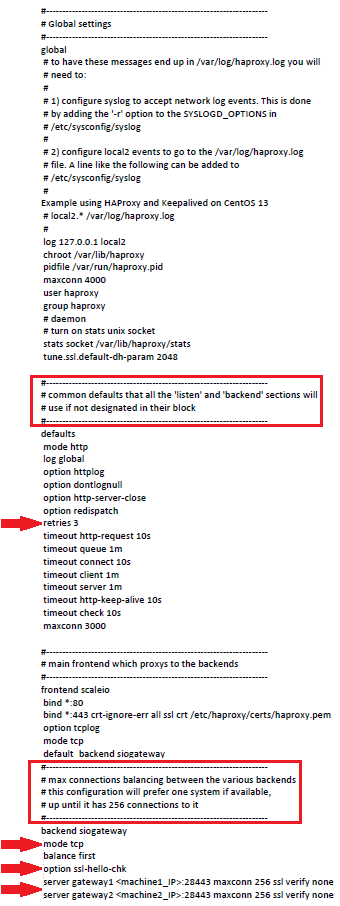
haproxy.cfg BEFORE edit:
...
defaults
    retries 3
...
backend powerflexgateway
    mode tcp
    balance first
    option ssl-hello-chk
    server gateway1 1.1.1.1:28443 maxconn 256 ssl verify none
    server gateway2 1.1.1.2:28443 maxconn 256 ssl verify none
haproxy.cfg AFTER edit:
...
defaults
    retries 1
...
backend powerflexgateway
    mode http
    balance first
    option httpchk
    server gateway1 1.1.1.1:28443 maxconn 256 ssl verify none check fall 5 inter 2000 rise 2
    server gateway2 1.1.1.2:28443 maxconn 256 ssl verify none check fall 5 inter 2000 rise 2
Affected Products
PowerFlex SoftwareArticle Properties
Article Number: 000188121
Article Type: Solution
Last Modified: 13 Nov 2025
Version: 4
Find answers to your questions from other Dell users
Support Services
Check if your device is covered by Support Services.