Avamar: Isilon NDMP 사용자 설정을 생성, 수정 또는 확인하는 방법
Summary: Isilon NDMP(Network Data Management Protocol) 사용자 설정을 생성, 수정 또는 확인하는 방법에 대한 지침입니다.
This article applies to
This article does not apply to
This article is not tied to any specific product.
Not all product versions are identified in this article.
Instructions
- OneFS 웹 UI에 루트로 로그인

- OneFS>데이터 보호>NDMP >NDMP 설정 경로를 따릅니다.


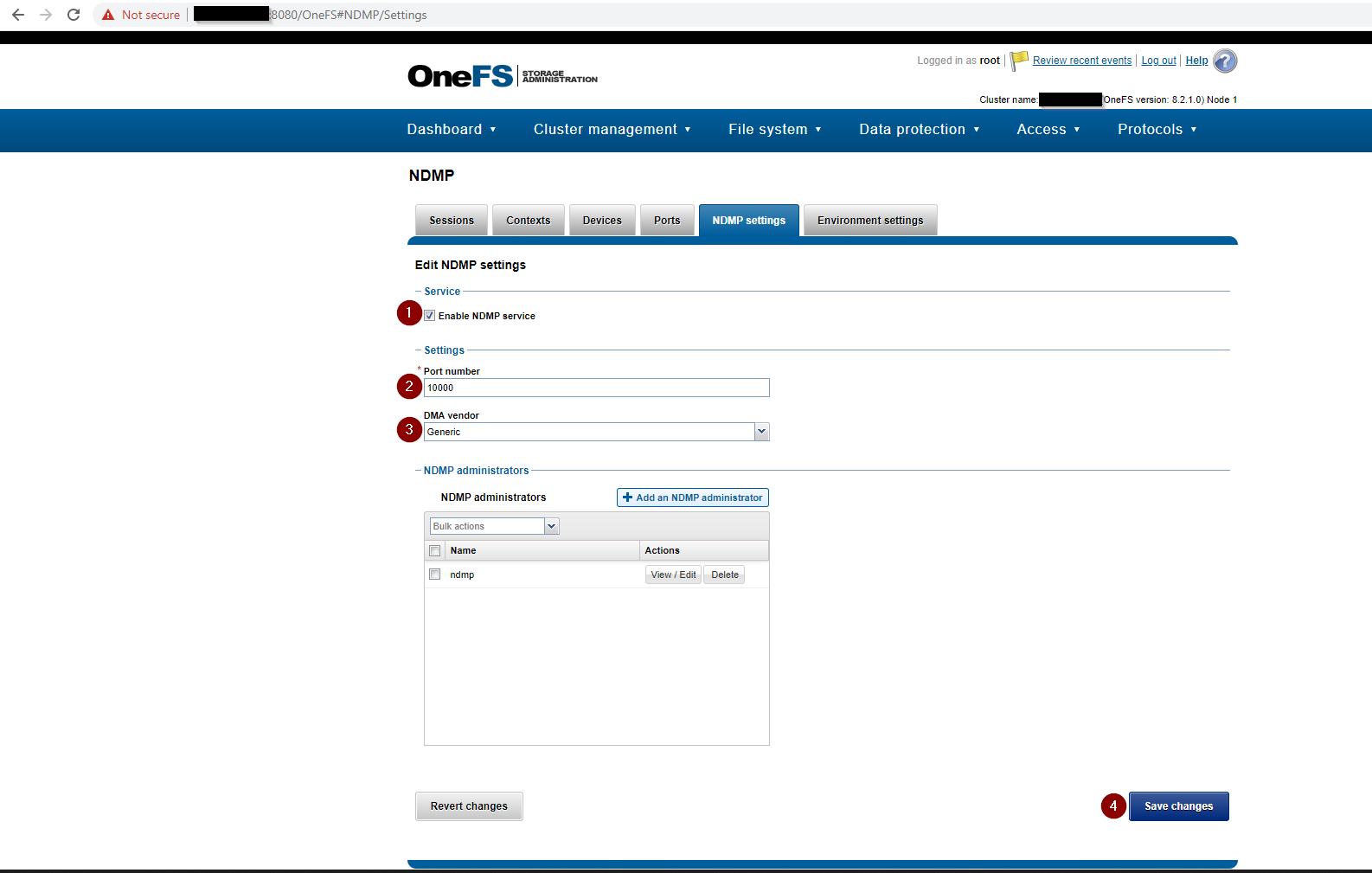
- 다음을 포함한 NDMP 설정을 완료합니다.
- Enable NDMP service 확인란이 선택되어 있어야 합니다.
- 포트 번호가10000으로 설정되어 있습니다.
- DMA 공급업체가 일반으로 설정됨
- N DMP 관리자가 NDMP의 관리자로 설정되고 암호 추가
NDMP 관리자 사용자가 생성되지 않은 경우 새로 생성합니다. Isilon을 새로 설치하는 경우 NDMP 설정 페이지는 아래 스크린샷과 같습니다.

- OneFS 웹 UI를 사용하여DMP 사용자 비밀번호를생성하거나 변경합니다.

- 또는 Isilon CLI를 사용하여 NDMP 사용자 비밀번호를생성하거나 변경합니다.
REDACTED_ISILON_CLUSTER# isi ndmp users create --name ndmp
password:
confirm:
REDACTED_ISILON_CLUSTER#

REDACTED_ISILON_CLUSTER# isi ndmp users modify --name ndmp
password:
confirm:
REDACTED_ISILON_CLUSTER#
- NDMP 설정을 확인합니다.
Isilon CLI를 사용하여 NDMP 설정을 확인합니다.
명령:
isi ndmp settings global view
샘플 출력:
REDACTED_ISILON_CLUSTER# isi ndmp settings global view
                       Service: True
                          Port: 10000
                           DMA: generic
          Bre Max Num Contexts: 64
MSB Context Retention Duration: 300
MSR Context Retention Duration: 600
        Stub File Open Timeout: 10
             Enable Redirector: False
              Enable Throttler: False
       Throttler CPU Threshold: 50

REDACTED_ISILON_CLUSTER# isi ndmp users list
Name
-----
ndmp
-----
Total: 1
Affected Products
AvamarArticle Properties
Article Number: 000189642
Article Type: How To
Last Modified: 02 Apr 2025
Version: 4
Find answers to your questions from other Dell users
Support Services
Check if your device is covered by Support Services.