Avamar: Unity NDMP-gebruikersinstellingen maken, wijzigen of verifiëren
Summary: Dit KB-artikel bevat instructies voor het maken, wijzigen of verifiëren van gebruikersinstellingen van Unity Network Data Management Protocol (NDMP).
This article applies to
This article does not apply to
This article is not tied to any specific product.
Not all product versions are identified in this article.
Instructions
- Meld u aan bij Unity Unisphere met een beheerdersaccount.

- Ga naar Unisphere > File > NAS-servers.
- Selecteer de doel-NAS-server en klik op Bewerken.

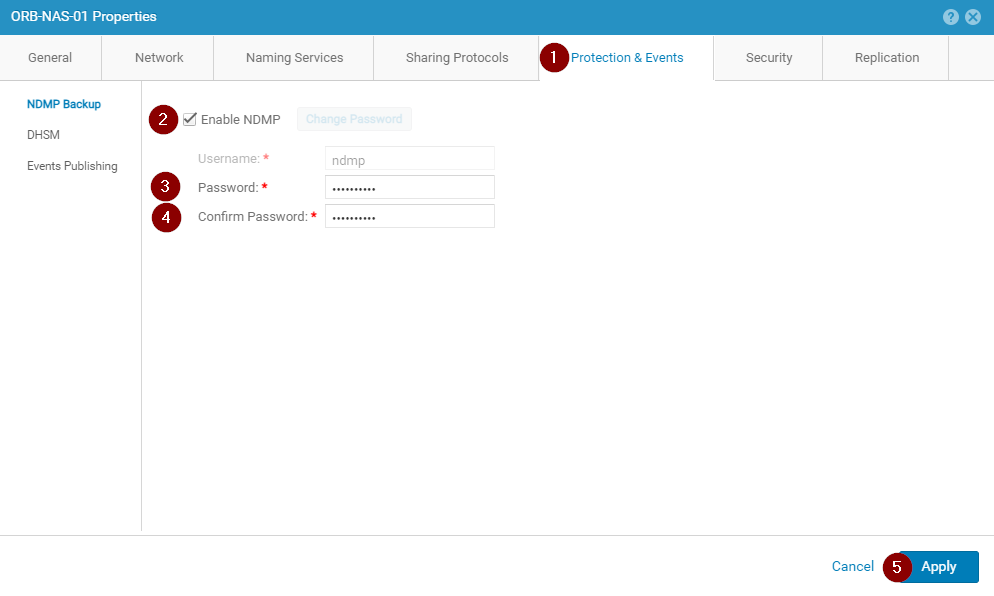
- Voor een nieuwe Unity-installatie wordt de pagina met NDMP-instellingen weergegeven als weergegeven:

- Vink het vakje Inschakelen NDMP aan.
- Voer het NDMP-gebruikerswachtwoord in en verifieer het.
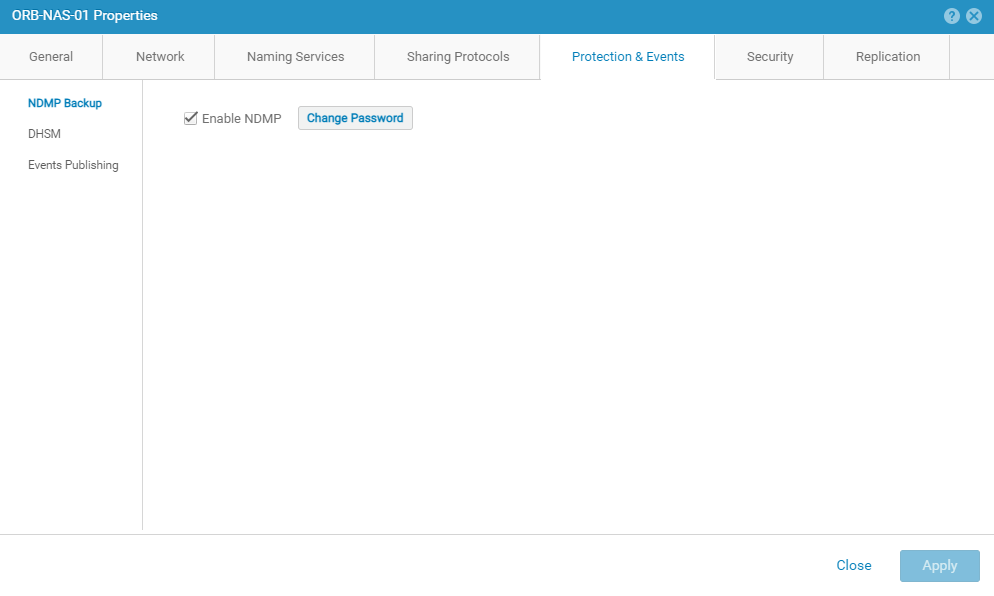
- Controleer of de NDMP-service-instellingen correct worden weergegeven:
Article Properties
Article Number: 000189645
Article Type: How To
Last Modified: 09 Dec 2025
Version: 5
Find answers to your questions from other Dell users
Support Services
Check if your device is covered by Support Services.