PowerProtect: backup Kubernetes non riuscito con errore "controller pod is not running"
Summary: PPDM: backup Kubernetes non riuscito con errore "controller pod is not running"
This article applies to
This article does not apply to
This article is not tied to any specific product.
Not all product versions are identified in this article.
Symptoms
Nel caso in cui sia stato osservato questo comportamento, tutti i backup di PPDM Kubernetes iniziano a non riuscire dopo il ripristino di PPDM dal backup del ripristino di emergenza del server. Tuttavia, potrebbe applicarsi ad altre situazioni.
Backup Kubernetes non riuscito con errore "controller pod is not running".
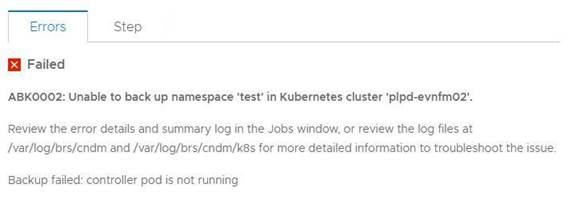
L'errore seguente può essere osservato nei registri:
2021-07-21T03:49:48.340Z ERROR [] [task-5011a057-340f-40fb-8cd8-12414685d058] [][][][TRACE_ID:a66ce529604914ad;JOB_ID:a9b8915af1637407][] [K8sHelperApi.isDone(90)] - Failed to wait on job com.emc.dpsg.ecdm.baseresourceservice.exception.ValidationServiceException: controller pod is not running
2021-07-21T03:50:14.065Z WARN [] [dsSource-plpd-testcluster] [][][][][] [c.e.b.c.s.p.K8sHealthMonitor.checkPodHealth(200)] - Controller Pod is down, cluster: , age=PT153H49M43.065S
Output del comando kubectl describe pod -n powerprotect for that k8s cluster:
powerprotect powerprotect-controller-666ffccbbf-p5rwh 0/1 ImagePullBackOff 0 6d12h
velero-ppdm backup-driver-587cfcdf59-2mc8p 1/1 Running 0 49d
velero-ppdm velero-5df5fcd896-p68rw 1/1 Running 0 49d
Backup Kubernetes non riuscito con errore "controller pod is not running".
L'errore seguente può essere osservato nei registri:
2021-07-21T03:49:48.340Z ERROR [] [task-5011a057-340f-40fb-8cd8-12414685d058] [][][][TRACE_ID:a66ce529604914ad;JOB_ID:a9b8915af1637407][] [K8sHelperApi.isDone(90)] - Failed to wait on job com.emc.dpsg.ecdm.baseresourceservice.exception.ValidationServiceException: controller pod is not running
2021-07-21T03:50:14.065Z WARN [] [dsSource-plpd-testcluster] [][][][][] [c.e.b.c.s.p.K8sHealthMonitor.checkPodHealth(200)] - Controller Pod is down, cluster: , age=PT153H49M43.065S
Output del comando kubectl describe pod -n powerprotect for that k8s cluster:
powerprotect powerprotect-controller-666ffccbbf-p5rwh 0/1 ImagePullBackOff 0 6d12h
velero-ppdm backup-driver-587cfcdf59-2mc8p 1/1 Running 0 49d
velero-ppdm velero-5df5fcd896-p68rw 1/1 Running 0 49d
Cause
PowerProtect - Il pod del controller non riesce a estrarre l'immagine richiesta da Internet.
Resolution
1. Verificare se il cluster Kubernetes può accedere a Docker Hub all'indirizzo https://hub.docker.com/ e a Quay all'indirizzo https://quay.io/ per estrarre le immagini richieste.
2. Se un cluster Kubernetes non è in grado di accedere a questi siti a causa di firewall o altre restrizioni, è possibile estrarre queste immagini in un registro locale accessibile al cluster. Seguire la procedura riportata di seguito.
1). Creare un file application.properties /usr/local/brs/lib/cndm/config/application.properties sull'appliance
PowerProtect Data Manager con il seguente contenuto:
k8s.docker.registry=fqdn:port Ad esempio, k8s.docker.registry=artifacts.example.com:8446
k8s.image.pullsecrets=secret resource name Specificare questa voce solo se è necessario un segreto per l'estrazione dell'immagine.
2). Eseguire cndm restart per applicare le proprietà.
Nota: per maggiori dettagli, consultare il documento PPDM Administration and User Guide.
3. Poiché il cluster Kubernetes è già stato aggiunto come origine asset nella GUI di PPDM, è necessaria un'individuazione manuale del cluster Kubernetes dopo aver verificato/eseguito il passaggio 1 o 2.
2. Se un cluster Kubernetes non è in grado di accedere a questi siti a causa di firewall o altre restrizioni, è possibile estrarre queste immagini in un registro locale accessibile al cluster. Seguire la procedura riportata di seguito.
1). Creare un file application.properties /usr/local/brs/lib/cndm/config/application.properties sull'appliance
PowerProtect Data Manager con il seguente contenuto:
k8s.docker.registry=fqdn:port Ad esempio, k8s.docker.registry=artifacts.example.com:8446
k8s.image.pullsecrets=secret resource name Specificare questa voce solo se è necessario un segreto per l'estrazione dell'immagine.
2). Eseguire cndm restart per applicare le proprietà.
Nota: per maggiori dettagli, consultare il documento PPDM Administration and User Guide.
3. Poiché il cluster Kubernetes è già stato aggiunto come origine asset nella GUI di PPDM, è necessaria un'individuazione manuale del cluster Kubernetes dopo aver verificato/eseguito il passaggio 1 o 2.
Affected Products
PowerProtect Data ManagerArticle Properties
Article Number: 000190024
Article Type: Solution
Last Modified: 27 Aug 2022
Version: 6
Find answers to your questions from other Dell users
Support Services
Check if your device is covered by Support Services.