IDPA: Sådan soft reset iDRAC fra DP4400, DP5x00 eller DP8x00 ESXi-node
Summary: Sådan soft reset iDRAC fra DP4400, DP5x00 eller DP8x00 ESXi-node
This article applies to
This article does not apply to
This article is not tied to any specific product.
Not all product versions are identified in this article.
Instructions
Formål
Viser trin til blød nulstilling af Integrated Dell Remote Access Controller (iDRAC) eksternt fra IDPA- (Integrated Data Protection Appliance) eller ESXi-værter i PowerProtect Data Protection-serien.
Årsag:
Kunne ikke logge på iDRAC-brugergrænsefladen, eller iDRAC svarer ikke på "racadm racreset" kommando i en SSH-session:
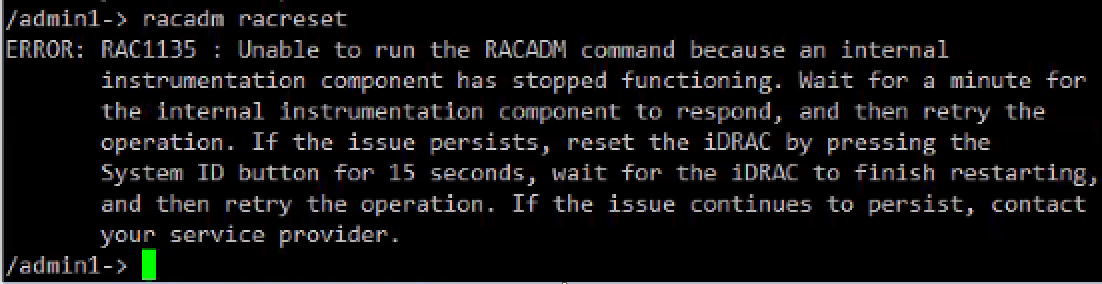
Prøv derefter at nulstille den ved hjælp af iDRAC Service Module-modulkommandoen
(iSM).Opløsning:
- Log på ESXi med rodkontoen, og kør kommandoen:
# /opt/dell/srvadmin/iSM/bin/Invoke-iDRACHardReset

or

# /opt/dell/idpa/bin/ipmitool mc reset cold
- Find iDRAC IP-adressen med kommandoen:
[root@esx-4400:~] /opt/dell/idpa/bin/ipmitool lan  print |grep "IP Address"
IP Address Source       : Static Address
IP Address              : 10.XX.XX.XX
[root@esx-4400:~]
- Fra IDPA ESXi-værten, SSH til iDRAC med den interne IP-adresse 169.254.0.1:
[root@esx-4400:~] ssh root@169.254.0.1
root@169.254.0.1's password:
racadm>>
Additional Information
Ekstern iDRAC-hård nulstilling
iDRAC reagerer muligvis ikke af forskellige årsager. iSM kan nulstille en iDRAC8- eller iDRAC9-controller, der ikke svarer, fuldstændigt ved midlertidigt at fjerne strømmen til iDRAC-controlleren uden at påvirke operativsystemets produktion. Denne funktion kan kun deaktiveres fra iDRAC-servicemodulsiden i iDRAC ved hjælp af en af iDRAC-grænsefladerne.
Du kan finde flere oplysninger om nulstillingsmulighederne i brugervejledningen til Dell Integrated Dell Remote Access Controller 9.
Se KB PowerEdge: Sådan nulstiller du den integrerede Dell Remote Access Controller (iDRAC) for at få andre muligheder for at nulstille iDRAC.
Affected Products
PowerProtect Data Protection Appliance, PowerProtect DP4400, PowerProtect DP5300, PowerProtect DP5800, PowerProtect DP8300, PowerProtect DP8800, PowerProtect Data Protection Software, Integrated Data Protection Appliance Family
, PowerProtect Data Protection Hardware, Integrated Data Protection Appliance Software, PowerProtect DP5900, PowerProtect DP8400, PowerProtect DP8900
...
Article Properties
Article Number: 000190074
Article Type: How To
Last Modified: 06 Aug 2025
Version: 6
Find answers to your questions from other Dell users
Support Services
Check if your device is covered by Support Services.