NVP vProxy: Cyber Recovery Vaulted vCenter is failing to Recover VM "Unable to find a usable device for recovery of save set"
Summary: The NetWorker server is a vaulted server in the PowerProtect Cyber Recovery vault solution. A Virtual Machine (VM) restores using the vaulted vCenter and Data Domain fails because it cannot find a usable device for the save set recovery. ...
This article applies to
This article does not apply to
This article is not tied to any specific product.
Not all product versions are identified in this article.
Symptoms
- NetWorker server is in Dell PowerProtect Cyber Recovery vault.
- There is a vCenter and Data Domain within the Cyber Recovery vault.
- PowerProtect solution is performing mtree replication between the source Data Domain and vaulted Data Domain.
- The devices associated with the vaulted Data Domain have been mounted.
- The "Device Access Information" of these devices uses the Fully Qualified Domain Name (FQDN) of the vaulted Data Domain
- vProxy is registered against the NetWorker server and vCenter server within the vault.
- VM restores performed through the vProxy fails with:
155752:nsrvproxy_recover: Unable to find a usable device for recovery of saveset SSID: Unable to find enabled Data Domain device for volume 'NON_VAULTED_DD_VOLUME'. An attempt will be made to perform automatic clone resurrection
08/13/21 10:27:51.811362 using staging pool VAULT_POOL
165713:nsrvproxy_recover: Attempting to automatically resurrect clone SSID with 7 days retention to DD volume in pool VAULT_POOL
08/13/21 10:27:51.811362 No callback registered on session channel 1 for user-defined message: (message type: 170, request type: 0)
08/13/21 10:27:51.811362 Resurrection clone job created
08/13/21 10:27:56.875018 Resurrection clone job started
08/13/21 10:28:35.899750 No callback registered on session channel 1 for user-defined message: (message type: 210, request type: 0)
08/13/21 10:28:35.899750 No callback registered on session channel 1 for user-defined message: (message type: 90, request type: 0)
08/13/21 10:28:36.899754 Resurrection clone job completed
166706:nsrvproxy_recover: ======= nsrclone log begins =================================
08/13/21 10:28:36.899754 i18n_vsnprintf: Truncation detected
17593:nsrvproxy_recover: 166707:nsrvproxy_recover: ======= nsrclone log ends =================================
08/13/21 10:28:36.899754 Unregistered session id:1, fd:1504, idx:0, ssn_max_pollfd:0, 0(512)
153335:nsrvproxy_recover: Virtual machine recovery failed: Unable to resurrect clone SSID to a Data Domain volume in a staging pool: nsrclone finished with code 1.
Cause
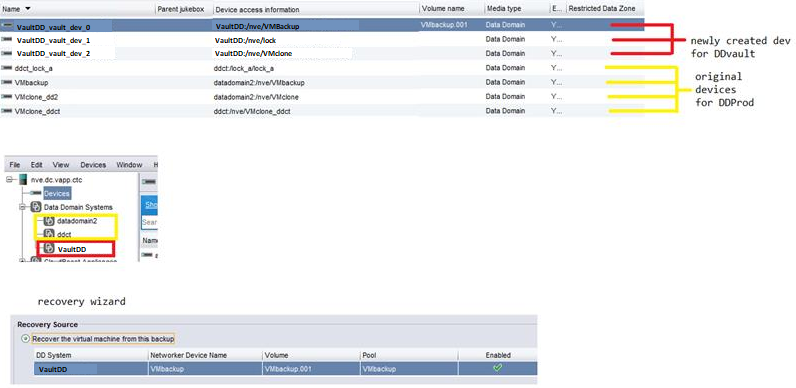
Under Devices->Data Domain Systems, only the source Data Domains are listed. There is no entry for the Data Domain from within the vault. This happens because the vault devices used the existing replication Data Domain, but no new device was created. As a result, no new volume was generated or registered under "Data Domain Systems." The NetWorker server is not aware of which DD it should be connecting to for the restore.
Resolution
Create a new device using the target Data Domain to register the Data Domain in the NetWorker data zone.
- From the NetWorker Management Consoles (NMC) Devices tab, create a new device
- Create a new folder on the vault DD and select it.
- Create a new pool for the vault DD pointing the new device.
- Label and mount the device.
- Check Devices->Data Domain Systems and ensure that the vault DD is listed.
- Perform the recovery again.
Additional Information
Affected Products
NetWorkerProducts
PowerProtect Cyber RecoveryArticle Properties
Article Number: 000190698
Article Type: Solution
Last Modified: 02 Sep 2025
Version: 6
Find answers to your questions from other Dell users
Support Services
Check if your device is covered by Support Services.