PowerProtect Backup Service:为 Phoenix Cloud 设置 NAS 代理备份
Summary: 设置 Phoenix 代理以备份 NAS 共享的步骤
This article applies to
This article does not apply to
This article is not tied to any specific product.
Not all product versions are identified in this article.
Instructions
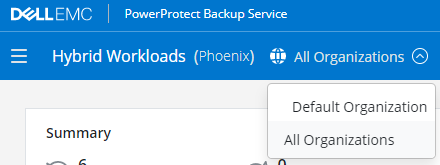
- 从 Hybrid Workloads 控制面板中,单击 Organizations 的下拉列表,然后选择 NAS 代理的组织。
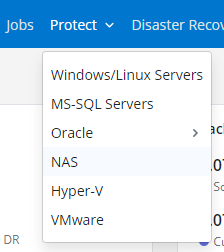
- 单击Protect的下拉列表并选择NAS。
-
- 在左侧,单击所有代理。
- 在右上角,单击添加代理。
- 下载并安装适用于代理主机作系统的相应代理程序。
- 从 Phoenix Management Console 选择有效的激活令牌或生成新令牌。
- 复制适用于 Windows 或 Linux 的预生成激活命令,并从代理主机运行。
激活授权 NAS 代理与 Phoenix Cloud 通信,并从 NAS 共享处理备份和还原作业。
- 在 Phoenix 控制台的左侧,单击所有设备。
- 在右上角,单击 Add NAS Device。
- 输入设备详细信息,然后选择 NAS 代理以运行备份。
- 如果尚未输入凭据,请在该下拉列表中选择 + New Credentials。
- 单击保存
Affected Products
PowerProtect Backup ServicesArticle Properties
Article Number: 000190871
Article Type: How To
Last Modified: 24 Aug 2021
Version: 1
Find answers to your questions from other Dell users
Support Services
Check if your device is covered by Support Services.