如何在 Dell Networking Enterprise SONiC MF-CLI 中配置网关 MAC 地址
Summary: 本文介绍如何在 Dell Networking Enterprise SONiC 中设置网关 MAC 地址。
This article applies to
This article does not apply to
This article is not tied to any specific product.
Not all product versions are identified in this article.
Instructions
Dell Enterprise SONiC 网关 MAC 地址
默认情况下,MC-LAG 交换机及其对等交换机使用活动对等节点的系统 MAC 地址作为 L3 接口中的网关 MAC 地址。要使用对等链路是 VLAN 成员的 L3 VLAN 接口的通用可配置网关 MAC 地址,请配置 MC-LAG 网关 MAC 地址。
提醒:在配置了 mclag-separate-ip 的 VLAN 接口上,VLAN 获取与配置的 mclag gateway-mac 不同的 MAC 地址(mclag-separate-ip 配置优先于 mclag gateway-mac)。
指数
配置语法
解释
mclag-separate-ip 对已配置网关 Mac 地址的影响
配置语法
配置 |
说明 |
|---|---|
Admin@SONIC:~$ sonic-cli |
输入 SONiC CLI |
SONiC# 配置终端 |
输入配置终端。 |
SONIC(config)# mclag gateway-mac <Mac 地址> |
配置网关 MAC 地址。 |
提醒:网关 MAC 地址不能是零、多播或广播 MAC 地址。
提醒:确保地址未与 Anycast MAC 地址混淆。
说明
下面我们用拓扑进行解释。
图 1:MC-LAG 拓扑示例
配置
示例让我们在两个 MC-LAG 对等节点中将 66:22:33:44:55:66 配置为 mclag gateway-mac。
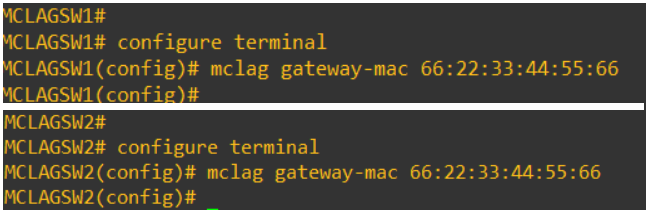
图 2:配置 MC-LAG MAC
我们可以从下游交换机看到,VLAN 25 和 VLAN 50 的 MAC 地址是 66:22:33:44:55:66。

图 3:show ip arp 命令的屏幕截图
mclag-separate-ip 对已配置网关 Mac 地址的影响
在配置了 mclag-separate-ip 的 VLAN 接口上,VLAN 获取与配置的 mclag gateway-mac 不同的 MAC 地址。请考虑我们在 VLAN 25 上配置 mclag-separate-ip。

图 4:MCLAGSW1中显示接口 VLAN 25 的屏幕截图

图 5:MCLAGSW2中显示接口 VLAN 25 的屏幕截图
两个交换机上的 VLAN 50 未配置 mclag-separate-ip。

图 6:未配置交换机MCLAGSW1显示 VLAN 50 接口的屏幕截图

图 7:未配置交换机MCLAGSW2显示 VLAN 50 界面的屏幕截图
我们可以看到,两个 mclag 对等节点上的 VLAN 25 的 MAC 地址已更改,并且不再是配置的网关 MAC。但是,MAC 地址 VLAN 50 仍然是配置的网关 MAC 地址。

图 8:显示 ip arp 和结果的屏幕截图
Affected Products
Enterprise SONiC Distribution, PowerSwitch S6000 ON, PowerSwitch E3200-ON Series, Dell EMC Networking N3200-ON, PowerSwitch S5232F-ON, PowerSwitch S5248F-ON, PowerSwitch S5296F-ON, PowerSwitch S6100-ON, PowerSwitch Z9100-ON, PowerSwitch Z9264F-ON
, PowerSwitch Z9332F-ON
...
Article Properties
Article Number: 000191547
Article Type: How To
Last Modified: 06 Jul 2023
Version: 7
Find answers to your questions from other Dell users
Support Services
Check if your device is covered by Support Services.