PowerProtect DP Series, Integrated Data Protection Appliances: Steps to mitigate VMSA-2021-0020 and VMSA-2021-0010 on IDPA vCenter for versions 2.5 and 2.6.x
Summary: Steps to mitigate VMSA-2021-0020 and VMSA-2021-0010 on IDPA vCenter for versions 2.5 and 2.6.x.
This article applies to
This article does not apply to
This article is not tied to any specific product.
Not all product versions are identified in this article.
Instructions
Impact Assessment:
Download:
Option 1: Direct link
Note: User must be logged into Dell Support with their service account in order to download the utility.
Option 2: Download from Product Page.

Steps:
Note: Extract or unzip the vc-patch-2.0.0.zip file and follow the instructions below.

- Functionality impacts are limited to IDPA Internal vCenter during the implementation of remediation procedure.
- No impact to customer backups, replications, and restore functionality.
- IDPA Internal VM (ACM, DPA, and so on) backups get impacted if they are running during the implementation of this procedure.
- The attached procedure must only be applied on IDPA versions 2.5 and 2.6.x [All Models].
- Do not use this KB for any other IDPA version.
- This remediation fix is cumulative and addresses vulnerabilities that are outlined in VMSA-2021-0020 and VMSA-2021-0010.
- Appliances on IDPA version 2.0, 2.1, 2.2, 2.3.x, and 2.4.x must upgrade to IDPA version 2.7 [Link to 2.7 upgrade binary].
- The security vulnerability VMSA-2021-0020 is addressed in PowerProtect DP Series IDPA 2.7 release.
Download:
Option 1: Direct link
Note: User must be logged into Dell Support with their service account in order to download the utility.
Option 2: Download from Product Page.
Steps:
Note: Extract or unzip the vc-patch-2.0.0.zip file and follow the instructions below.
- Copy the "vc-patch-2.0.0.jar" to "/data01" folder on Appliance Configuration Manager using an SCP client like WinSCP. SSH to ACM using an SSH client such as PuTTY using root and appliance password. Go to /data01 folder using "cd /data01" command.
- Check sha256 sum of the file "vc-patch-2.0.0.jar" and ensure it matches with sha256sum provided in "vc-patch-2.0.0.jar.sha256" file
- Run "java -jar vc-patch-2.0.0.jar." The patch performs prechecks and applies the vCenter patch on IDPA vCenter.
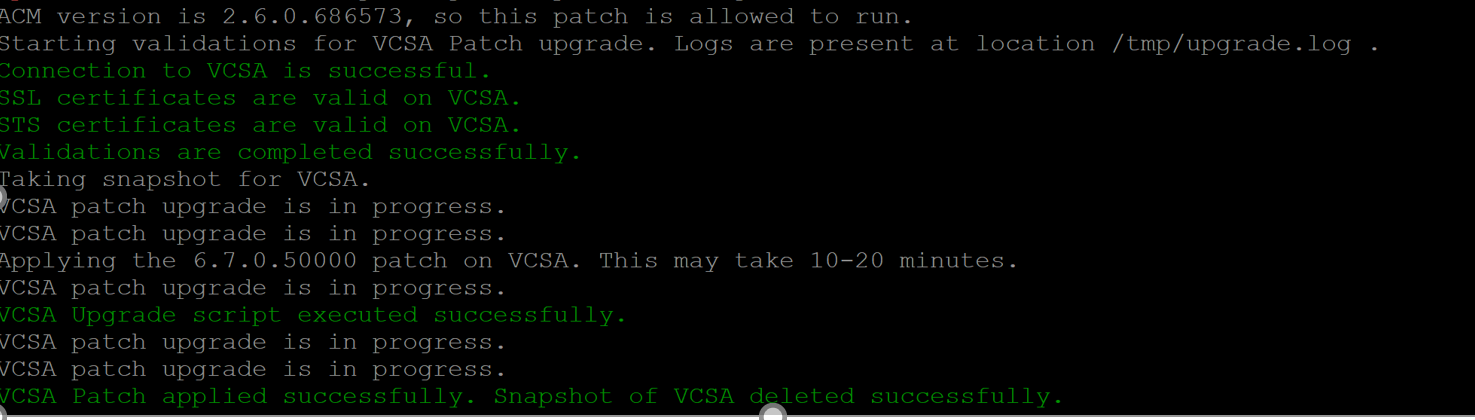
- Delete "vc-patch-2.0.0.jar" from "/data01" folder on ACM after successful execution using command "rm vc-patch-2.0.0.jar."
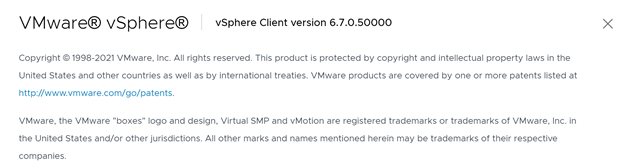
- Hit the vCenter IP in browser (like Chrome). Log in to vCenter HTML5 UI using root and password as appliance password. Click Help About VMware vSphere. You should see the following version.
Affected Products
PowerProtect DP4400, PowerProtect DP5300, PowerProtect DP5800, PowerProtect DP8300, PowerProtect DP8800, Integrated Data Protection Appliance Family, PowerProtect DP5900, PowerProtect DP8400, PowerProtect DP8900Products
Integrated Data Protection Appliance SoftwareArticle Properties
Article Number: 000192233
Article Type: How To
Last Modified: 14 Dec 2022
Version: 7
Find answers to your questions from other Dell users
Support Services
Check if your device is covered by Support Services.