PowerProtect: I backup hanno esito negativo perché l'host dell'agent non può essere raggiunto o il servizio non è in esecuzione
Summary: I backup di PowerProtect Data Manager (PPDM) hanno esito negativo restituendo l'errore "Protection of these assets was unsuccessful because the Agent host cannot be reached or the Agent service is not running". ...
This article applies to
This article does not apply to
This article is not tied to any specific product.
Not all product versions are identified in this article.
Symptoms
I backup dell'agent (file system o database) in PPDM hanno esito negativo per alcuni host con il seguente errore:
CRITICAL
ABA0009
Protection of these assets was unsuccessful because either the Agent host cannot be reached or the Agent service is not running.
Details
SQL-Prod-Policy: Unable to backup MICROSOFT_SQL_DATABASE UiPathArchive on Agent host
Cause
Il servizio agent non è in esecuzione sull'host oppure PPDM e l'host non riescono a comunicare con l'host sulla porta 7000.
Resolution
1. Controllo delle porte dalla sessione SSH su PowerProtect Data Manager: aprire una sessione PuTTY in PowerProtect Data Manager ed eseguire il seguente comando:
curl -kv ip/hostame of client:7000
Se agentservice non è in esecuzione sull host o se si verifica un problema sulla porta 7000, può verificarsi un errore.
La seguente tabella mostra un errore di connessione:
una porta aperta con un servizio di esecuzione restituisce quanto segue.
2. Verificare che il servizio PowerProtect Agent sia in esecuzione sull host:
- Cliccare su Start, digitare services.msc e premere [Invio].
- Individuare il servizio PowerProtect Agent.
- Cliccare con il pulsante destro del mouse sul servizio PowerProtect Agent e scegliere Start.

- Verificare che il servizio PowerProtect Agent sia in esecuzione.
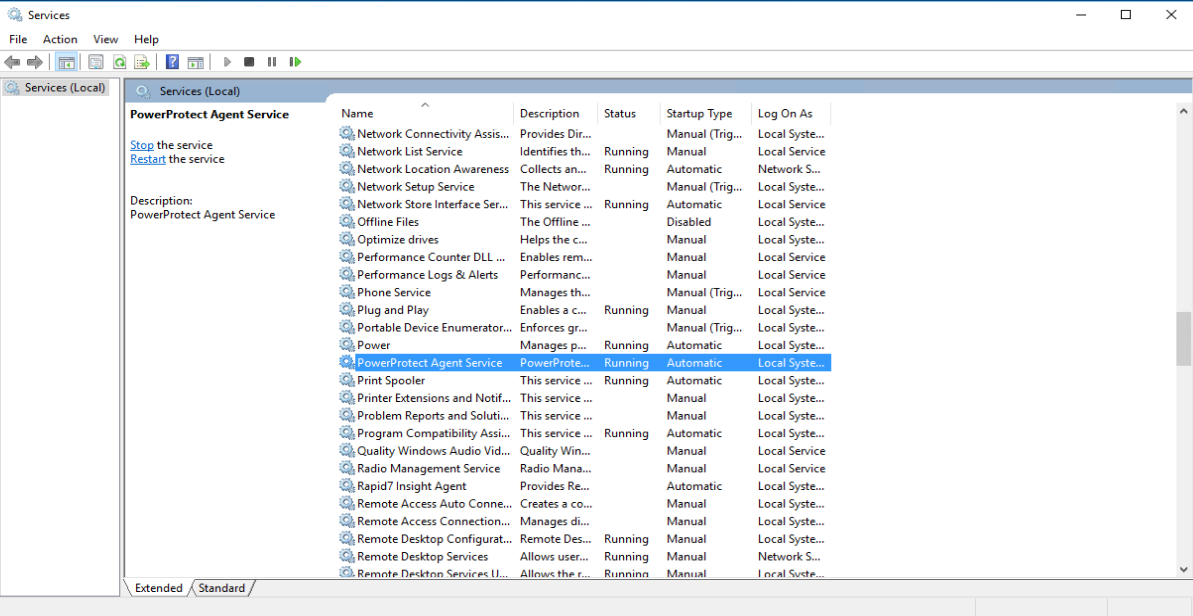
Per verificare la risoluzione dei nomi DNS e la connettività:
Dall host:
- Cliccare su Start, digitare cmd e premere [Enter] per aprire un prompt dei comandi su questo host ed eseguire i seguenti comandi:
- Verificare che sia in grado di risolvere il nome DNS e l'indirizzo IP del PPDM (in avanti e all'indietro).
-
nslookup <short name of your PPDM>
nslookup <FQDN of your PPDM>
nslookup <IP address of your PPDM>
- Verificare che l'host sia in grado di eseguire il ping del PPDM in base al nome breve, al nome di dominio completo (FQDN) e all'indirizzo IP.
-
ping <short name of your PPDM>
ping <FQDN of your PPDM>
ping <IP address of your PPDM>
Da PPDM:
- Aprire una sessione PuTTY, connettersi a PPDM ed eseguire i seguenti comandi:
- Verificare che sia in grado di risolvere il nome DNS e l'indirizzo IP dell host guasto (in avanti e all'indietro).
-
nslookup <short name of failing host>
nslookup <FQDN of of failing host>
nslookup <IP address of of failing host>
- Verificare che PPDM sia in grado di eseguire il ping dell host in base a nome breve, FQDN e indirizzo IP.
Nota: Il comando ping viene eseguito solo sul PPDM come utente root.
-
su [Enter]
enter root password [Enter]
ping <short name of failing host>
ping <FQDN of failing host>
ping <IP address of failing host>
Article Properties
Article Number: 000193211
Article Type: Solution
Last Modified: 16 Feb 2024
Version: 2
Find answers to your questions from other Dell users
Support Services
Check if your device is covered by Support Services.