PowerProtect:由於無法連接代理程式主機或服務未執行,導致備份失敗
Summary: PowerProtect Data Manager (PPDM) 備份失敗,並出現錯誤「保護這些資產失敗,因為無法連線代理程式主機,或是代理程式服務未執行。」
This article applies to
This article does not apply to
This article is not tied to any specific product.
Not all product versions are identified in this article.
Symptoms
部分主機在 PPDM 中的代理程式備份 (檔案系統或資料庫) 失敗,並傳回下列錯誤:
CRITICAL
ABA0009
Protection of these assets was unsuccessful because either the Agent host cannot be reached or the Agent service is not running.
Details
SQL-Prod-Policy: Unable to backup MICROSOFT_SQL_DATABASE UiPathArchive on Agent host
Cause
可能是代理程式服務未在主機上執行,或是 PPDM 和主機無法透過連接埠 7000 與主機通訊。
Resolution
1.從 PowerProtect Data Manager 上的 SSH 工作階段進行連接埠檢查:開啟 putty 工作階段至 PowerProtect Data Manager,然後執行下列命令:
curl -kv ip/hostame of client:7000
如果 代理服務 未在主機上運行,或者埠 7000 上存在問題,則可能導致故障。
下面顯示了連接失敗:
具有運行服務的打開埠返回以下內容。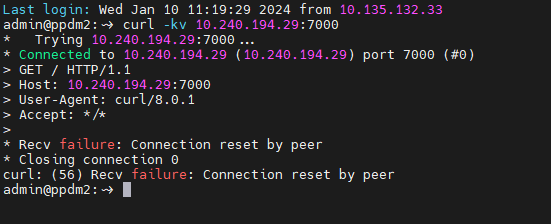
2. 確認 PowerProtect 代理程式服務正在主機上執行:
- 按一下開始,輸入 services.msc,然後按下 [Enter]。
- 找到 PowerProtect 代理程式服務。
- 在 PowerProtect 代理程式服務上按一下滑鼠右鍵,然後按 一下開始。
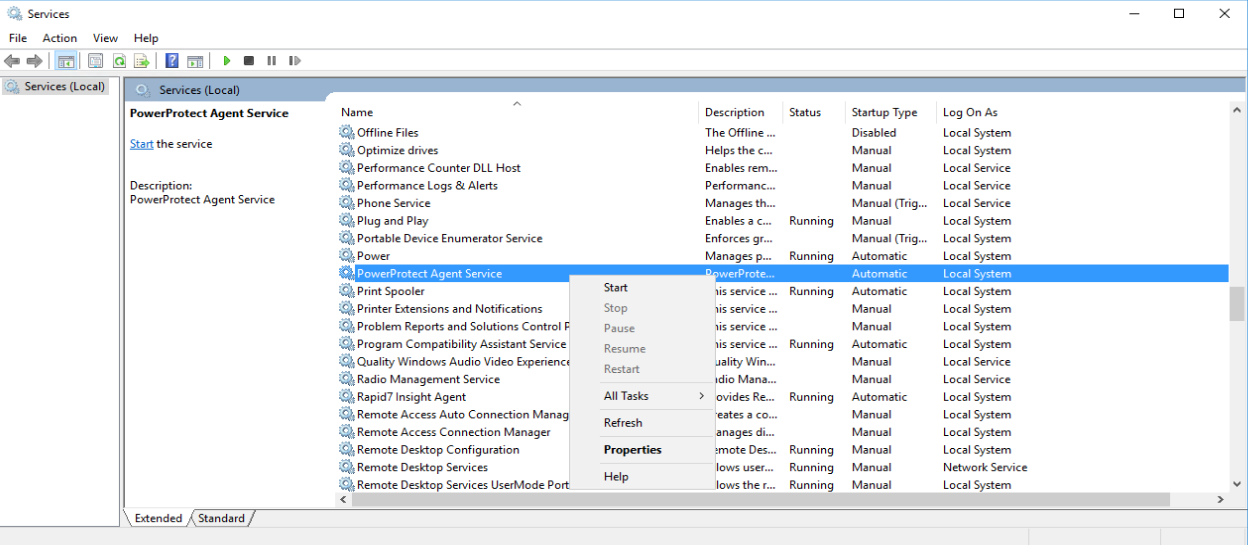
- 確認 PowerProtect 代理程式服務正在執行中。

若要驗證 DNS 名稱解析和連線能力,請執行以下操作:
從主機:
- 按 一下開始,輸入 cmd,然後按下 [Enter] 以在此主機上開啟命令提示字元,並執行下列命令:
- 確認其可解析 PPDM 的 DNS 名稱和 IP 位址 (正向和反向)。
-
nslookup <short name of your PPDM>
nslookup <FQDN of your PPDM>
nslookup <IP address of your PPDM>
- 確認主機可依短名稱、完整網域名稱 (FQDN) 和 IP 位址 ping PPDM。
-
ping <short name of your PPDM>
ping <FQDN of your PPDM>
ping <IP address of your PPDM>
從 PPDM:
- 開啟 PuTTY 工作階段並連線至 PPDM 並執行下列命令:
- 驗證它是否可以解析故障主機的 DNS 名稱和 IP 位址(正向和反向)。
-
nslookup <short name of failing host>
nslookup <FQDN of of failing host>
nslookup <IP address of of failing host>
- 確認 PPDM 可以依短名稱、FQDN 和 IP 位址對主機執行 ping 操作。
注意:ping 命令僅以根使用者身分在 PPDM 上執行。
-
su [Enter]
enter root password [Enter]
ping <short name of failing host>
ping <FQDN of failing host>
ping <IP address of failing host>
Article Properties
Article Number: 000193211
Article Type: Solution
Last Modified: 16 Feb 2024
Version: 2
Find answers to your questions from other Dell users
Support Services
Check if your device is covered by Support Services.