Windows Server: How to Convert an Evaluation Edition to a Non-Evaluation Edition
Summary: This article explains how to convert an evaluation edition of Windows Server to a fully-licensed edition. The conversion must be performed before the operating system (OS) can be activated using its product key. Attempting to activate an evaluation edition is a common cause of activation error 0xC004F050. ...
This article applies to
This article does not apply to
This article is not tied to any specific product.
Not all product versions are identified in this article.
Instructions
A Windows Server evaluation can be converted to either the Standard or Datacenter edition using a dism command. To determine whether an evaluation is in use, run the following command:
dism /online /get-currentedition
The output of this command lists the edition of Windows Server that is running, including whether it is an evaluation. To determine which editions the running edition can be converted to, run the following command:
dism /online /get-targeteditionsTypical target editions are ServerStandard and ServerDatacenter. Convert to an edition for which you have a valid product key, or the OS cannot activate after the conversion. It is not possible to reverse the conversion once it has been performed.
To perform the conversion, run this command:
dism /online /set-edition:<edition> /productkey:<key> /accepteulaIn this command, <edition> represents the target edition and <key> represents a product key for that edition. After the command finishes, a reboot is required to complete the conversion process. After the reboot, the OS should activate automatically.
Examples
The following command converts a Windows Server evaluation to the Datacenter edition using an Automatic Virtual Machine Activation (AVMA) key. AVMA can only be used to activate virtual machines on a host running a Datacenter edition of Windows Server.
dism /online /set-edition:ServerDatacenter /productkey:W3GNR-8DDXR-2TFRP-H8P33-DV9BG /accepteula
For more information about AVMA, see PowerEdge: How to Activate Virtual Machines Using Automatic Virtual Machine Activation.
The following command converts a Windows Server evaluation to the Standard edition using a Key Management Services (KMS) client key. KMS can only be used to activate the OS in an environment that contains a KMS server.
dism /online /set-edition:ServerStandard /productkey:VDYBN-27WPP-V4HQT-9VMD4-VMK7H /accepteula
Potential Issues
An evaluation which has been installed as the Datacenter edition can only be converted to the full Datacenter edition; it cannot be converted to Standard. In this case, the output of dism /online /get-currentedition shows ServerDatacenterEval as the current edition:
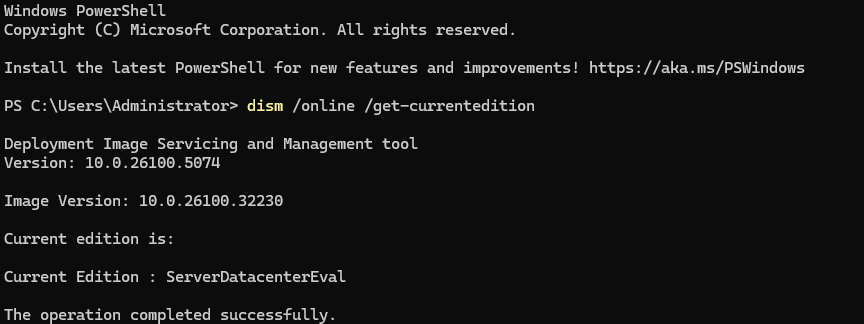
Figure 1: "ServerDatacenterEval" is shown as the current edition if the Datacenter edition is selected during installation of the evaluation.
There is no way to convert this evaluation to the Standard edition without reinstallation.
The Server Core evaluation of Windows Server, which has no graphical interface, cannot be converted to the Core edition of Windows Server Standard. It can only be converted to the Core edition of Windows Server Datacenter. This requires a valid Datacenter product key. More information about this issue can be found in Windows Server: Cannot convert the Server Core evaluation edition to the Standard nonevaluation edition.
Microsoft states here
Additional Information
AVMA keys can be found here: https://learn.microsoft.com/en-us/windows-server/get-started-19/vm-activation-19
KMS Keys can be found here: https://learn.microsoft.com/en-us/windows-server/get-started/kmsclientkeys
Videos
The following video illustrates the conversion process.
Duration: 00:05:17 (hh:mm:ss)
When available, closed caption (subtitles) language settings can be chosen using the CC icon on this video player.
Affected Products
Microsoft Windows Server 2016, Microsoft Windows Server 2019, Microsoft Windows Server 2022, Microsoft Windows Server 2025Article Properties
Article Number: 000193584
Article Type: How To
Last Modified: 12 May 2026
Version: 11
Find answers to your questions from other Dell users
Support Services
Check if your device is covered by Support Services.