PowerStore: System Full Capacity Alerts
Summary: This article discusses alerts relating to full capacity Write Protect Mode (WPM).
This article applies to
This article does not apply to
This article is not tied to any specific product.
Not all product versions are identified in this article.
Symptoms
When PowerStore encounters an issue, an error alert is generated to help identify the issue. This article explains the different possible causes and the relevant remediation for these error alerts.
If your issue is not resolved despite the remediation that is provided, check the Dell Support contact options.
Note: Cannot find the information that you need? Let us know using the feedback form at the bottom of this article.
Cause
When an appliance reaches its full capacity, it enters a condition that is known as Write Protect Mode (WPM). In WPM, all volumes transition to read-only, and a repair of the system is required.
For an explanation of how Physical Capacity is calculated, see article 000188491: PowerStore: How PowerStore Physical Capacity is calculated.
Resolution
| Alert ID | DATA_PATH_WRITE_PROTECT_MODE_ENTER
DATA_PATH_APP_EXIT_WPM_WITH_ENOUGH_MD_NOTIFY
DATA_PATH_APP_WPM_SHORT_OF_MD_NOTIFY |
| Alert Text | The <user or system > data capacity has reached its full capacity.
Appliance has exited the write protection state with 16 GB of free capacity.
Appliance cannot exit the Write Protection mode due to insufficient system data capacity. |
| Error Code | (0x00200701)
(0x00201401)
(0x00201501) |
| Resolution | What happens when in Write Protect Mode (WPM)?
When an appliance reaches its full capacity, it enters a condition that is known as Write Protect Mode (WPM), where all volumes transition to read-only.
Figure 1. Physical Capacity Breakdown On PowerStoreOS pre-3.0 versions, the following is displayed on PowerStore Manager. The user is only presented with a breakdown of Physical Used Capacity:
Figure 2. Physical Usage
When the system reaches 70% capacity, alerts are raised to warn of lack of space. See article 000123351 PowerStore Alerts: Capacity Utilization. If the user takes no action, and the system reaches 100%, the system enters Write Protect Mode (WPM), which indicates that all volumes enter read-only mode, and the alert Alert How to determine the WPM root cause:
The workaround is determined by the type of WPM condition (User Data or System Data). Solution: Recovering from an OOS condition depends on the reason for the OOS. The cause of the WPM condition is contained in the alert text:
The workaround is determined by the type of WPM condition (User Data or System Data).
User Data
Additional information
Note: Reclaiming space by deleting snapshots or volumes initially requires additional space for System Data, and hence, may lead to alert
0x00201501 (Alert text: Appliance cannot exit the Write Protection mode due to insufficient system data capacity).
Use one of the following options:
This information can be viewed from the Volume Capacity Dashboard. In this example, deleting the below volume reclaims 59.8 GB of space that can be used for either User Data or System Data. System Data requires a minimum of around 100 GB of unique space to be able to expand. Sometimes it may require 200 GB of space to properly expand.
|
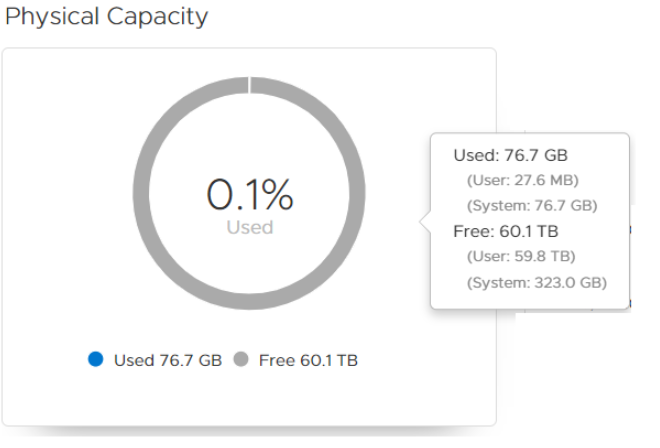
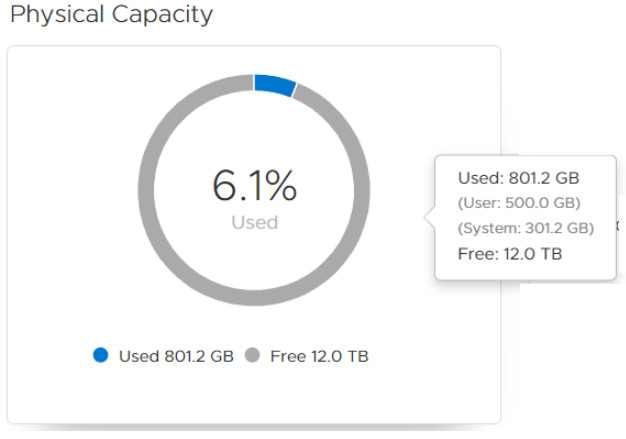
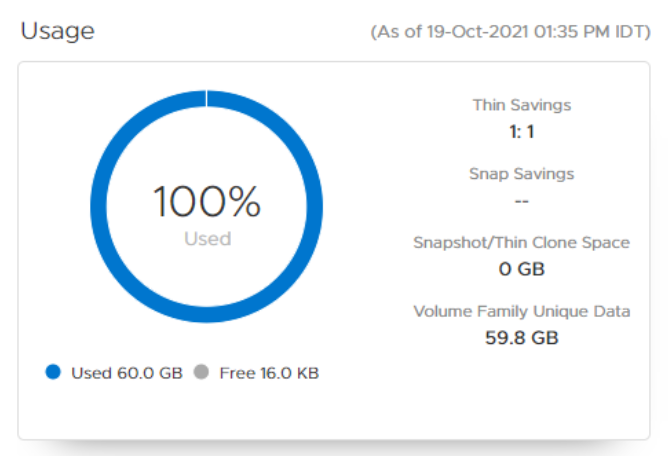
Figure 3. Usage
Additional information
-
Usually, when an appliance enters WPM due to System Data, User Data also runs out of space. This is because there is no capacity that is left for expanding (either System Data or User Data).
-
To get out of WPM, typically the user is required to add additional drives and scale up the appliance.
-
When the system raises the alert
0x00200701(Alert text:TheSystemcapacity has reached its full capacity.) This indicates that System Data has run out of space and cannot be expanded. -
Avoid deleting volumes in this condition and escalate to Global Services for support.
How to use svc_volume_space_metrics
-
PowerStoreOS 1.0.3 introduced a service script that allows users when in WPM to see additional information about each volume tree.
-
To run the script, SSH must be enabled on the specified appliance, and the user must connect using SSH to the cluster IP using the service account.
-
When trying to run this service script when not in WPM, the service script fails.
-
When appliance runs out of space, the user can run the script and see additional information, such as:
Family Unique Physical Used- This represents the unique data (compressed) this volume, and all its family (snapshots and clones) releases if this volume is deleted.
Example:[SVC:service@xxxxxx-A user]$ svc_volume_space_metrics 2020-10-29 12:28:33,997 - INFO - event_client init() address: localhost node: A 2020-10-29 12:28:34,248 - INFO - PyCycloneDp.init localhost 2020-10-29 12:28:34,318 - PyCycloneDp - INFO - logging in PyCycloneDp.__init__ Namespace state is ro-oos Retrieve family space stats from DP namespace. It will take some time... 2020-10-29 12:28:35,972 - INFO - event_client init() address: localhost node: A 2020-10-29 12:28:36,175 - INFO - PyCycloneDp.init localhost 2020-10-29 12:28:36,220 - PyCycloneDp - INFO - logging in PyCycloneDp.__init__ --------------------------------------+------------------------------------------------------+-------------+----------------+----------------+-----------+---------- Family ID | Primary Volume/FS/vVol Name | Type | Family Unique | Family Shared | No. of | No. of | | | Physical Used | Logical Used | Clones | Snapshots --------------------------------------+------------------------------------------------------+-------------+----------------+----------------+-----------+---------- d301959c-6eb9-4e23-967a-e0b3cdf06bea | labtea-vol-1 |Block | 97.91 GB| 486.36 GB| 0 | 1 6c97fdd8-5b01-44ef-adaf-047449f83c27 | labtea-vol-2 |Block | 99.47 GB| 492.30 GB| 0 | 1
|
Alert ID |
|
|
Alert Text |
|
|
Error Code |
|
|
Impact |
Several internal services (such as NAS and UI) may not operate optimally. |
|
Resolution |
Cause: Some of the appliance capacity is reserved for internal services (such as NAS core services, Data Collects, internal DB and more). When the appliance reaches Write Protect Mode ( Solution: Contact Dell Technical Support for immediate assistance. |
Additional Information
Known Issues:
- If a PowerStore node is down for more than 30 minutes, capacity may rapidly increase. For more information, see article 000194258 PowerStore: Appliance may run into WPM (Write Protect Mode) or OOS (Out of Space) after a single node is down for more than 30 min.
- When deleting a volume, the space from deleted volumes is reflected quickly in the PowerStore Manager UI. However, the space reclamation is done in the background and may take some time to complete. It is recommended to wait several hours for the background processes to complete reclaiming the space.
Affected Products
PowerStoreArticle Properties
Article Number: 000193645
Article Type: Solution
Last Modified: 04 Aug 2026
Version: 10
Find answers to your questions from other Dell users
Support Services
Check if your device is covered by Support Services.