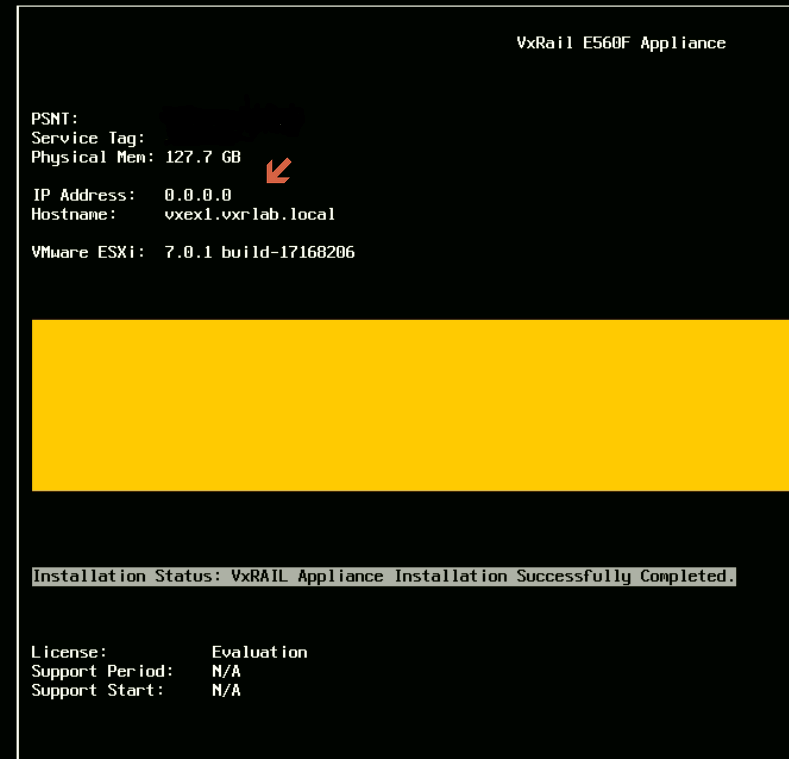
VxRail: Dopo l'installazione e/o l'aggiornamento, l'indirizzo IP DCUI ESXi 0.0.0.0
Summary: Dopo un'installazione e/o un aggiornamento, l'indirizzo IP di vSphere DCUI viene visualizzato come 0.0.0.0.
This article applies to
This article does not apply to
This article is not tied to any specific product.
Not all product versions are identified in this article.
Symptoms
Dopo un'installazione e/o un aggiornamento, l'indirizzo IP DCUI ESXi 0.0.0.0.
Cause
Per impostazione predefinita, il sistema operativo ESXi seleziona l'indirizzo IP statico da vmk0.
Resolution
Per risolvere il problema:
- Impostare i nodi interessati in modalità di manutenzione
- Impostare l'interfaccia VMkernel corretta e l'indirizzo IP di gestione, eseguire:
# esxcfg-advcfg --set vmk2 /Net/ManagementIface
# esxcfg-advcfg --set <IP address> /Net/ManagementAddr
- Controllare e confermare che le impostazioni corrette siano presenti nei file seguenti:
/etc/vmware/esx.conf > look for line: /adv/Net/ManagementAddr
/bootbank/etc/vmware/esx.conf > look for line: /adv/Net/ManagementAddr
/altbootbank/etc/vmware/esx.conf > look for line: /adv/Net/ManagementAddr
- Eseguire
auto-backup.she confermare le stesse impostazioni dai file precedenti - Riavviare l'host
- Ricontrolla il problema
Affected Products
Converged Infrastructure, Converged Systems, Hybrid Cloud Platforms, Hyper-converged SystemsArticle Properties
Article Number: 000193940
Article Type: Solution
Last Modified: 05 Sep 2025
Version: 5
Find answers to your questions from other Dell users
Support Services
Check if your device is covered by Support Services.