VxRail: Yükleme ve/veya yükseltmeden sonra ESXi DCUI IP adresi 0.0.0.0
Summary: Kurulum ve/veya yükseltmeden sonra vSphere DCUI IP adresi 0.0.0.0 olarak gösterilir.
This article applies to
This article does not apply to
This article is not tied to any specific product.
Not all product versions are identified in this article.
Symptoms
Yükleme ve/veya yükseltmeden sonra ESXi DCUI IP adresi 0.0.0.0.
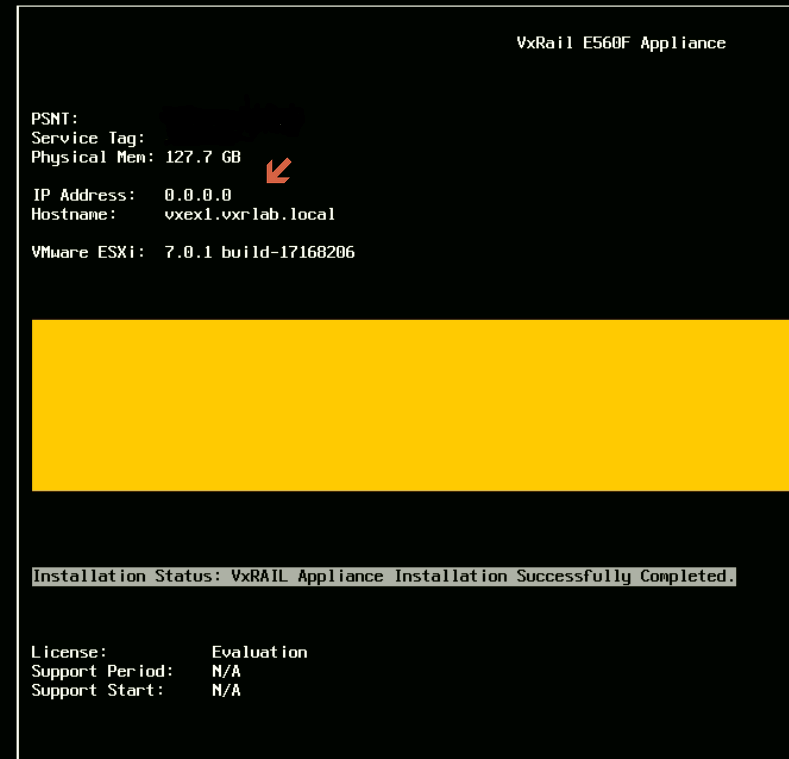
Cause
Varsayılan olarak, ESXi işletim sistemi statik IP adresini vmk0'dan seçer.
Resolution
Bu sorunu çözmek için:
- Etkilenen düğümleri bakım moduna alın
- Doğru VMkernel arayüzünü ve yönetim IP adresini ayarlayıp şunu çalıştırın:
# esxcfg-advcfg --set vmk2 /Net/ManagementIface
# esxcfg-advcfg --set <IP address> /Net/ManagementAddr
- Aşağıdaki dosyalarda doğru ayarların bulunup bulunmadığını kontrol edin ve onaylayın:
/etc/vmware/esx.conf > look for line: /adv/Net/ManagementAddr
/bootbank/etc/vmware/esx.conf > look for line: /adv/Net/ManagementAddr
/altbootbank/etc/vmware/esx.conf > look for line: /adv/Net/ManagementAddr
- Sürücüyü yüklemek için ilgili düğümde
auto-backup.shve yukarıdaki dosyalardan aynı ayarları onaylayın - Ana bilgisayarı yeniden başlatın
- Sorunu tekrar kontrol edin
Affected Products
Converged Infrastructure, Converged Systems, Hybrid Cloud Platforms, Hyper-converged SystemsArticle Properties
Article Number: 000193940
Article Type: Solution
Last Modified: 05 Sep 2025
Version: 5
Find answers to your questions from other Dell users
Support Services
Check if your device is covered by Support Services.