Unisphere for PowerMax: Unable to add 2 NTP IP addresses in vApp UI it failed with error "Invalid IP address" in v9.2 but same worked in v9.1
Summary: Unable to add 2 NTP IP addresses in vApp UI v9.2.0.74.
This article applies to
This article does not apply to
This article is not tied to any specific product.
Not all product versions are identified in this article.
Symptoms
Unable to configure 2 NTP address in vApp UI v9.2.0.747. When we try to add 2 NTP address in "IP configuration > NTP" tab, it failed with error "Invalid IP address."
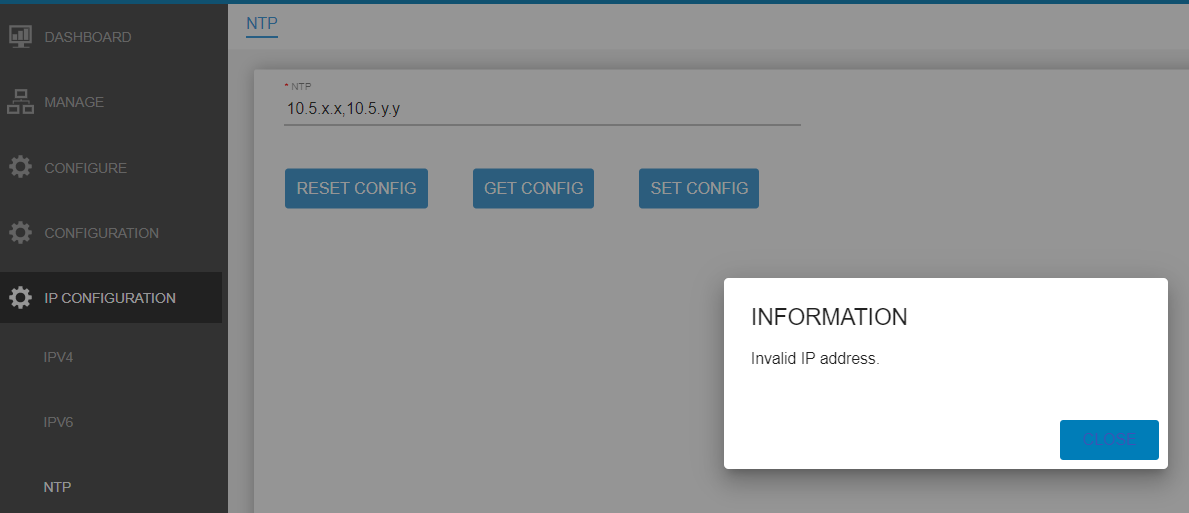
From vappmgr.log found following errors:
When we try to add 2 NTP IP's using space as separator (instead of comma), it just takes first IP and ignored the second one.
From log:
From vappmgr.log found following errors:
2021-02-23 06:52:05,785 INFO  [com.emc.em.vappmgr.ntp.NTPUpdateExec] (default task-3) NTP Update EJB Initilalized
2021-02-23 06:52:05,785 INFO  [com.emc.em.vappmgr.ntp.NTPUpdateExec] (default task-3) Executing Disk Usage Command..
2021-02-23 06:52:05,785 INFO  [com.emc.em.vappmgr.util.SystemCommandExecutionUtil] (default task-3)  CommandArray :[/opt/emc/vapp/bin/ntpconfig.sh, -set_ntpvalue, 10.5.x.x,10.5.y.y.]
2021-02-23 06:52:05,785 INFO  [com.emc.em.vappmgr.util.SystemCommandExecutionUtil] (default task-3)  Working Directory :
2021-02-23 06:52:05,785 INFO  [com.emc.em.vappmgr.util.SystemCommandExecutionUtil] (default task-3)  Redirect Error :false
2021-02-23 06:52:05,785 INFO  [com.emc.em.vappmgr.util.SystemCommandExecutionUtil] (default task-3)  Redirect Error setting :false
2021-02-23 06:52:05,800 INFO  [com.emc.em.vappmgr.util.SystemCommandExecutionUtil] (default task-3)  Exit Status [1]
2021-02-23 06:52:05,800 INFO  [com.emc.em.vappmgr.util.SystemCommandExecutionUtil] (default task-3)  Output [Invalid IP address.]
2021-02-23 06:52:05,800 INFO  [com.emc.em.vappmgr.util.SystemCommandExecutionUtil] (default task-3)  Error []
2021-02-23 06:52:05,800 INFO  [com.emc.em.vappmgr.handlers.NTPHandler] (default task-3) Sending failure response for NTP
When we try to add 2 NTP IP's using space as separator (instead of comma), it just takes first IP and ignored the second one.
From log:
2021-02-25 01:23:33,346 INFO  [com.emc.em.vappmgr.ntp.NTPUpdateExec] (default task-5) NTP Update EJB Initilalized
2021-02-25 01:23:33,346 INFO  [com.emc.em.vappmgr.ntp.NTPUpdateExec] (default task-5) Executing Disk Usage Command..
2021-02-25 01:23:33,346 INFO  [com.emc.em.vappmgr.util.SystemCommandExecutionUtil] (default task-5)  CommandArray :[/opt/emc/vapp/bin/ntpconfig.sh, -set_ntpvalue, 10.5.x.x 10.5.y.y]
2021-02-25 01:23:33,346 INFO  [com.emc.em.vappmgr.util.SystemCommandExecutionUtil] (default task-5)  Working Directory :
2021-02-25 01:23:33,346 INFO  [com.emc.em.vappmgr.util.SystemCommandExecutionUtil] (default task-5)  Redirect Error :false
2021-02-25 01:23:33,346 INFO  [com.emc.em.vappmgr.util.SystemCommandExecutionUtil] (default task-5)  Redirect Error setting :false
2021-02-25 01:26:41,537 INFO  [com.emc.em.vappmgr.util.SystemCommandExecutionUtil] (default task-5)  Exit Status [0]
2021-02-25 01:26:41,537 INFO  [com.emc.em.vappmgr.util.SystemCommandExecutionUtil] (default task-5)  Output [Successfully updated NTP with 10.5.x.x .]
Cause
Adding multiple NTP IPs from vApp UI.
Resolution
There is no support for multiple NTP IPs. Since the underlying layer in v9.1 did not restrict it, it was possible to configure multiple NTPs from v9.1 vApp UI. But in v9.2 it has been blocked from the UI. In 5978.711.711 it was added for the IP check, and it does not allow two NTP IPs to be added over vApp UI. It is working as designed.
Affected Products
Unisphere for PowerMaxArticle Properties
Article Number: 000194003
Article Type: Solution
Last Modified: 11 Jul 2024
Version: 3
Find answers to your questions from other Dell users
Support Services
Check if your device is covered by Support Services.