「ECS:GeoDriveでパフォーマンスの問題が発生する
Summary: GeoDriveの低速なパフォーマンスおよびタイムアウト エラーのトラブルシューティング
This article applies to
This article does not apply to
This article is not tied to any specific product.
Not all product versions are identified in this article.
Symptoms
- Windows Storage ServerでGeoDriveを使用してECSにアーカイブする際に、パフォーマンスが低速になります。
- また、ECS上のリクエストに対して404エラーが発生しました。
Cause
考えられる原因は、各クラウド ドライブで見つかった非常に大きな変更ログです。この変更ログには、権限、属性の変更、ファイル/フォルダーの削除、フォルダーの作成、ファイル名の変更などが含まれます。これは、操作の順序を維持する必要があるファーストイン/ファーストアウト キューです。変更ログの数が膨大な場合は、パフォーマンスの問題が発生します。
Resolution
解決策:
すべてのGeodriveバージョン:
変更ログのサイズを確認し、サイズが大きい場合は、クラウド サーバーでファイル セキュリティ/説明を保存しないように、次のように変更ログを無効にします。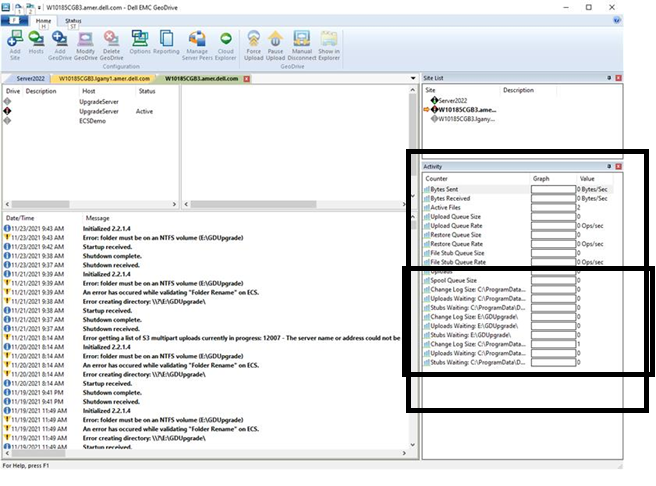
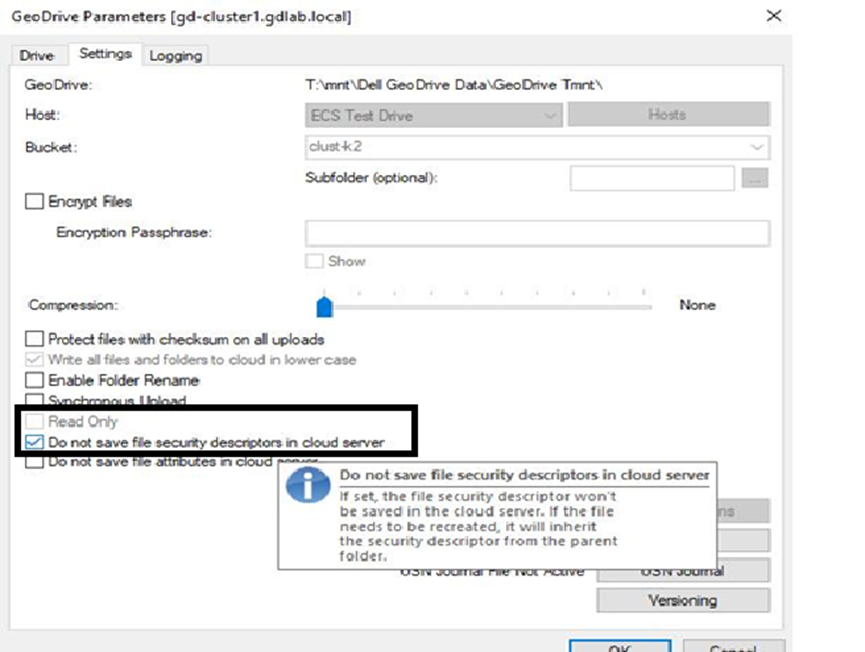
すべてのGeodriveバージョン:
変更ログのサイズを確認し、サイズが大きい場合は、クラウド サーバーでファイル セキュリティ/説明を保存しないように、次のように変更ログを無効にします。
- スクリーンショットの右側にある[Activity]ウィンドウに、各クラウド ドライブの変更ログのサイズが表示されます。
- クラウド ドライブを右クリックし、[Settings]に移動し、[DO not save file security/description in cloud server]チェック ボックスをオンにします。[OK]をクリックします。
Affected Products
GeoDrive for Windows, Elastic Cloud StorageArticle Properties
Article Number: 000194162
Article Type: Solution
Last Modified: 02 Feb 2022
Version: 2
Find answers to your questions from other Dell users
Support Services
Check if your device is covered by Support Services.