ECS:GeoDrive 遇到效能問題
Summary: 故障診斷 GeoDrive 效能緩慢和逾時錯誤
This article applies to
This article does not apply to
This article is not tied to any specific product.
Not all product versions are identified in this article.
Symptoms
- 在 Windows Storage Server 上使用 Geo Drive 封存至 ECS 時,發生效能緩慢的狀況。
- ECS 上的要求亦會發生 404 錯誤。
Cause
可能的原因是在每個雲端磁碟機上發現非常大的變更記錄。變更記錄包含權限、屬性變更、檔案/資料夾刪除、資料夾建立、檔案重新命名等內容。這是先入/先出的佇列,必須保留作業的順序。如果變更記錄數量龐大,則會導致效能問題。
Resolution
解決方案:
針對所有 Geodrive 版本:
尋找變更記錄的大小,若記錄檔案過大,請停用將檔案安全性/描述儲存至雲端伺服器: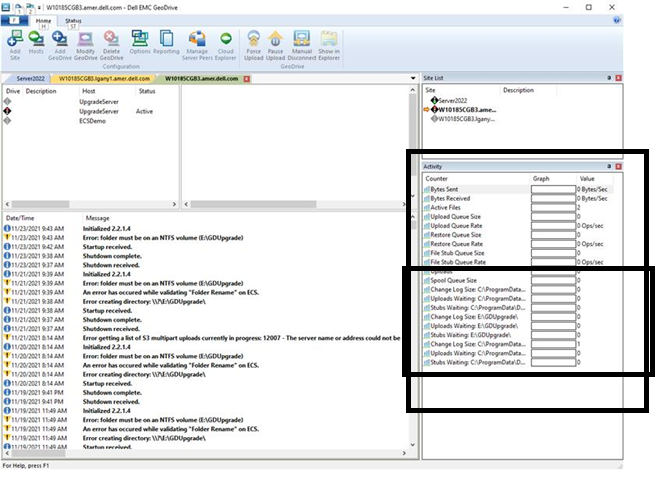

針對所有 Geodrive 版本:
尋找變更記錄的大小,若記錄檔案過大,請停用將檔案安全性/描述儲存至雲端伺服器:
- 在螢幕擷取畫面中,右側的「使用中」視窗會顯示每個雲端磁碟機的變更記錄大小。
- 在雲端磁碟機上按一下滑鼠右鍵,移至「設定」,並勾選「不要將檔案安全性/描述儲存至雲端伺服器」。按一下「確定」。
Affected Products
GeoDrive for Windows, Elastic Cloud StorageArticle Properties
Article Number: 000194162
Article Type: Solution
Last Modified: 02 Feb 2022
Version: 2
Find answers to your questions from other Dell users
Support Services
Check if your device is covered by Support Services.