ECS:GeoDrive 遇到性能问题
Summary: GeoDrive 性能缓慢和超时错误故障处理
This article applies to
This article does not apply to
This article is not tied to any specific product.
Not all product versions are identified in this article.
Symptoms
- 在 Windows Storage Server 上使用 Geo Drive 归档到 ECS 时发现性能缓慢。
- 还注意到 ECS 上的请求有 404 错误。
Cause
一个可能的原因是为每个云驱动器找到一个非常大的更改日志。更改日志包含权限、属性更改、文件/文件夹删除、文件夹创建、文件重命名等内容。它是一个必须保留操作顺序的先进/先出队列。如果更改日志的数量巨大,则会导致性能问题。
Resolution
解决方法:
对于所有 Geodrive 版本:
查找更改日志的大小,如果日志很大,请将其禁用,使其无法在云服务器中保存文件安全性/说明: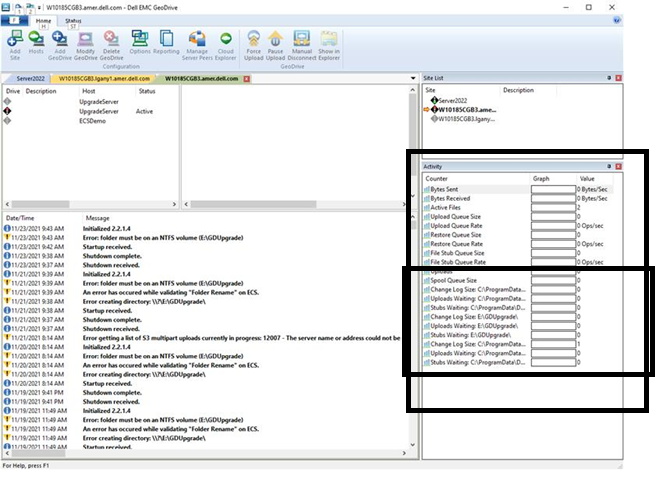

对于所有 Geodrive 版本:
查找更改日志的大小,如果日志很大,请将其禁用,使其无法在云服务器中保存文件安全性/说明:
- 在 Activity Window 右侧的屏幕截图中,显示每个云驱动器的更改日志的大小。
- 右键单击云驱动器,转至 Settings,并选中复选标记 "DO not save file security/description in cloud server"。单击“OK”
Affected Products
GeoDrive for Windows, Elastic Cloud StorageArticle Properties
Article Number: 000194162
Article Type: Solution
Last Modified: 02 Feb 2022
Version: 2
Find answers to your questions from other Dell users
Support Services
Check if your device is covered by Support Services.