Avamar VM Image level backup that is initiated is attempted through the wrong IP address of ESXI which has multiple IPs
Summary: This article explains how to make Avamar VM Image level backup-initiated flows through particular IP or IPS of ESXI which has multiple IPs.
This article applies to
This article does not apply to
This article is not tied to any specific product.
Not all product versions are identified in this article.
Symptoms
Backup may succeed through wrong IP which is not wanted as per VMware Admin.
Backup may fail with below error if attempted though wrong IP of ESXI which does not have corresponding port opened:
Backup may fail with below error if attempted though wrong IP of ESXI which does not have corresponding port opened:
Error message: Failed to connect to server A.B.X.Y:902
Cause
Incorrect VMkernel adapter settings which allow backup through incorrect IP.
Resolution
Note: This is entirely a VMware Admin Task.
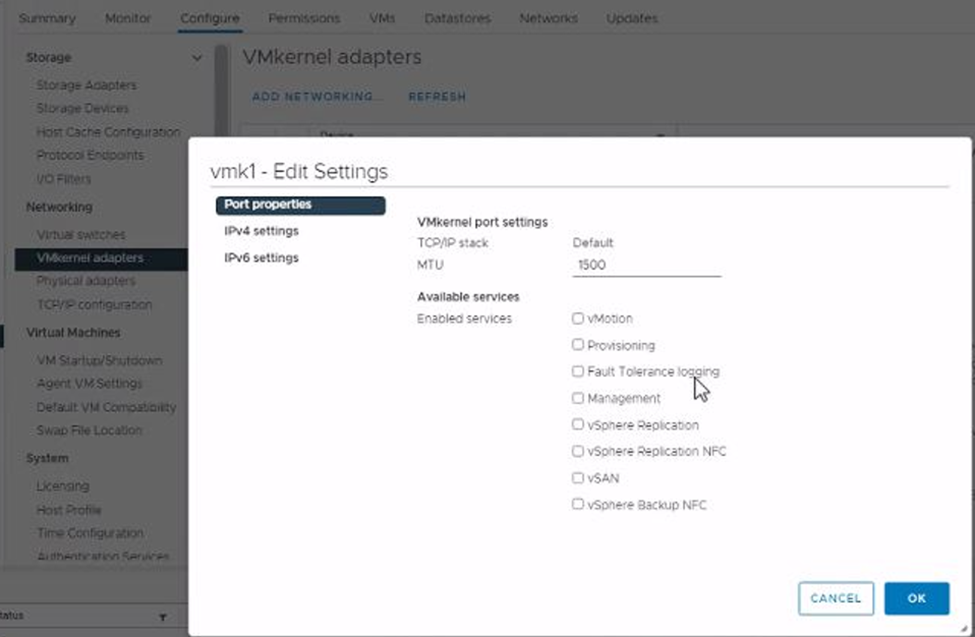
- Select the ESXI host in vCenter console and navigate through Configure > VMkernel Adapter > select the individual VMkernel adapter and edit settings.
- Selecting check box for vSphere Backup NFC allows backup, and clearing check box cancels the backup.
Affected Products
Avamar ServerArticle Properties
Article Number: 000194598
Article Type: Solution
Last Modified: 24 Feb 2022
Version: 1
Find answers to your questions from other Dell users
Support Services
Check if your device is covered by Support Services.