在升級至 IDPA 2.7 或 2.7.1 後,報告與分析 (DPA) 會在 ACM 中將應用程式服務和應用程式伺服器管理員 UI 顯示為紅色
Summary: 本 KB 涵蓋如何解決 DPA 應用程式服務在 IDPA 2.7 或 2.7.1 升級後未啟動的問題。
This article applies to
This article does not apply to
This article is not tied to any specific product.
Not all product versions are identified in this article.
Symptoms
升級至 IDPA 2.7 或 2.7.1 後,報告與分析 (DPA) 應用程式服務不會啟動,並在 ACM UI 中顯示紅色標記。 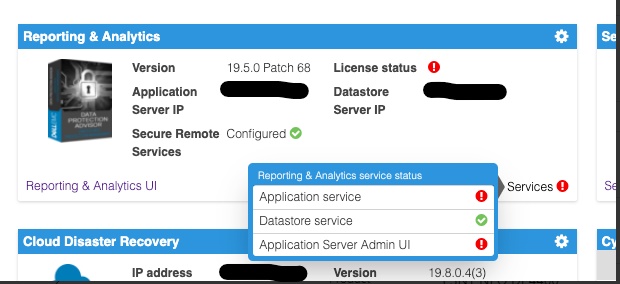
檢查位於以下位置的 DPA 應用程式伺服器記錄: <dpa_install_path>/services/logs/server.log 將看到以下消息。
2021-12-27 14:14:07,113 INFO  [com.emc.apollo.serverstart.pre.PreApolloStartupBean] (ServerService Thread Pool -- 62) Server starting
2021-12-27 14:14:07,114 INFO  [com.emc.apollo.services.container.ApolloClusterServicesJbossImpl] (ServerService Thread Pool -- 62) initIsMaster set to true
2021-12-27 14:14:07,115 INFO  [com.emc.apollo.serverstart.pre.PreApolloStartupBean] (ServerService Thread Pool -- 62) Apollo Version: 19.5.0.1634796815
2021-12-27 14:14:07,117 WARN  [org.jboss.jca.core.connectionmanager.pool.strategy.PoolBySubject] (ServerService Thread Pool -- 62) IJ000604: Throwable while attempting to get a new connection: null: javax.resource.ResourceException: Could not create connection
...
Caused by: org.postgresql.util.PSQLException: Connection to <ip_address_of_DS>:9003 refused. Check that the hostname and port are correct and that the postmaster is accepting TCP/IP connections.
...
Caused by: java.net.ConnectException: Connection refused (Connection refused)
at java.net.PlainSocketImpl.socketConnect(Native Method) [rt.jar:1.8.0_301]
和
2021-12-27 14:14:07,120 ERROR [com.emc.apollo.serverstart.pre.PreApolloStartupBean] (ServerService Thread Pool -- 62) exception trying to obtain a connection to the database: com.emc.apollo.jdbc.ApolloSQLException: Could not obtain connection: javax.resource.ResourceException: IJ000453: Unable to get managed connection for java:jboss/datasources/ApolloDS最後,若要確認問題,請使用 PUTTY/SSH 以 root 登入 DPA DS 伺服器,並執行下列命令:
dpa.sh ds con
如果 DPA APP 服務未啟動,輸出會類似以下內容:
dpa.sh ds con

EMC Data Protection Advisor

[INFO] Service Bind Address(es)    : 127.0.0.1
       Client(s) Address(es)       : 127.0.0.1/32
                                     ::1/128
                                     127.0.0.1/32
                                     ::1/128
                                     <DS_ip_addresss>/32

Command completed successfully.

Where <DS_ip_addresss> is the IP Address of the DPA Datastore, example 10.0.0.20.
識別問題包含下列其中一個或兩個元件:
- 在服務繫結位址 (es) 中,不會列出 DPA 資料存放區的 IP 位址。
- 在用戶端位址中,未列出 DPA 應用程式的 IP 位址。
在此範例中,兩個問題都存在。
此命令的正確輸出應如下所示:
dpa.sh ds con

EMC Data Protection Advisor

[INFO] Service Bind Address(es)    : <DS_ip_addresss>
       Client(s) Address(es)       : 127.0.0.1/32
                                     ::1/128
                                     127.0.0.1/32
                                     ::1/128
                                     <App_ip_addresss>/32
                                     <DS_ip_addresss>/32

Command completed successfully.

Where <DS_ip_addresss> is the IP Address of the DPA Datastore, example 10.0.0.20.

Where <App_ip_addresss> is the IP Address of the DPA Application, example 10.0.0.21.
Cause
這在 Data Protection Advisor 中是已知問題/缺陷。
Resolution
此問題沒有解決方案。
此問題有可用的因應措施。請按照以下步驟操作。
注意:最佳實務是在執行這些命令之前,先複製並備份所有 DPA 資料存放區組態檔案。
必須執行下列兩項之一。在某些情況下,只有 DPA 資料存放區繫結位址必須固定,在其他情況下,DPA 資料存放區繫結位址和 DPA 應用程式的用戶端位址必須固定。
修正 DPA 資料存放區「綁定」位址。
1. 從 /opt/emc/epa/services/bin 目錄在 DPA 資料存放區伺服器上執行下列命令:
dpa.sh ds con -b <ip_address_of_the_datastore>
2. 重新啟動 DPA 資料存放區服務。
在 DPA 資料存放區伺服器上從 / 執行下列命令
opt/emc/epa/services/bin 目錄:
dpa.sh ds restart3. 重新啟動 DPA 應用程式服務。
在 DPA APP 伺服器上執行下列命令,從
/opt/emc/epa/services/bin 目錄:
dpa.sh app restart
修正 DPA 應用程式用戶端位址
1. 在 DPA 資料存放區伺服器上執行下列命令,從 /opt/emc/epa/services/bin 目錄:
dpa.sh ds con -a <ip_address_of_the_dpa_application>
2. 重新啟動 DPA 資料存放區服務。
在 DPA 資料存放區伺服器上執行下列命令,從
/opt/emc/epa/services/bin 目錄:
dpa.sh ds restart
3. 重新啟動 DPA 應用程式服務。
在 DPA APP 伺服器上執行下列命令,從
/opt/emc/epa/services/bin 目錄:
dpa.sh app restart
移除組態 IP (若有)
如果在 dpa.sh ds con 的輸出中,您看到列出了以下 IP,則必須將其刪除:
10.63.62.242/32
若要移除此項目,請從下列位置在 DPA 資料存放區伺服器上執行下列命令: /opt/emc/epa/services/bin 目錄:
dpa.sh ds con -d 10.63.62.242
請聯絡 Dell 技術支援部門 ,以取得更多詳細資料或資訊。
Article Properties
Article Number: 000195087
Article Type: Solution
Last Modified: 16 Apr 2025
Version: 3
Find answers to your questions from other Dell users
Support Services
Check if your device is covered by Support Services.