VxRail: vCenter-services worden niet automatisch gestart na een herstelbewerking vanaf een op images gebaseerde back-up
Summary: vCenter Services worden niet automatisch gestart na een herstelbewerking vanaf een op images gebaseerde back-up
This article applies to
This article does not apply to
This article is not tied to any specific product.
Not all product versions are identified in this article.
Symptoms
- vCenter/PSC start niet volledig na het herstellen van VM vanaf back-up
- De back-upmethode was een Image-Based Backup.
- Back-ups met behulp van back-ups op basis van VAMI-bestanden worden niet beïnvloed.
- VMON-service is gemaskeerd, waardoor niet alle services die door VMON worden beheerd, kunnen worden gestart.
- Door vmon te ontmaskeren kunnen services worden gestart.
- Bij opnieuw opstarten wordt vmon opnieuw gemaskeerd.
Bij een handmatige start van de services mislukt deze zoals hieronder,
#service-control --start --all
Operation not cancellable. Please wait for it to finish...
Performing start operation on service lwsmd...
Service lwsmd startup type is not automatic. Skip
Performing start operation on service vmafdd...
Service vmafdd startup type is not automatic. Skip
Performing start operation on service vmdird...
Service vmdird startup type is not automatic. Skip
Performing start operation on service vmcad...
Service vmcad startup type is not automatic. Skip
Performing start operation on service vmware-sts-idmd...
Service vmware-sts-idmd startup type is not automatic. Skip
Performing start operation on service vmware-stsd...
Service vmware-stsd startup type is not automatic. Skip
Performing start operation on service vmdnsd...
Service vmdnsd startup type is not automatic. Skip
Performing start operation on profile: ALL...
Service vmware-vmon startup type is not automatic. Skip
Service-control failed. Error: Failed to start services in profile ALL. RC=11, stderr=Connect error. ErrCode: 111
Hier leest u hoe u controleert of een vmon is gemaskeerd.
# systemctl list-unit-files | grep vmware-vmon.service
vmware-vmon.service          masked
Om de service te ontmaskeren.
#systemctl unmask vmware-vmon.service
Opmerking: Hiermee kunt u de service starten -, maar het probleem treedt opnieuw op bij het opnieuw opstarten.
Cause
N.v.t.
Resolution
-
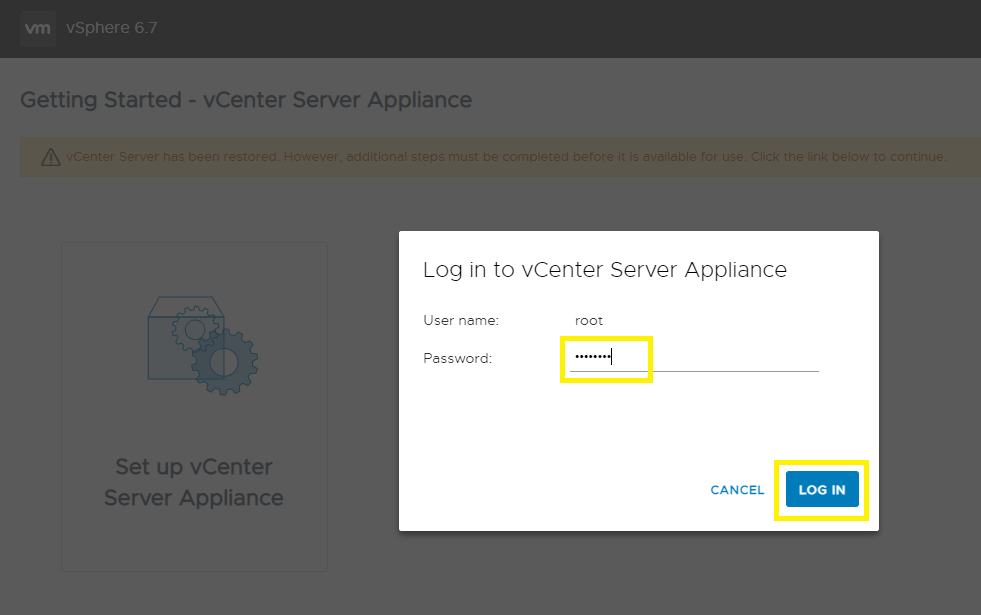
Ga naar de vCenter Server Management Interface, https://vCenter_FQDN_or_IP:5480, en klik op de knop vCenter Server Appliance instellen .

-
Voer het root-wachtwoord in en klik op INLOGGEN.
-
Klik op NEXT.

-
Voer een SSO-gebruikersnaam en -wachtwoord in en klik op VOLTOOIEN.

-
De verzoening begint. Wacht 15-30 minuten om te voltooien.

-
De afstemming is voltooid en u hebt toegang tot de vSphere Client.

Affected Products
VxRack, VxRail, VxRail SoftwareArticle Properties
Article Number: 000195302
Article Type: Solution
Last Modified: 04 Sep 2025
Version: 3
Find answers to your questions from other Dell users
Support Services
Check if your device is covered by Support Services.