PowerProtect Data Manager:如何匯出特定工作的記錄
Summary: 「匯出記錄功能」會從 PowerProtect Data Manager 記錄中收集所有追蹤 ID,並將它們置於簡明可讀的形式,可清除所有主機名稱和 IP 位址,並提供給支援人員。
This article applies to
This article does not apply to
This article is not tied to any specific product.
Not all product versions are identified in this article.
Instructions
特定環境 (例如隱藏網站) 無法清除整個記錄套裝,但可以清除較小的內容。「匯出記錄功能」會從 PowerProtect Data Manager (PPDM) 記錄中收集所有追蹤 ID,並將它們置於簡潔可讀的形式,可清除所有主機名稱和 IP 位址,並提供給支援人員。
手續:
從 「保護工作」畫面:
- 選取發生故障的工作。
- 按一下 匯出記錄。

- 系統工作畫面顯示記錄正在建立中。
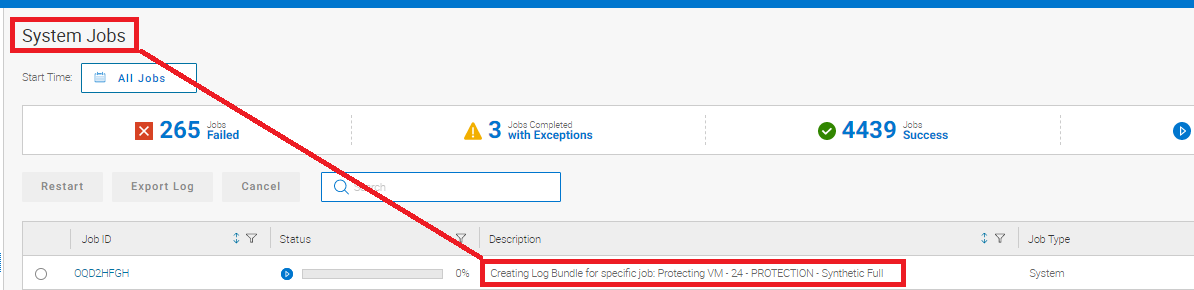
成功完成時也會顯示。

- 返回 「保護工作」畫面,然後按一下下載套裝 的記錄 連結。
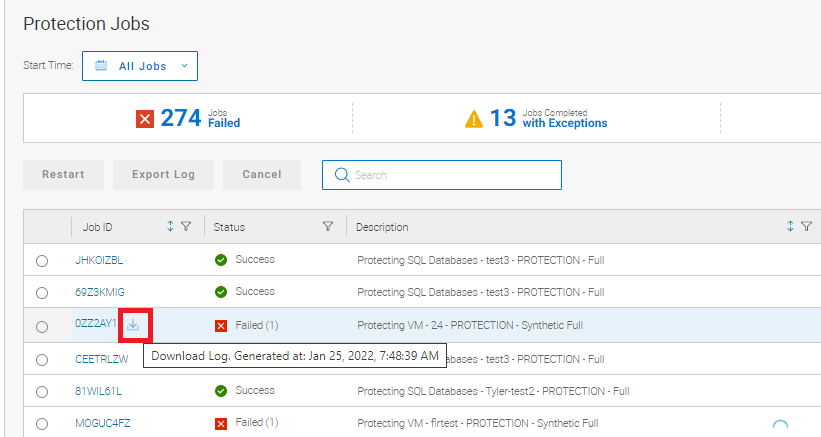
此下載連結可讓使用者選擇儲存記錄的目錄。

此功能使清理資訊更易於上傳。
Article Properties
Article Number: 000195595
Article Type: How To
Last Modified: 22 Oct 2024
Version: 4
Find answers to your questions from other Dell users
Support Services
Check if your device is covered by Support Services.