ME5:如何找到 PowerVault 机柜服务编号
Summary: 机柜服务编号是一个七位字母数字编号。它可使用 PowerVault Manager、命令行界面 (CLI) 或机柜正面的信息标签找到。此信息用于在联系戴尔技术支持时将支持呼叫转接给合适的人员。
This article applies to
This article does not apply to
This article is not tied to any specific product.
Not all product versions are identified in this article.
Instructions
在机柜上
在系统正面拉出信息标签,可以找到服务编号和快速服务代码。或者,这些信息可能在存储系统机箱背面的粘贴标签上。
使用 PowerVault Manager
“关于”面板(维护 >关于)显示有关系统、硬件及其存储配置的信息。
服务编号是写在机柜<编号>之后的七位字母数字:
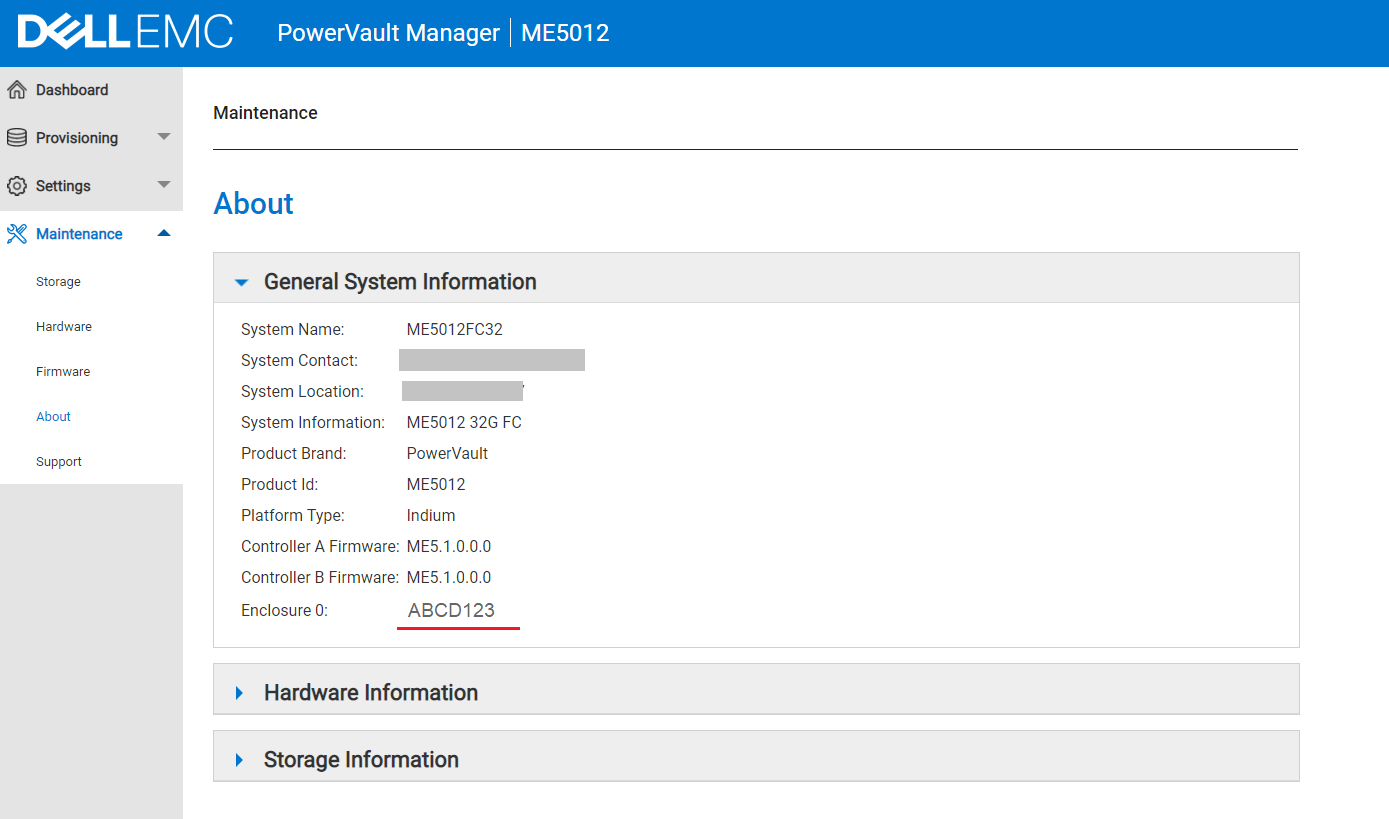
使用命令行界面 (CLI)
服务编号是以下任一命令的输出中显示的七位字母数字:
show service-tag-infoshow enclosures
# show service-tag-info

Encl Service Tag
--------------------------------------
0    ABCD123
--------------------------------------
Success: Command completed successfully. (2022-01-21 04:16:23)
Additional Information
请观看此视频:
如何找到 PowerVault 机柜服务编号。
持续时间:00:01:34 (hh:mm:ss)
如果可用,可以使用此视频播放器上的 CC 图标选择隐藏式字幕(字幕)语言设置。
您也可以在 YouTube
Affected Products
PowerVault ME5012, PowerVault ME5024, PowerVault ME5084Article Properties
Article Number: 000196714
Article Type: How To
Last Modified: 28 May 2025
Version: 4
Find answers to your questions from other Dell users
Support Services
Check if your device is covered by Support Services.