Upgrade NetWorker on Windows operating system
Summary: This article provides some general guidelines or best practices for when upgrading the NetWorker server and NetWorker Management Console software on a Windows server. Full details on NetWorker installations or requirements are found in the NetWorker Installation Guide. ...
This article applies to
This article does not apply to
This article is not tied to any specific product.
Not all product versions are identified in this article.
Instructions
NetWorker server and NetWorker Management Console (NMC) are installed on the Same System.
Uninstall NetWorker:
Perform an uninstall when upgrading NetWorker packages. This ensures that existing executables and operating system registries are cleaned up.
- Go to the Control Panel and choose Programs and Features, NetWorker, Change Option, and then choose the Remove option.
- This removes the application; however, this retains the resource database, management console database, media database, and client file indexes. When NetWorker is reinstalled, it is installed over the previously used install path; retaining any previous configurations and backups. When installing the new package, any needed conversions or upgrades to the databases are performed.
Prerequisites
- Download and extract the NetWorker locally to a local directory of your choice.
- Existing authc keystore password; however, if the keystore password is not known it can be re-created.
- NetWorker Administrator account password
- Installation user must have operating system permissions to "Run as Admin."
- Perform a Server Protection backup and collect bootstrap information with: mminfo -B
- Optionally, if server is a virtual machine, create a snapshot of the system.

Installation
- Right-click the NetWorker-#.#.#.# package from the extracted installation package and click Run as Admin.
- Select the Server and Client radio button. If NetWorker server also has NMC package that is installed previously, check the NetWorker Management Console checkbox.
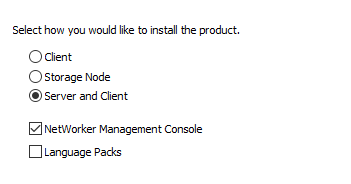
Note: If system is only a Storage Node or Client, select these options instead of Server and Client.
- Even when the operating system firewall is not used, select Configure the Windows firewall, and click Next.
- When asked about licensing, choose OK and ensure that you have 64-bit Java or NetWorker Runtime Environment (NRE) installed on the system.
- The Authentication Server is typically the NetWorker server itself; however, some environments use a centralized authc server which processes authentication requests for multiple NetWorker servers.
Note: The NMC server's 'C:\Program Files\EMC NetWorker\Management\GST\etc\gstd.conf' shows which host is used for authc on the authsvc_hostname line.
- Enter the existing keystore password. If the existing keystore password is not known, create a password.
- Use the existing certificate, or create a certificate if wanted.
- During the NMC server installation, keep the existing database.
- Once the installation is complete, the following confirmation should appear.
- Access the NetWorker server from the NetWorker Management Console, in large environments it may take some time during initial service startup.
Confirmation
- The daemon.raw can be rendered for any messages during service startup: nsr_render_log "C:\Program Files\EMC NetWorker\nsr\logs\daemon.raw"
- Command-line interface: nsrwatch
Additional Information
Engage your Dell sales or account representative for Dell performed installations, upgrades, and configurations; Dell Professional Services can be engaged. NetWorker support does not perform software installations or upgrades.
Download NetWorker Product.
Download NetWorker Installation Documentation.
Download Networker Previous Versions Documentation.
Download NetWorker Administration Guides.
Download NetWorker Performance Optimization Guides.
Download NetWorker Product.
Download NetWorker Installation Documentation.
Download Networker Previous Versions Documentation.
Download NetWorker Administration Guides.
Download NetWorker Performance Optimization Guides.
Affected Products
NetWorker FamilyArticle Properties
Article Number: 000196908
Article Type: How To
Last Modified: 14 Dec 2022
Version: 4
Find answers to your questions from other Dell users
Support Services
Check if your device is covered by Support Services.