NetWorker-Webnutzeroberfläche kann aufgrund eines fehlenden Zertifikats die aktuelle Anzahl für das Dashboard nicht abrufen
Summary: NetWorker-Webnutzeroberfläche (NWUI) erzeugt den Fehler "Fehler beim Abrufen der aktuellen Anzahl für das Dashboard – Fehler beim Abrufen der Anzahl der Aktivitäten basierend auf dem Status vom Monitoring Service." ...
This article applies to
This article does not apply to
This article is not tied to any specific product.
Not all product versions are identified in this article.
Symptoms
Nach der erfolgreichen Anmeldung bei der NWUI zeigt die Benutzeroberfläche den folgenden Fehler an:
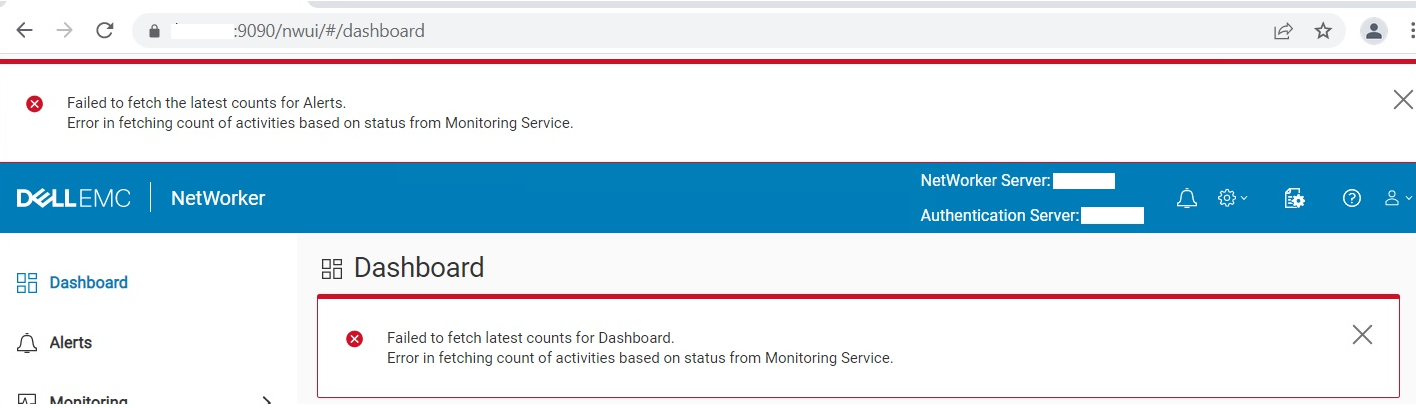
Failed to fetch latest counts for Dashboard. Error in fetching count of activities based on status from Monitoring Service
Cause
Fehlender Zertifikatalias emcnwuimonitoring im Java cacerts Keystore.
- Linux:
/opt/nre/java/latest/lib/security/cacerts
- Windows:
%drive%:\Program Files\NRE\java\jre1.8.0_<xxx>\lib\security\cacerts
Resolution
Import emcnwuimonitoring Zertifikat (Das Herunterfahren von NetWorker-Services ist nicht erforderlich.)
- Linux:
/opt/nre/java/latest/bin # keytool -import -alias emcnwuimonitoring -keystore /opt/nre/java/latest/lib/security/cacerts -storepass changeit -file /nsr/nwui/monitoring/app/conf/emcnwuimonitoring.cer
- Windows:
%drive%:\Program Files\NRE\java\jre1.8.0_<xxx>\bin> keytool.exe -import -alias emcnwuimonitoring -keystore "C:\Program Files\NRE\java\jre1.8.0_<xxx>\lib\security\cacerts" -storepass changeit -file "%drive%:\Program Files\EMC NetWorker\nwui\monitoring\app\conf\emcnwuimonitoring.cer"
Affected Products
NetWorkerProducts
NetWorker SeriesArticle Properties
Article Number: 000197327
Article Type: Solution
Last Modified: 01 Jul 2024
Version: 6
Find answers to your questions from other Dell users
Support Services
Check if your device is covered by Support Services.